We use cookies to improve your experience on our platform. By clicking “Accept all cookies”, you agree to the storing of cookies on your device to enhance site navigation, analyze site usage and assist in our marketing efforts.
Cookies required for basic website functionality.
Cookies used to deliver content most relevant to you and your needs.
Cookies used to deliver content most relevant to you and your needs.
Cookies that help understand the performance of the website, how users interact with it and to identify bugs.
How is Zeffy free?
How is Zeffy free?
Zeffy relies entirely on optional contributions from donors. At the payment confirmation step - we ask donors to leave an optional contribution to Zeffy.
Charity Chart of Accounts: Free UK Template and Setup Guide (2026)
July 8, 2026
⚡TL;DR: The Short Answer
Running a charity chart of accounts in the UK comes down to SORP fund structure, Gift Aid receivable, and clean upstream data.
Five account categories form the core: Assets, Liabilities, Funds, Income, and Expenditure.
UK charities follow the Charities SORP (FRS 102), not US GAAP: use restricted, unrestricted, designated, and endowment fund classes.
Add a Gift Aid receivable account (1120) and a Gift Aid income line (4050) so every HMRC claim reconciles to the penny.
Keep your COA to 30 to 50 accounts and align it to the Statement of Financial Activities so your annual return takes hours, not days.
Run Zeffy upstream and every payout arrives pre-sorted by campaign and fund, with no Sunday-night hand-splitting required.
If you run a small UK charity, here is the part nobody tells you about your chart of accounts: the COA itself is rarely where the books break. The feed into it is.
One Friday bank deposit might hold £300 from a quiz night, £200 in merchandise, six donations split across three restricted funds, a Gift Aid receivable for three of them, and a Stripe fee that turns a £5,000 gift into £4,979.80 on the deposit line. Someone (often a volunteer treasurer with a day job) has to hand-split that single deposit into ten separate COA lines before Sunday night.
The honest plan for a small charity is two parts. First, design the leanest viable COA: five categories, 30 to 50 accounts, numbered with the common convention, mapped to the Statement of Financial Activities (SoFA). Second, fix the upstream feed so income arrives already broken down by campaign and fund instead of as one mystery deposit.
This guide does both. Grab the free Excel and Google Sheets template below, then work through the setup steps, numbering convention, SoFA mapping, and the common mistakes that turn a clean COA into a 200-line mess.
A chart of accounts (COA) is the numbered list of every account your charity uses to record money in and money out. Think of it as the index for your books. Every donation, grant payment, payroll run, and office-supply purchase lands in one specific account, so you can pull a clean report when a funder, trustee, or independent examiner asks.
The big difference from a for-profit COA is the Funds section. For-profit businesses track owner equity. UK charities track funds that donors or grantors have restricted (you can only spend them on a specific programme) and funds with no strings attached. They also track designated funds (unrestricted, but earmarked by trustees for a particular purpose) and endowment funds (where capital is held long-term). That structure flows from the Charities SORP (FRS 102), the UK accounting framework that governs how registered charities prepare their accounts, and it flows through everything: how you record gifts, how you report on grants, and how you complete your annual return and Trustees' Annual Report and Accounts (TAR).
Your COA does not have to be elaborate. For a small charity, 30 to 50 accounts across five categories is plenty. The free template below gives you a starting point you can customise in an afternoon.
For a small charity: a lean COA you actually maintain beats a 200-line custom COA that nobody updates. Aim for "good enough to file the annual return and answer a grant report in 10 minutes," not "perfect."
Why your charity needs a well-structured COA
A good COA is not paperwork for paperwork's sake. It saves you real time when it matters:
Grant reports in minutes, not hours. When a funder asks how you spent their £10,000 programme grant, a clean COA lets you pull the answer in two minutes instead of two evenings of digging through bank statements.
Faster annual return and TAR preparation. Categories that already map to the SoFA Income and Expenditure columns cut your year-end preparation time sharply.
Independent examination and audit readiness. Under the Charities Act 2011 (as amended by the Charities Act 2022), CCEW-registered charities with gross income above £25,000 require an independent examination. A full statutory audit is required where gross income exceeds £1 million, or where gross income exceeds £250,000 and gross assets exceed £3.26 million. OSCR (Scotland) and CCNI (Northern Ireland) operate their own thresholds. Grant funders such as the National Lottery Community Fund may impose their own independent examination or audit requirement regardless of size. A structured COA is what the examiner or auditor opens first.
Honest trustee reporting. Restricted versus unrestricted fund balances show up cleanly, so your board of trustees sees what you can actually spend.
Gift Aid claims that reconcile. A clean income COA lets you tie your HMRC Charities Online claim back to your books line by line, which is critical if HMRC ever opens a Gift Aid compliance review.
Catch costs early. Accounts such as "Bank fees" and "Payment processing fees" surface costs that otherwise hide inside income lines.
Budgeting that works. Year-over-year category totals make next year's budget a 30-minute exercise instead of a guess.
For a small charity: the COA pays for itself the first time a grant officer emails you "how did you spend our money?" and you answer the same day.
Free charity chart of accounts template (Excel and Google Sheets)
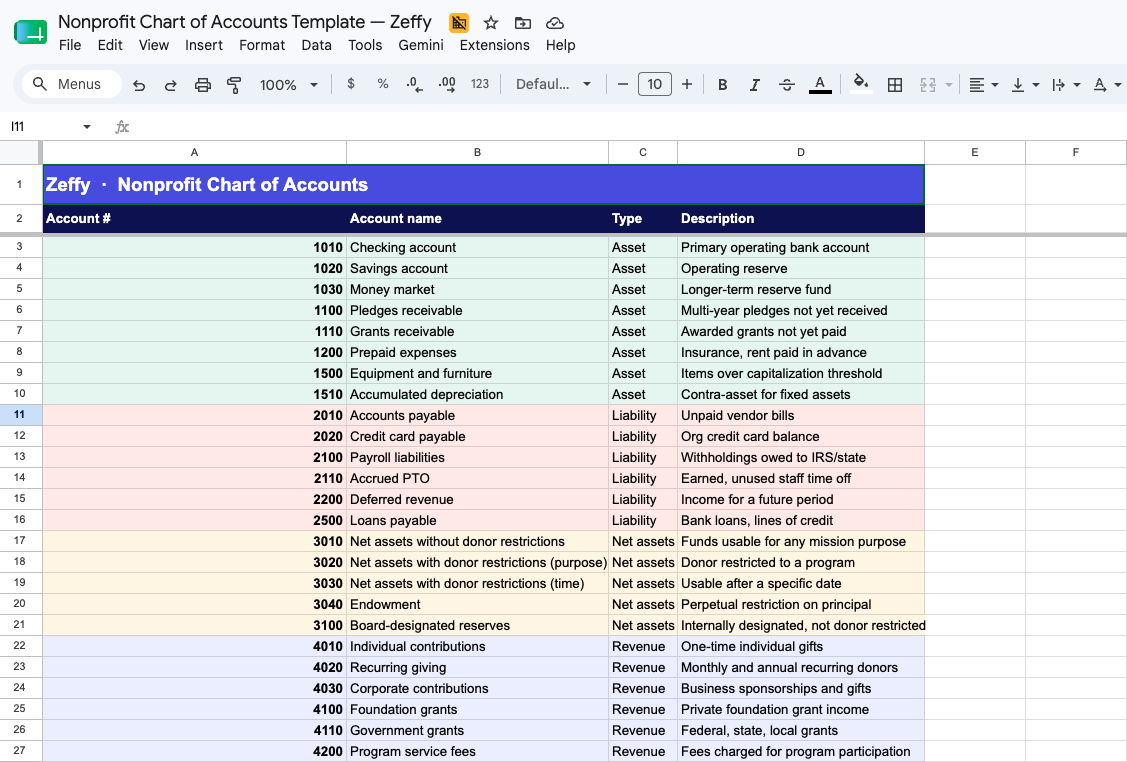
The template below is a lean 30 to 50 account starter COA, pre-numbered with the common convention, sorted into the five categories, with an instructions tab.
What is inside:
45 pre-numbered accounts in one sortable tab, colour-coded into the five UK charity categories: Assets, Liabilities, Funds, Income, and Expenditure
Columns for Account Number, Account Name, Type, and Description
Standard 1000s numbering convention (1000s Assets through 5000s Expenditure)
Gift Aid receivable (1120) and Gift Aid income (4050) accounts pre-built
An Instructions tab with notes on customising for your programmes and funds
Open it in Google Sheets (File > Make a copy), or export to Excel at any time via File > Download > .xlsx
Customising takes about an afternoon: add rows for your specific programmes, rename a few accounts to match how your team talks, and delete anything that does not apply.
The 5 core account categories for UK charities
Every charity COA is built around five categories. Below is what each one tracks, the typical numbering range it uses (a widely used convention, not a legal requirement), and the accounts a small charity usually needs.
1. Assets (1000 to 1999)
What your charity owns: cash, receivables, prepaid expenses, equipment, and Gift Aid receivable.
Typical accounts:
1010 Current account
1020 Savings or reserve account
1030 Short-term investment account
1100 Pledges receivable
1110 Grants receivable
1120 Gift Aid receivable
1200 Prepaid expenses
1500 Equipment and furniture
1510 Accumulated depreciation
Gift Aid receivable (1120): when a donor makes a Gift Aid eligible donation, your charity is entitled to reclaim 25p from HMRC for every £1 given. Under accrual accounting, you recognise both the Gift Aid income (4050, see below) and a corresponding asset (1120 Gift Aid receivable) at the point the donation is received, before HMRC actually pays out. Once HMRC settles the claim, 1120 reduces to zero. Keeping this as a distinct asset line means your balance sheet accurately reflects money your charity has earned but not yet received.
2. Liabilities (2000 to 2999)
What your charity owes: bills, payroll liabilities, deferred income, VAT, loans.
2200 Deferred income (event tickets sold for a future financial year)
2300 VAT control account
2500 Loans payable
VAT note: UK charities are not VAT-exempt by default. If your charity is VAT-registered, add a 2300 VAT control account and split relevant expense accounts into net and VAT. The Charity Tax Group is the authoritative reference for charity VAT reliefs and edge cases.
3. Funds (3000 to 3999)
This is the section that makes a UK charity COA different from a for-profit COA, and from a US nonprofit COA. Under the Charities SORP (FRS 102), the framework that governs UK charity accounts (see Charity Commission guidance), funds fall into four classes:
Unrestricted funds: general funds the charity can spend on any charitable purpose.
Designated funds: unrestricted funds that trustees have earmarked for a specific purpose (e.g., a building project). Trustees can undo the designation; donors cannot.
Restricted funds: donor- or grantor-imposed purpose restrictions. You must be able to demonstrate that spending matched the restriction. These are not the same as designated funds.
Endowment funds: held long-term. A permanent endowment preserves capital; income from it can be spent. An expendable endowment allows trustees to spend capital at their discretion.
Typical accounts:
3010 Unrestricted funds, general
3020 Designated funds, trustees' reserve
3100 Restricted funds, [named appeal or programme]
3200 Endowment fund, permanent
3210 Endowment fund, expendable
3300 Board-designated reserves
The Funds section only stays clean if the restriction is captured at the moment the gift comes in, not three weeks later when the treasurer tries to remember which donations were for the building fund. That is a donor management problem, not a COA problem. Free donor management built for small charities captures the fund designation on the donation form, so the restriction flows through to your COA automatically.
4. Income (4000 to 4999)
All money in: donations, Gift Aid, grants, programme fees, event income, trading income, investment income.
Gift Aid income (4050) and GASDS (4060): for every eligible £1 donation from a UK taxpayer with a valid Gift Aid declaration, your charity reclaims 25p from HMRC via Charities Online. A £100 donation becomes £125 to the charity at no extra cost to the donor. Record the gross donation in 4010 and the Gift Aid element in 4050, with 1120 Gift Aid receivable on the balance sheet until HMRC pays out. The Gift Aid Small Donations Scheme (GASDS) gives a 25% top-up on small cash and contactless donations of £30 or less, up to a cap of £8,000 in eligible donations per tax year. Track GASDS claims separately in 4060 so they reconcile to your HMRC claim records.
This is the section where the upstream feed matters most. If a £5,000 donation arrives in your bank as £4,979.80 after Stripe's 1.5% + 20p UK card processing fee, your COA needs both: £5,000 in income and £20.20 in payment-processing expenditure. Most fundraising platforms only deposit the net. A free online donation platform such as Zeffy charges zero platform fee, zero transaction fee, and zero card fee, so the deposit equals the gift exactly. No platform fee, no transaction fee, no card fee. Ever.
5. Expenditure (5000+)
All money out, organised so you can split it into the three functional categories the SORP SoFA expects: expenditure on raising funds, expenditure on charitable activities, and expenditure on governance.
Typical accounts:
5010 Salaries and wages
5020 Employer NIC and Apprenticeship Levy
5030 Staff benefits and pensions
5100 Programme supplies
5110 Programme travel
5200 Rent and utilities
5300 Office supplies
5400 Professional fees (legal, accounting, independent examination)
5500 Fundraising expenditure
5600 Payment processing fees
5700 Bank charges
5800 Insurance
5900 Governance costs (trustee expenses, AGM, Companies House filing)
For a small charity: resist the urge to create a sub-account for every nuance. Start with one row per category above, then add sub-accounts only when you have a reporting need you cannot answer today.
Standard account numbering convention
One thing to clear up first: accounting standards do not require you to use any specific account numbers. The 1000s-for-assets, 2000s-for-liabilities pattern below is a widely used convention in UK charity accounting, not a legal requirement. You can use any system that is consistent and makes sense to your team. Most charities adopt the convention because auditors, bookkeepers, and software defaults (QuickBooks Online, Xero, Sage 50, Liberty Accounts) all expect it.
Account range
Category
What it covers
1000 to 1999
Assets
Cash, receivables (including Gift Aid receivable), prepaid expenses, equipment
Why this works: the leading digit tells you the category at a glance, and the trailing digits leave room for sub-accounts. If you ever need to split "5100 Programme supplies" into youth programmes and adult programmes, you can use 5110 and 5120 without renumbering everything. Most accounting software used by UK charities (QuickBooks Online, Xero, Sage 50, Liberty Accounts, QuickFile) defaults to a version of this convention out of the box.
For a small charity: use four-digit numbers, leave gaps (every 10 or 100, not every 1), and you will never paint yourself into a corner.
Sample charity chart of accounts
Below is a complete 45-account lean COA you can copy or download from the template above. This is sized for a small-to-mid UK charity. Gift Aid receivable, Gift Aid income, GASDS, and VAT control are included. If your accountant suggests expanding this to 200 lines, ask what reporting question the extra accounts answer that this one does not.
Account number
Account name
Category
Notes
1010
Current account
Asset
Main operating bank account
1020
Savings account
Asset
Reserve or restricted fund bank account
1030
Short-term investment account
Asset
Any money market or notice account
1100
Pledges receivable
Asset
Donor pledges not yet received
1110
Grants receivable
Asset
Grants awarded but not yet paid
1120
Gift Aid receivable
Asset
HMRC reclaim recognised but not yet paid
1200
Prepaid expenses
Asset
Insurance, subscriptions paid in advance
1500
Equipment and furniture
Asset
Tangible fixed assets
1510
Accumulated depreciation
Asset
Contra-asset; reduces book value of 1500
2010
Accounts payable
Liability
Supplier invoices not yet paid
2020
Credit card payable
Liability
Outstanding card balance
2100
Payroll liabilities
Liability
PAYE, employee NIC, employer NIC due to HMRC
2110
Accrued holiday pay
Liability
Untaken annual leave liability
2200
Deferred income
Liability
Tickets or memberships sold for a future period
2300
VAT control account
Liability
Net VAT due to or from HMRC (if VAT-registered)
2500
Loans payable
Liability
Any outstanding loans
3010
Unrestricted funds, general
Funds
Free reserves; no donor conditions
3020
Designated funds, trustees
Funds
Earmarked by trustees; can be redesignated
3100
Restricted funds, [appeal name]
Funds
Donor/grantor purpose restriction; duplicate for each fund
3200
Endowment fund, permanent
Funds
Capital held in perpetuity; income only spendable
3210
Endowment fund, expendable
Funds
Capital spendable at trustee discretion
4010
Individual donations
Income
One-off gifts from individuals
4020
Regular giving
Income
Direct Debit and standing-order gifts
4030
Corporate donations
Income
Gifts from companies and businesses
4040
Legacies and bequests
Income
Gifts received through wills
4050
Gift Aid income
Income
HMRC reclaim on eligible donations (25p per £1)
4060
GASDS top-up
Income
Gift Aid Small Donations Scheme 25% top-up
4100
Foundation grants
Income
Grants from trusts and foundations
4110
Government grants
Income
Local authority, NLCF, or central government grants
4200
Programme service fees
Income
Fees charged for charitable activities
4300
Event income
Income
Ticket sales, sponsorships, table sales
4400
Membership subscriptions
Income
Annual membership fees
4500
Investment income
Income
Interest and dividends
4600
Gifts in kind
Income
Non-cash donations (at estimated fair value)
5010
Salaries and wages
Expenditure
Gross pay for all staff
5020
Employer NIC and Apprenticeship Levy
Expenditure
Employer payroll liabilities
5030
Staff benefits and pensions
Expenditure
Auto-enrolment pension contributions and other benefits
5100
Programme supplies
Expenditure
Materials and consumables for charitable activities
5110
Programme travel
Expenditure
Staff and volunteer travel for programmes
5200
Rent and utilities
Expenditure
Office and activity-space costs
5300
Office supplies
Expenditure
Stationery, postage, printing
5400
Professional fees
Expenditure
Legal, accounting, independent examination fees
5500
Fundraising expenditure
Expenditure
Costs of raising funds (events, appeals, platform costs)
5600
Payment processing fees
Expenditure
Card and payment platform fees (£0 with Zeffy)
5700
Bank charges
Expenditure
Monthly bank fees and transaction charges
5800
Insurance
Expenditure
Employer liability, trustees' indemnity, public liability
5900
Governance costs
Expenditure
Trustee expenses, AGM, annual return filing fees
For a small charity: 45 lines is the sweet spot. You can add 5 to 10 programme-specific accounts and still be under 60 lines, which is what your independent examiner or auditor actually wants to see.
Fund accounting: the SORP layer above your COA
UK charities need two layers working together: (1) the COA (the accounts) and (2) the fund (which pot of money each transaction belongs to).
A £5,000 restricted appeal donation hits 4010 Individual donations in your COA AND Restricted Fund: [Appeal Name] in your fund structure simultaneously. Without the fund dimension, your COA can tell you total income but not which income is restricted to a specific purpose. The Charities SORP requires you to present your Statement of Financial Activities (SoFA) with columns for unrestricted, restricted, and endowment funds. You cannot produce a SORP-compliant SoFA from a COA alone.
Accounting software handles this in different ways:
QuickBooks Online: use Classes to tag each transaction to a fund. One class per restricted fund or programme.
Xero: use Tracking Categories. Create a "Fund" tracking category with options for each fund name.
Liberty Accounts: native fund accounting; funds are a first-class object, not a workaround.
Sage 50: use Departments as a proxy for fund tracking.
The golden rule: capture the fund designation at the point of donation, not at year-end. If your donation form does not record which fund the donor is giving to, your treasurer is back-filling that information from memory three months later. Free donor management for charities captures fund designations on the donation form so restrictions flow through automatically.
How to set up your chart of accounts, step by step
Set aside a half-day. Open the template, work through these eight steps in order, and you will have a usable COA by the end of the afternoon.
1.Review how you track money today. Pull the last three bank statements, your most recent grant report, and your last annual return and TAR if you have one. Note every type of income and expenditure that shows up. This is your starting list.
2.Identify your reporting needs. List the questions you have to answer at least once a year: grant reports by funder, SoFA functional columns, trustee financials by programme, independent examination trial balance. Each answer becomes an account or sub-account.
3.Choose your numbering system. Use the 1000s convention from the table above unless you have a hard reason not to. Stick with four digits and leave gaps of 10 between accounts.
4.Set up your five main categories. In your template (or accounting software), confirm the five top-level categories: Assets, Liabilities, Funds, Income, Expenditure. Every account you add lives under one of these.
5.Add sub-accounts for programmes and funds. If you run three programmes, you might add 5101, 5102, 5103 under "Programme supplies." If you have two restricted funds, set up 3101 (building fund) and 3102 (scholarship fund) under "Restricted funds." Do not over-build. You can add more later.
6.Configure your accounting software and fix the upstream feed. Import the COA into your accounting software. This is also the moment to be honest about where your COA gets messy in practice. For most small charities, the highest-volume rows are income lines: donations, regular gifts, event tickets, merchandise, raffle proceeds. If those arrive in your bank as one lump deposit per week with a processor fee baked in, your treasurer is hand-splitting that deposit into ten COA lines every Sunday night. The fix is upstream of the COA, not inside it. Zeffy's free QuickBooks Online integration pushes payouts to QuickBooks already broken down by campaign and fund, mapped to the accounts and classes you set up. Other fundraising platforms charge £14 to £25 a month for a QuickBooks sync; with Zeffy it is free. Your treasurer opens the deposit, clicks "Match," and reconciliation is done.
7.Test with sample transactions. Before you go live, run five or six real transactions through: a £50 donation (with Gift Aid), a £1,000 grant deposit, a payroll run, an office-supply purchase, a card payment to a supplier. Walk each one to its account. If you cannot decide where it goes, your account names need clarification.
8.Document and share. Write a one-page "how we use our COA" document: which accounts get which transactions, who has the final call on judgement calls, when you will review the COA. Share it with your bookkeeper and treasurer.
For a small charity: the half-day investment here saves you a full day every month for the rest of the year. The upstream feed fix saves you a weekend a month.
3 types of charity chart of accounts
1. SORP-aligned framework COA
The Charities SORP (FRS 102) does not publish a numbered model COA, but the SORP framework implies a structure: income analysed by the SoFA income headings, expenditure analysed by charitable activity and nature (grants, staff costs, other direct costs, support costs). This is the deepest option and the most useful for restricted-fund reporting. Sector accounting firms and umbrella bodies publish SORP-aligned COA templates aligned to the Trustees' Annual Report disclosures.
Right fit when: you are a mid-sized charity with multiple restricted funds, a mix of grant types, and an independent examination or audit scope. Pre-mapping to the SORP SoFA headings means your accounts feed directly into the financial statements without manual rearrangement.
2. Operating chart of accounts
An operating COA focuses on day-to-day activity: regular income, regular expenditure, the accounts a small team actually uses every week. This is the lean approach the template above takes.
Right fit when: you are a small or mid-sized charity (under £5m income, fewer than five programmes) and want a COA you can maintain without a full-time accountant.
3. Group chart of accounts
A group COA uses a parent structure with child sub-charts for each location or programme. The parent enforces consistency; the children let each unit track its own specifics.
Right fit when: you run multiple branches, chapters, or distinct programmes that each need their own books but consolidate into one set of group financial statements.
For a small charity: start with the operating COA. You can move to a SORP-aligned framework or group structure later if you actually need to. Most small charities never do.
How your COA aligns with your annual return and SoFA
If your COA categories already match the structure of the Statement of Financial Activities (SoFA) and the Charity Commission annual return, your year-end preparation collapses from a weekend project to an afternoon. The two reporting documents to align with are the SoFA (income and expenditure statement, per the Charities SORP) and the Balance Sheet.
COA account
SoFA heading
Fund column
Balance sheet
4010 Individual donations
Donations and legacies
Unrestricted
,
4020 Regular giving
Donations and legacies
Unrestricted
,
4030 Corporate donations
Donations and legacies
Unrestricted or restricted
,
4040 Legacies and bequests
Donations and legacies
Unrestricted
,
4050 Gift Aid income
Donations and legacies
Unrestricted
,
4060 GASDS top-up
Donations and legacies
Unrestricted
,
4100 Foundation grants
Donations and legacies
Restricted (if purpose-restricted)
,
4110 Government grants
Donations and legacies
Restricted
,
4200 Programme service fees
Income from charitable activities
Unrestricted
,
4300 Event income
Income from other trading activities
Unrestricted
,
4400 Membership subscriptions
Income from charitable activities
Unrestricted
,
4500 Investment income
Investment income
Unrestricted or endowment
,
5500 Fundraising expenditure
Expenditure on raising funds
Allocated by fund
,
5100 Programme supplies
Expenditure on charitable activities
Allocated by fund
,
5110 Programme travel
Expenditure on charitable activities
Allocated by fund
,
5400 Professional fees
Expenditure on charitable activities / raising funds
Allocated
,
5900 Governance costs
Expenditure on governance
Unrestricted
,
1010-1120 Asset accounts
,
,
Current assets / fixed assets
2010-2500 Liability accounts
,
,
Creditors falling due within one year
3010-3210 Fund accounts
,
,
Funds of the charity (analysed by class)
Salaries (5010), employer NIC (5020), and pensions (5030) typically split across all functional columns. Track the allocation with timesheets or estimated percentages, and document your method for your independent examiner.
For a small charity: if you only do one thing on this list, set up the three functional-expenditure splits (charitable activities, raising funds, governance) inside your accounting software now. Back-filling that split at year-end is miserable.
6 best practices for maintaining your COA
1. Use main accounts and sub-accounts on purpose
Main accounts handle category-level reporting (total programme expenditure). Sub-accounts handle drill-down (programme supplies versus programme travel). Do not create a sub-account unless you have a real reporting question it answers.
2. Keep account names clear
"Miscellaneous" is the enemy. Use names such as "Youth programme supplies" or "Annual gala expenditure." If a new volunteer cannot guess where a transaction belongs from the account name, the name is wrong.
3. Design for flexibility
Leave numbering gaps. Avoid hyper-specific accounts that lock you in. If a new income stream appears next year, you should be able to add it with one new line, not a restructure.
4. Pair your COA with the right software
A spreadsheet works for the first year. After that, accounting software pays for itself. See the software section below.
5. Review annually during budget planning
Once a year, during budget season, scan your COA for unused accounts, missing accounts, and renaming opportunities. Combine accounts that always move together; split accounts that hide useful detail.
6. Get professional input when stakes are high
If you are filing your first annual return and TAR, going through your first independent examination, or onboarding a major grant from the National Lottery Community Fund, a charity-experienced bookkeeper or accountant for a few hours is cheap insurance. You do not need them year-round. NCVO and the Chartered Institute of Fundraising both publish practical guidance and signpost affordable support for small charities.
For a small charity: a 30-minute annual review of the COA prevents 90% of the "why does our budget never tie out?" problems.
6 common chart of accounts mistakes to avoid
1. Too many accounts. 200 lines is not "thorough," it is unmaintained. If you cannot find a transaction without scrolling for two minutes, you have too many accounts.
2. Mixing restricted and unrestricted in one line. If your "Donations" account holds both general gifts and restricted building-fund gifts, you cannot answer the building-fund donor when they ask how their gift was used. Set up the restriction at the source.
3. Using "Miscellaneous" as a real account. Every "Miscellaneous" transaction is a deferred decision. Make the decision once and name a real account.
4. Skipping the functional-expenditure split. If you do not track charitable activities versus fundraising versus governance splits during the year, the SoFA becomes a guess at year-end.
5. Never updating the COA. The charity grows. The COA does not. Two years later, half your transactions sit in "Other income." An annual review fixes this.
6. No documentation. The treasurer who set up the COA leaves. The new treasurer guesses where everything goes. Write the one-page guide.
7. Forgetting to reconcile Gift Aid to your income COA. If your Gift Aid claims to HMRC do not tie back to specific donation entries in your COA, an HMRC compliance review will surface it. Keep declarations for at least six years; reconcile every claim to the source income lines, per HMRC Charities Online record-keeping requirements.
For a small charity: the most common failure mode is over-building the COA and then quietly dumping everything into "Other" because no one remembers the rules. Lean beats elaborate every time.
Charity accounting software that works with your COA
Your COA lives inside a general ledger. The general ledger lives inside accounting software. Here are the five options most small and mid-sized UK charities actually use, and how Zeffy fits in as the upstream feed (not a replacement for any of them).
QuickBooks Online
The dominant small-business GL in the UK and a common choice for charity bookkeepers. Strong ecosystem, Class tracking for fund accounting, broad integration support, and a large pool of bookkeepers who already know it.
Right fit when: your bookkeeper already uses QuickBooks Online and you want the easiest bookkeeper-hire experience. Pair it with Zeffy's free QuickBooks Online integration so your fundraising income flows in pre-sorted by campaign and fund.
Xero
Arguably the leading cloud accounting platform for UK small businesses, with a slightly larger UK market share than QuickBooks Online among SMEs. Tracking Categories handle fund accounting when used consistently. A growing range of third-party charity add-ons extends SORP functionality.
Right fit when: your treasurer or bookkeeper already knows Xero, or you want a clean modern interface with strong bank-feed connectivity.
Sage 50 / Sage Accounting
Deep UK roots; Sage 50 (desktop) is still common in older and larger charities that have used it for years. Sage Accounting (cloud) is the modern equivalent.
Right fit when: you inherited Sage and it works, or you are a larger charity (above £1m income) with complex reporting needs and staff familiar with the platform.
Liberty Accounts
UK-built, church and charity specialist, SORP-aligned out of the box, with native Gift Aid handling and fund accounting as first-class features rather than workarounds. The closest thing to a purpose-built UK charity accounting system in the small-charity price range.
Right fit when: you want fund accounting configured correctly from day one without having to coax Classes or Tracking Categories into SORP compliance. Strong choice for churches, smaller grant-making foundations, and charities with multiple restricted funds.
QuickFile
Free UK cloud bookkeeping software, capable enough for micro-charities and CICs that do not yet need full fund accounting. Limited SORP support, but a solid COA and bank reconciliation tool for organisations under £100k income.
Right fit when: you are a very small charity or CIC with simple books and a tight budget.
For any of these, your fundraising data is the layer upstream of the accounting system. If you are on Xero, Sage, or even a spreadsheet, Zeffy's free public API lets you pull payment, contact, and campaign data into whatever general ledger or COA you use, without paying for a sync tool. You can also see our deeper charity accounting software guide for a full comparison.
Zeffy is not a general ledger or a replacement for QuickBooks Online, Xero, Sage, or Liberty Accounts. The QuickBooks sync is one-way (Zeffy to QuickBooks) and covers future payouts (it does not back-fill history). Refunds require a manual journal entry in QuickBooks; they do not auto-sync.
Zeffy is trusted by 100,000+ charities and nonprofits worldwide who have raised over £2 billion on the platform. It is 100% free: no platform fee, no transaction fee, no card fee. Ever.
For a small charity: QuickBooks Online or Xero plus Zeffy upstream is the lowest-effort stack for most UK charities. Use the time you save on something that grows income.
chart of accounts (COA) is the numbered list of every account your charity uses to record money in and money out. It is the index for your general ledger. Every donation, grant, payroll run, and supplier payment lands in one specific account, so you can pull a clean report when a trustee, funder, or independent examiner asks. UK charity COAs are typically structured around five categories: Assets, Liabilities, Funds, Income, and Expenditure.
The key difference is the Funds section. A for-profit business tracks owner equity. A UK charity tracks funds under the Charities SORP (FRS 102): unrestricted funds (general, spend on any charitable purpose), designated funds (earmarked by trustees), restricted funds (donor or grantor-imposed purpose), and endowment funds (capital held long-term). This SORP fund structure drives the layout of the Statement of Financial Activities (SoFA), which is the UK charity equivalent of a profit-and-loss account. A well-designed charity COA maps directly to those SoFA headings so year-end accounts flow cleanly from the books.
It depends on your income and assets. Under the Charities Act 2011 (as amended by the Charities Act 2022), for charities registered with the Charity Commission for England and Wales (CCEW): an independent examination is required where gross income exceeds £25,000 (and falls below the audit threshold); a full statutory audit is required where gross income exceeds £1 million, or where gross income exceeds £250,000 and gross assets exceed £3.26 million. Scotland (OSCR) and Northern Ireland (CCNI) operate their own thresholds, which broadly mirror the CCEW ladder. Grant funders such as the National Lottery Community Fund may impose their own independent examination or audit requirement regardless of your income level. See Charity Commission guidance for the current thresholds.
Restricted funds are imposed by the donor or grantor: the money can only be spent on a specified purpose (for example, a named building project, a youth programme, or a particular geographic area). You must be able to demonstrate that spending matched the restriction. Under the Charities SORP, restricted funds appear as a separate column in the SoFA, distinct from unrestricted and endowment funds. In your accounting software, tag every restricted transaction to the relevant fund at the point of entry (using a Xero Tracking Category, a QuickBooks Online Class, or a Liberty Accounts fund). Capture the restriction on the donation form so your COA stays clean from day one rather than requiring back-filling at year-end.
Gift Aid creates two accounts you would not have in a for-profit COA: a Gift Aid receivable asset (1120) and a Gift Aid income revenue line (4050). When a UK taxpayer makes a Gift Aid eligible donation, your charity is entitled to reclaim 25p from HMRC for every £1 given. Under accrual accounting, you recognise the Gift Aid income at the point the underlying donation is received, with a corresponding Gift Aid receivable on the balance sheet. When HMRC pays out (via Charities Online), you clear the receivable. Also track the Gift Aid Small Donations Scheme (GASDS) top-up separately in account 4060. Keep all Gift Aid declarations for at least six years and reconcile every HMRC claim back to the specific donation lines in your COA. See HMRC guidance on Gift Aid for declaration requirements.
30 to 50 accounts is the sweet spot for a small or mid-sized charity. That gives you enough granularity to produce meaningful grant reports and a clean SoFA, without so many accounts that volunteers cannot decide where a transaction belongs. The free template in this article starts at 45 accounts and can grow to 55 to 60 with programme-specific sub-accounts. Only add more accounts when you have a specific reporting question that the current structure cannot answer.
The most common choices are QuickBooks Online (widely used, large bookkeeper pool, free Zeffy integration), Xero (strong UK market share, clean interface, good bank feeds), Sage 50 or Sage Accounting (long UK track record, common in older or larger charities), Liberty Accounts (UK-built, SORP-aligned, native Gift Aid handling, strong for churches and smaller grant-making charities), and QuickFile (free, adequate for micro-charities and CICs). For restricted-fund reporting, Liberty Accounts or a properly configured QuickBooks Online or Xero setup is the most practical choice. See our charity accounting software guide for a full comparison.
The Statement of Financial Activities is the UK charity equivalent of a profit-and-loss account, required under the Charities SORP. It presents all income and expenditure analysed by fund type (unrestricted, restricted, endowment) and by SoFA heading (donations and legacies, income from charitable activities, income from other trading activities, investment income, expenditure on raising funds, expenditure on charitable activities, expenditure on governance). A well-structured COA maps each account to a SoFA row, so the financial statements are generated directly from the books rather than reconstructed at year-end.
Get weekly fundraising tips from nonprofits experts
Thank you! Your submission has been received!
Oops! Something went wrong while submitting the form.
Keep reading :
Nonprofit guides
The complete guide to charity accounting in the UK (2026)
Strong charity accounting is a foundational element of how to run a registered charity in the UK. Whether you manage the numbers yourself or work with an accountant, keeping a close eye on your organisation's finances is always a sound idea. This guide walks you through the UK charity accounting framework: from the Charities SORP and fund accounting to Gift Aid, the Trustees' Annual Report, independent examination thresholds, and practical best practices for small-to-mid charities.
A UK charity treasurer's guide to the best accounting software in 2026. Covers fund accounting, Gift Aid claim submission, Charities SORP compliance, and UK-verified pricing for Xero, QuickBooks, Sage, Liberty Accounts, Zoho Books, and more.
Charity Bookkeeping: A Complete Guide for UK Treasurers (2026)
Charity bookkeeping in the UK is built on SORP fund accounting, Gift Aid tracking, and the annual return to the Charity Commission. This guide covers every concept a volunteer treasurer or solo staffer needs: the three-fund framework (unrestricted, restricted, endowment), SORP functional cost categories, Gift Aid declaration records, the Trustees' Annual Report and Accounts, and the best bookkeeping software for small UK charities. The goal is a 15-minute monthly reconciliation habit instead of a quarterly panic.
Look for people who attend related events, follow relevant Facebook groups, or subscribe to aligned newsletters.These aren’t just potential donors—they’re your future advocates.
Look for people who attend related events, follow relevant Facebook groups, or subscribe to aligned newsletters.These aren’t just potential donors—they’re your future advocates.





.avif)

.png)


.webp)

