We use cookies to improve your experience on our platform. By clicking “Accept all cookies”, you agree to the storing of cookies on your device to enhance site navigation, analyze site usage and assist in our marketing efforts.
Cookies required for basic website functionality.
Cookies used to deliver content most relevant to you and your needs.
Cookies used to deliver content most relevant to you and your needs.
Cookies that help understand the performance of the website, how users interact with it and to identify bugs.
How is Zeffy free?
How is Zeffy free?
Zeffy relies entirely on optional contributions from donors. At the payment confirmation step - we ask donors to leave an optional contribution to Zeffy.
Most impact-report guides treat the document as the deliverable. For a small or all-volunteer nonprofit, that is backwards. The report is a donor-retention asset, and the real deliverable is the send: who you email it to, how you segment, and whether the closing link turns a reader into a second gift.
This guide is for the volunteer or solo staffer who needs to ship a 4-8 page impact report this quarter without hiring a designer. You will get a free in-page template, the essential sections, a step-by-step writing process, five real examples to study, and the metrics that actually matter to donors.
What is a nonprofit impact report?
A nonprofit impact report is a short, donor-facing document that shows what your organization accomplished in the past year and how donor money made it happen. For a small nonprofit, that is a 4-8 page document with about eight sections: a cover with one hero stat, a letter from leadership, your mission, the impact data, one or two stories, a simple financial snapshot, a thank-you to supporters, and a call to give again.
It is not a 40-page annual report. An annual report is a formal accountability document, often required by law, that covers your full fiscal year and detailed financials. An impact report is a marketing and retention asset focused on outcomes and stories. We cover the full comparison in the impact report vs annual report section below.
For a small nonprofit: if you can only build one document this year, build the impact report. It is shorter, more engaging for donors, and far easier to produce with a two-person team.
Why impact reports matter for small nonprofits
You are competing for attention with organizations that have full marketing teams. An impact report is one of the few assets that puts your small org on equal footing, because what donors care about is not your page count. It is whether their gift mattered.
It builds donor trust. Donors who can see exactly what their money did are far more likely to give again. Donor retention is the cheapest fundraising you have, and a report sent at the right moment is the cheapest retention tool you have.
It supports your grant applications. Foundation officers ask for impact data. A finished report is a ready-made attachment.
It earns warm introductions. Board members will forward a sharp 6-page PDF to their network. They will not forward a wall of text.
It sharpens your own thinking. Forcing yourself to pick the year's hero stat is the most useful planning exercise your team will run.
It turns one-time givers into recurring supporters. The report is a natural moment to ask a one-time donor to upgrade to monthly.
The benchmark numbers that frame why this matters are not flattering. The Fundraising Effectiveness Project, the standing benchmark study from AFP, has reported overall donor retention near 26% in recent quarters (source: AFP). M+R Benchmarks 2026 reports new online donor retention at 24% and prior-donor retention at 66% (source: M+R Benchmarks). Translation: three out of four first-time donors do not come back. A clear impact report is one of the few tools small orgs can use to move that number. For more on the retention play, see our guide to donor retention.
For a small nonprofit: if retention is your weakest fundraising metric, a yearly impact report sent to every donor in your CRM is the single highest-leverage write-up you can produce.
What to include: the essential sections checklist
Use this as a scannable checklist when you start. The 8 steps later in the guide walk through how to write each piece.
☐ Cover page with one hero stat that summarizes the year
☐ Mission statement reminder (one short paragraph)
☐ Letter from leadership (executive director or board chair)
☐ Impact data: the headline KPIs with year-over-year context
☐ Programs delivered: a short list of what you ran this year
☐ One or two impact stories: real people, real outcomes
☐ Financial snapshot: a simple income and expense pie chart
☐ Supporter recognition: thank donors, volunteers, and partners by name where possible
☐ Looking ahead: 2-3 goals for next year
☐ Call to action: a one-click link to give again
For a small nonprofit: if a section feels like padding, cut it. A tight 5-page report that hits these essentials beats a polished 30-pager you never finish.
How to write a nonprofit impact report in 8 steps
The 8 steps below match the 8 body sections. Work in this order so you build the spine of the report first, then layer in stories and design.
1. State your mission statement
Open with a short, plain restatement of your nonprofit mission statement. Two or three sentences is enough. The reader has probably forgotten the exact wording since their last gift, and you want them oriented before you ask them to care about your numbers.
Concrete example: "We provide free tutoring to public school students in three Boston neighborhoods, with a focus on grades 6 to 9." That is one sentence. It works.
2. Include a leadership message
A 200-300 word letter from your executive director or board chair, addressed to "Dear friends" or "Dear supporters". Hit three beats: what we set out to do this year, what we actually accomplished, and a thank-you naming the donors and volunteers who made it possible.
Why it matters: donors want to feel they have a relationship with a human, not a brand. A signed letter is the cheapest way to deliver that.
3. Share impact stories and testimonials
Pick one or two real stories from the year. A volunteer who became a board member. A family who came through your food program. Use a photograph if you have written consent, and a real first name if the person is comfortable. We walk through the full story framework in the storytelling section below and in our deeper guide to nonprofit storytelling.
4. Gather and present actionable data
This is where most reports go wrong: too many numbers, no hierarchy. Pick one hero stat for the cover, then five to seven supporting KPIs for the inside spread.
You need both kinds of data:
Quantitative data is what you can count: people served, programs delivered, dollars raised, volunteer hours, year-over-year growth.
Qualitative data is what you cannot count but can quote: testimonials from beneficiaries, board reflections, community feedback, behavior changes you observed.
You need both. Quantitative data proves you delivered. Qualitative data proves it mattered.
5. Provide a financial overview
Show a simple breakdown of income and expenses. A pie chart for each is plenty. Include income by source (individual gifts, grants, events, earned revenue) and expenses by category (program, admin, fundraising).
You are not writing a 990. You are showing a donor that their dollar went to the program, not overhead. For the full picture, see our guide to nonprofit financial statements.
6. Include future objectives and strategic plans
Two or three goals for next year. Be specific. "Serve 200 more students" beats "expand our impact". Donors who feel they helped you hit last year's number want to know what they are helping you hit next.
7. Recognize your supporters
Thank donors, volunteers, and partners. For small orgs, naming individuals is the move. A list of 40 donor names with a "thank you" header outperforms a generic "we are grateful to all of our supporters" paragraph every time.
Tier the list if you have giving levels, but err on the side of inclusion. The donor who gave $25 reads this list looking for their own name.
8. Make it easy to connect
End the report with one clear action. The best CTA on an impact report is a give-again link, ideally one that opens a pre-filled donation form so the reader does not retype their address. Use a free donor CRM to tag the donors who clicked, so you know who to follow up with personally.
If you do nothing else from this guide, do this: do not end with "contact us". End with "Give again to fund next year's work" and a working link.
For a small nonprofit: the 8 steps above are the report. Resist the urge to add a tenth section. A clean 6-page report you finish beats a 20-page report you abandon in November.
Impact report data: which metrics actually matter
Donors do not want every number you tracked. They want the handful that prove the mission moved. Here are the KPIs small nonprofits should consider:
People served. The headline. How many beneficiaries did your programs reach?
Programs delivered. How many classes, meals, services, or events ran?
Volunteer hours. The donated labor that powered the work.
Cost per outcome. What did it cost to deliver one unit of impact (one meal, one tutoring hour, one shelter night)? Donors love this number.
Year-over-year growth. Pick your most important metric and show last year vs this year.
Donor retention rate. The share of last year's donors who gave again this year.
New donors acquired. First-time givers who joined your community this year.
Geographic reach. Cities, counties, or regions served.
Demographic breakdown. Who you served (with consent and care for privacy).
Hours of programming. Total program time delivered to beneficiaries.
Partnerships. Other orgs, schools, or agencies you worked with.
Grant dollars raised. Restricted funding secured this year.
For each metric, present it visually if you can: a big number with a label, an icon, a one-line caption, and the year-over-year comparison in smaller type. Save tables for the financial section.
If you cite a sector benchmark (for example, "the average donor retention rate is X%"), link the source. AFP's Fundraising Effectiveness Project and M+R Benchmarks are the two standard sources. Do not invent a percentage.
For a small nonprofit: pick five KPIs total. One hero stat on the cover, four supporting on the data spread. More than that and you have a spreadsheet, not a report.
How to tell compelling impact stories
Numbers prove. Stories convince. Every impact report needs at least one story written well enough that a donor pauses on it.
Use this five-beat framework for each story:
1.Situation. Who is the person, and where were they when your work reached them? Two sentences.
2.Challenge. What were they facing? Be concrete. "Maria, a single mother of two, lost her job in March."
3.Intervention. What did your program do? Specific actions, not vague support.
4.Outcome. What changed for them? A real result, ideally measurable.
5.Quote. One short line in the beneficiary's own words. Always with consent.
Here is a fill-in-the-blank template for a 150-word beneficiary story:
When [first name] came to [program name] in [month], they were [situation in one sentence]. They needed [the challenge in concrete terms].
Over [time period], [name] worked with [staff or volunteer role] to [the intervention, in two or three specific actions]. By [end date], [name] had [the measurable outcome].
"[One-line quote from the beneficiary about what changed]," [name] said.
Stories like [name]'s are possible because of [donor group, e.g., "supporters like you"].
A few rules: always get written consent before naming or photographing a beneficiary. For minors, get parent or guardian consent. If a story is sensitive, change the name and say so ("Maria's name has been changed"). Never publish identifying details that could put someone at risk.
For a small nonprofit: one well-written story is worth ten thin ones. Pick the year's most powerful and tell it in 150 words with a real quote. That is the page donors will remember.
Impact report design: making your data visual
You do not need a design agency. You need three good decisions.
1. Length: 4-8 pages. For a small org, anything longer goes unread. Plan for a cover, a leadership letter spread, an impact-data spread, a story page, a financial page, a recognition page, and a closing CTA page. That is your page count.
2. The right chart for the right data:
Pie chart for the budget breakdown (income sources, expense categories)
Bar chart for year-over-year growth (this year vs last year on your hero metrics)
Big numbers with icons for headline KPIs (people served, programs delivered, volunteer hours)
Map graphic if geographic reach is part of your story
Pull quotes for testimonials, sized large enough that a skimmer reads them
3. Brand consistency. Use your logo colors and one or two fonts (one for headlines, one for body). Reuse the same icon style throughout. Add your logo to every page footer.
Free tools that work:
Canva has nonprofit impact report templates and a free nonprofit plan
Google Slides in landscape mode works fine and exports to PDF
Google Docs if you want a simple page-flow layout
For a small nonprofit: if you are choosing between spending another weekend on the design and spending it on the send, pick the send. A plain-looking report that lands in 800 inboxes beats a beautiful report that sits on your website.
Free nonprofit impact report template
Use the structure below to build your report. It walks through every section with a suggested word count and a one-line prompt so you know exactly what to write.
1.Cover page (10-20 words). Hero stat, year, organization name. Example: "In 2026, 1,240 students finished our after-school tutoring program."
2.Letter from leadership (200-300 words). What we set out to do, what we accomplished, who made it possible. Signed by ED or board chair.
3.Mission reminder (50-75 words). Two or three sentences restating your mission for readers who need a refresher.
4.Impact by the numbers (100-150 words plus visuals). Five KPIs as big numbers with icons. Add year-over-year context where useful.
5.Programs delivered (150-200 words). A short paragraph or bullet list of what you ran this year. Names, dates, locations.
6.Featured story (150-200 words). One beneficiary story using the situation-challenge-intervention-outcome-quote framework.
7.Financial snapshot (75-150 words plus charts). Income pie chart, expense pie chart, one-paragraph summary.
8.Thank you to supporters (100-150 words plus a name list). Donor names, volunteers, board, partners. Tier if you have giving levels.
9.Looking ahead (100-150 words). Two or three specific goals for next year.
10.How to help (50-100 words). One clear ask. Link to a pre-filled give-again donation form. Newsletter signup. Volunteer page.
Total target: about 1,200-1,800 words, spread across 4-8 pages with visuals.
When your report is ready, the harder problem is getting it into donors' inboxes. A free donor CRM lets you segment donors by gift size, recency, and tag. From there you can send segmented emails with open and click tracking so you know who actually read it. That is the send most small orgs skip, and it is the part that turns the report into a retention play.
Five real annual impact reports, with the specific things to steal from each. The first three are large orgs that set the bar for design and structure. The last two are smaller orgs whose reports a volunteer team can realistically copy.
The Rainforest Alliance is a global environmental nonprofit. Their 2023 report opens with a short note of appreciation and then layers data, partner stories, and regional spotlights.
Steal these moves:
A "by the numbers" spread early in the report with five big stats and icons. Donors who only flip to one page get the year in 10 seconds.
Beneficiary quotes pulled out at large type, with a photograph next to them. Adapt this even if you only have one quote.
The International Justice Mission publishes a yearly review with strong design discipline. Their 2022 report opens with the mission statement, then a letter from the founder, then the year's headline numbers.
Steal these moves:
The hero-stat treatment: four large numbers, each with a one-line caption that tells you what kind of outcome it is.
A simple world map with dots marking active program countries. A small org can do this with US state pins instead.
3. United Way 2018 transformation and impact report
United Way is a network of more than 1,800 local nonprofits. Their 2018 report opens with the mission and vision, a leadership letter, and an impact snapshot.
Steal these moves:
A "partner spotlight" page that names specific partners and what each contributed. For a small org, this works for major donors or in-kind sponsors.
Clear navigation across the top of each spread, like a website. Helps a skimming donor land where they want.
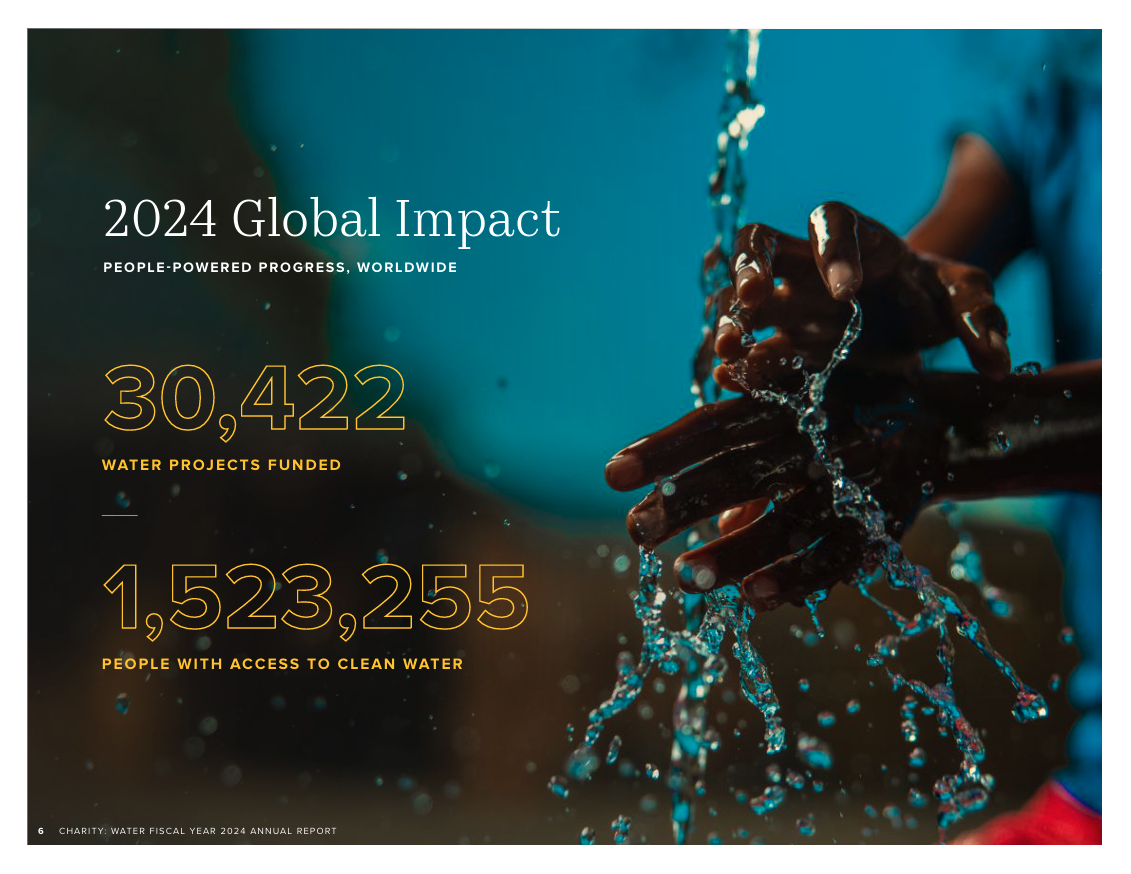
charity: water publishes annual impact reports that small orgs can study for their structure even if the design budget is bigger than yours.
Steal these moves:
A single hero number on the cover, framed by the year. That is the entire cover. Borrow that discipline.
One beneficiary story told at length, with a real name and a real photograph. The rest of the report supports that story rather than competing with it.
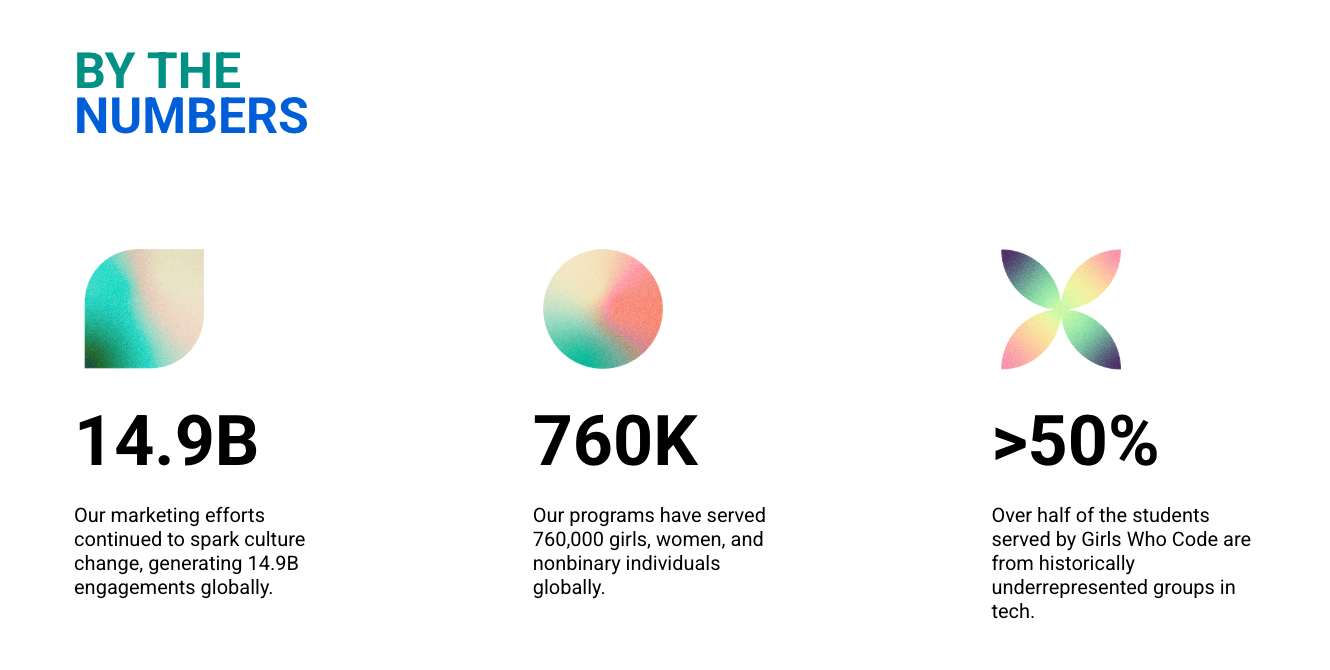
Girls Who Code publishes a yearly impact report sized for a mid-budget nonprofit. Realistic to study if your team is two to ten people.
Steal these moves:
A "programs by the numbers" spread broken out by program line. If you run more than one program, this format lets each get its own moment.
A future-goals section with three specific commitments and timelines, not vague aspirations.
For a small nonprofit: do not try to copy a 40-page report from a 200-person org. Copy the structural moves (one hero stat, one strong story, named donors) and skip the design budget.
Your readers are donors, volunteers, board members, and community partners. Each group cares about different things. Donors want to see where their money went. Volunteers want to see the people they helped. Board members want strategic context. Write for donors first, then make sure the others find what they need.
2. Ignoring clear goals
If you cannot say in one sentence what this year's report is supposed to do, the reader will not figure it out either. Write that sentence first. Then write the report.
3. Overloading with data
Too many numbers freeze a reader. Pick one hero stat for the cover and four or five supporting KPIs. Everything else goes in your internal end-of-year deck, not the donor-facing report.
4. A weak opening and closing
Donors decide whether to read on within the first 10 seconds. The cover hero stat and the first line of the leadership letter do that work. The closing CTA does the conversion work. Spend extra time on both.
5. Using jargon
"Stakeholder engagement", "capacity building", "outcomes alignment". Your donor is a teacher, a retiree, a small business owner. Write at an 8th to 10th grade reading level. If you need a technical term, define it the first time.
6. Ignoring visuals
A wall of text is the fastest way to lose a skimmer. Every spread should have one visual: a chart, a pull quote, a photograph, or a big number with an icon. Use your brand colors and a consistent font set.
7. Hiding your challenges
Donors trust transparency. A short paragraph naming a setback (and what you learned) builds more credibility than a relentless highlight reel. Mature donors actively look for this honesty.
8. Missing a call to action
"Thank you for your support" is not a CTA. Direct the reader to do one thing: give again, sign up for the newsletter, volunteer for an upcoming event, refer a friend. Make the link work and pre-fill the form where you can.
9. Burying the impact data
Your biggest win belongs on page 1, not page 5. If a donor reads only the cover and the first inside spread, they should already know the year was a success. Everything after that is supporting material.
For a small nonprofit: the most expensive mistakes on this list are jargon, no CTA, and burying the data. Fix those three and you have already out-written most of your peers.
Impact report vs annual report: what's the difference?
Short version: an annual report is a formal accountability document. An impact report is a donor-retention asset. If you can only produce one, produce the impact report. It is shorter, more engaging, and easier for a small team to ship.
Aspect
Impact report
Annual report
Focus
Program outcomes and social change
Financial data and organizational overview
Legal requirement
Usually voluntary
Often required by law or funder
Financial content
High-level snapshot
Detailed statements and budgets
Key personnel
Staff and volunteers running programs
Board members and leadership
Tone and style
Visually engaging and accessible
Formal and comprehensive
Scope
Specific achievements and outcomes
Full range of organizational activity
Storytelling
Heavy use of beneficiary stories
Limited, focused on org narrative
Primary audience
Donors, partners, general public
Regulators, board, sophisticated donors
Timeframe
Often project- or theme-based
Full fiscal year
Metrics
Social impact and program effectiveness
Org growth and financial health
Purpose
Inspire continued support
Demonstrate accountability
For a small nonprofit: start with the impact report. Add a full annual report only when a funder asks for one or when your board wants the formal version.
Final thoughts: the template was never the bottleneck
The hardest part of an impact report is not writing it. It is sending it. A perfect 8-page PDF that sits on your website does not change donor retention. The same report, sent to every donor in your CRM, segmented by gift level, with a one-click give-again link in the closing CTA, does.
For a small nonprofit, that means the math is simple. Every dollar you spend on platform fees, software subscriptions, or design contractors is a dollar that did not go into the program impact you are trying to report on. Zeffy is a fundraising platform built for small nonprofits, and the canonical $0 line is the point: No platform fee, no transaction fee, no credit card fee. Ever. Your nonprofit keeps 100% of every donation, no matter what.
That matters here because the same free platform also gives you the tools to send your impact report well: a free donor CRM to segment by gift size and recency, an email tool to send segmented emails with open and click tracking, a way to print and mail copies to major donors, and the option to embed a pre-filled donation form in the report's CTA so reading turns into giving in one click. 100K+ nonprofits use Zeffy, and $2B+ has been raised on the platform.
Once a year is the standard cadence. Some larger orgs add a mid-year update or program-specific micro-reports, but for a small nonprofit, a single well-sent annual impact report is the right target. Align it with your fiscal year-end so you have clean numbers to work with.
For a small nonprofit, 4-8 pages. Anything longer goes unread by most of your list. Plan for a cover, a leadership letter spread, an impact-data spread, a story page, a financial page, a recognition page, and a closing CTA page. If you are tempted to add a 10th section, cut it instead.
Lead with stories and qualitative change. A small org that served 40 families well can tell a more compelling year than a regional org that served 4,000 with no story attached. Pick one beneficiary story, tell it in 150 words, and use a real quote. Your donor knows you are small. They funded you anyway. They want to see what their money did, not how it compared to United Way.
Digital first, print for your top donors. Send the PDF by email to your full donor list using a tool that lets you send segmented emails with open and click tracking. Then print and mail copies to major donors, your board, and any partner organizations. That covers about 95% of the value of the report for about 5% of the printing cost.
Define your goals first, then pick the KPIs that map to them. For most small orgs that means: people served, programs delivered, cost per outcome, year-over-year growth on the headline metric, and donor retention rate. Collect data through program records, post-program surveys, and short beneficiary interviews. The interviews are where your qualitative content comes from.
For small nonprofits, usually the executive director or development lead. Use the template above to split the work: a board member can draft the leadership letter, a program staffer can pull the data, a volunteer with design skills can lay it out in Canva. The ED's job is to pick the hero stat and the featured story.
Nonprofit Tax Filing (2026): The Small-Org 990 Guide
Discover essential tips for nonprofit tax filing in 2024. Learn which IRS forms to use, deadlines, and best practices to ensure compliance and maintain your tax-exempt status.
Look for people who attend related events, follow relevant Facebook groups, or subscribe to aligned newsletters.These aren’t just potential donors—they’re your future advocates.
Look for people who attend related events, follow relevant Facebook groups, or subscribe to aligned newsletters.These aren’t just potential donors—they’re your future advocates.







.webp)


%201.avif)

.webp)


