We use cookies to improve your experience on our platform. By clicking “Accept all cookies”, you agree to the storing of cookies on your device to enhance site navigation, analyze site usage and assist in our marketing efforts.
Cookies required for basic website functionality.
Cookies used to deliver content most relevant to you and your needs.
Cookies used to deliver content most relevant to you and your needs.
Cookies that help understand the performance of the website, how users interact with it and to identify bugs.
How is Zeffy free?
How is Zeffy free?
Zeffy relies entirely on optional contributions from donors. At the payment confirmation step - we ask donors to leave an optional contribution to Zeffy.
YouTube for Nonprofits: Add a Donate Button & Start Fundraising
April 21, 2026
⚡TL;DR — The Short Answer
Verdict: Any nonprofit can turn YouTube views into donations today. Use Zeffy as your universal donate link — paste it into your channel banner, video descriptions, end screens, and pinned comments. No API, no approval, $0 fees.
What works: The 10-tactic playbook below works whether or not you qualify for the YouTube Nonprofit Program. Zeffy donation form URLs drop into every YouTube placement in minutes.
What doesn't: Waiting for YouTube Nonprofit Program approval before you start fundraising. International orgs, newly registered nonprofits, and orgs without Candid opt-in can still fundraise on YouTube right now using tactics #1–#9.
Best for: Any nonprofit — US 501(c)(3), Canadian charity, or international org — that wants to turn its YouTube audience into donors without paying platform fees.
Worth considering if: You're already in the YouTube Nonprofit Program — Link Anywhere cards let you send viewers directly to a Zeffy donation form mid-video, which beats a generic homepage link every time.
Your nonprofit is already on YouTube (or should be). The question isn't whether YouTube can drive donations — it's whether you're capturing that intent when viewers feel moved to give. This guide covers the YouTube Nonprofit Program, a 10-tactic playbook for turning views into donations, and a dedicated section on how Zeffy works as your universal donate link — whether you're in the Nonprofit Program or not. These tactics work for every nonprofit, in every country, at every stage.
The YouTube Nonprofit Program gives eligible organizations a set of tools that go beyond what a standard YouTube channel offers. It's not a separate platform. It's an upgrade layer on top of your existing channel.
The program is currently limited to specific countries. If your org is based outside the US or an approved region, you won't qualify — but you can still fundraise on YouTube. More on that in the Not eligible section below.
What you get
Link Anywhere cards: Clickable overlays mid-video that can point directly to an external URL — including your Zeffy donation form
YouTube Premium revenue share: A small revenue share from Premium members who watch your content
Production suite access: Tools to improve video quality and presentation
5. Wait for confirmation — typically 2 to 14 business days
Once approved, connect your YouTube channel to your Google for Nonprofits account inside YouTube Studio.
10 ways to turn YouTube views into donations
These tactics work for any nonprofit. For each one, the donate link you paste is your Zeffy donation form URL — no developer, no API, no approval process needed.
1.Channel banner CTA: Add "Donate" text and your Zeffy link to the channel header. Every visitor to your channel page sees it first.
2."About" tab pinned donate link: The About tab is the most persistent, evergreen placement on your channel. Drop your Zeffy URL here so it's always visible, even on older videos.
3.Video descriptions, above the fold: Place your Zeffy link within the first two to three lines of every video description. Viewers see it without clicking "Show more." Do this on every upload and go back to update older videos.
4.End screens and cards: YouTube lets you add clickable overlays in the final 5 to 20 seconds of any video. Link those overlays to your Zeffy donation form. Viewers who watch to the end are your most engaged — catch them at peak intent.
5.Pinned top comment on every video: Post a comment like "Support our work: [your Zeffy link]" and pin it to the top of comments on each video. It costs nothing and stays visible indefinitely.
6.Community tab posts: Use the Community tab for weekly or monthly donate-link reminders. Pair the post with a mission update or impact stat so it feels like news, not a pitch.
7.YouTube Shorts caption link: Every Short has a "Visit website" link at the bottom. Set that destination to your Zeffy donation form. Shorts reach new audiences — give them a path to give.
8.Live stream chat pinned message: During any live stream, pin a chat message with your Zeffy link for the entire broadcast. Viewers in the moment are primed to act — make the link impossible to miss.
9.QR code overlay on-screen: Display a QR code pointing to your Zeffy donation form in your video intros or outros. Mobile viewers can scan directly without leaving the video.
Tactic for YouTube Nonprofit Program members only
1.Link Anywhere cards: Nonprofit Program members can place clickable cards at any point mid-video that link to an external URL. Point those cards directly at your Zeffy donation form — not your homepage. A direct path to donate beats a general website every time.
Every tactic above uses one thing: your Zeffy donation form URL. Paste it once, reuse it everywhere.
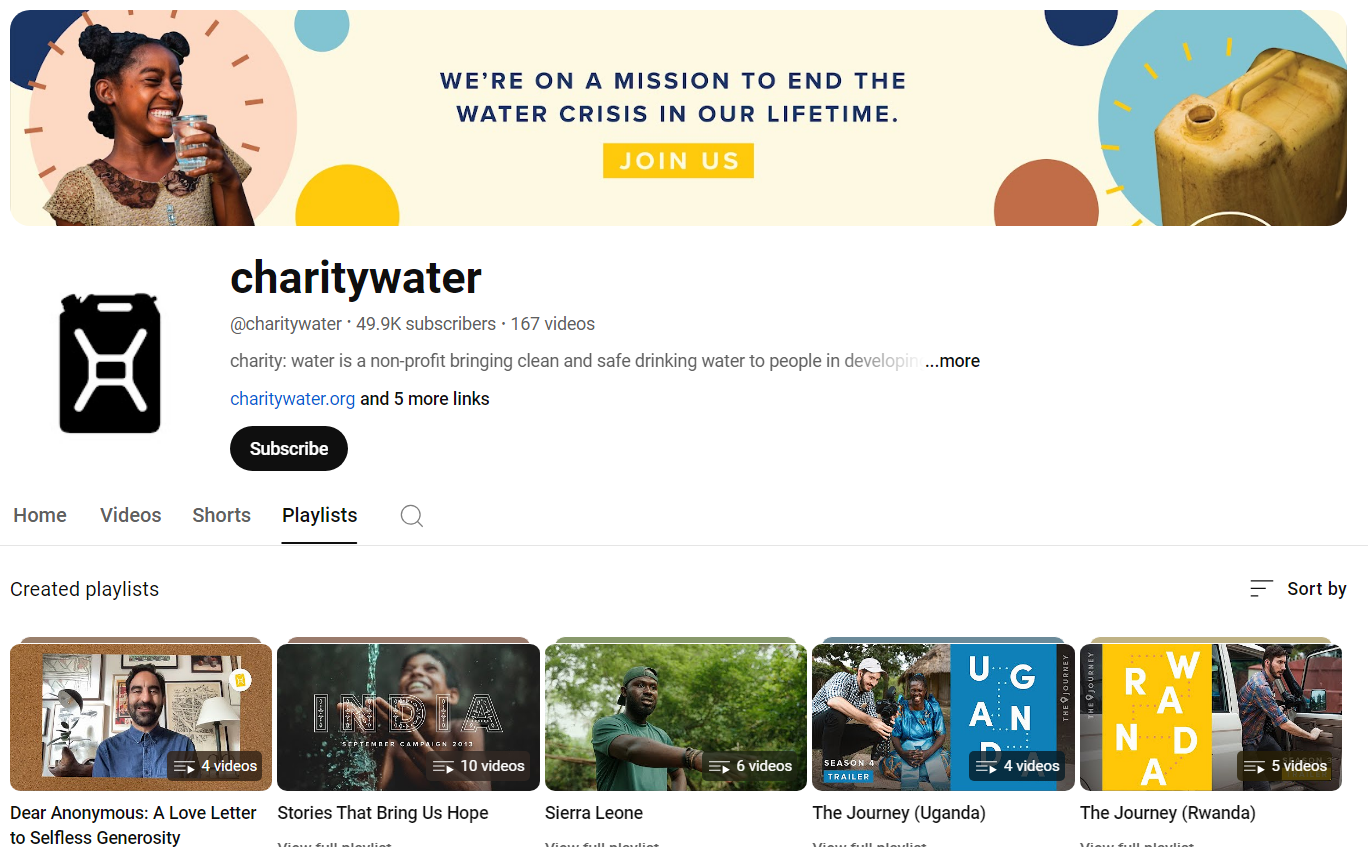
Draw inspiration from successful nonprofit channels like Stand Up to Cancer.
Zeffy + YouTube: your universal donate link
Zeffy doesn't integrate with YouTube via an API. It doesn't need to. Your Zeffy donation form URL is a plain web link — and YouTube accepts plain web links in every placement listed above. That's the entire integration.
Why this matters
$0 in fees: Zeffy charges no platform fees, no transaction fees, and no credit card fees. Every dollar a YouTube viewer donates reaches your nonprofit. YouTube's own Channel Memberships take 30% of membership revenue. Zeffy takes nothing.
No approval gate: You don't need to be in the YouTube Nonprofit Program to use a Zeffy link. You don't need a tech team. You don't need a special account. You paste the link, it works.
Recurring donations included: Zeffy supports recurring donations at zero fees. That means a YouTube viewer who becomes a monthly donor through your Zeffy link costs you nothing extra — ever.
Works internationally: Zeffy operates in the US and Canada. If your org is based in a country where the YouTube Nonprofit Program doesn't apply, Zeffy still works as your donation rail.
One link, every placement: Create one Zeffy donation form, copy the URL, and paste it into every tactic in the playbook above. Update the form once and all your placements stay current automatically.
Over 100K nonprofits have raised $2B+ through Zeffy with $0 in fees. The YouTube tactic is just one more channel where those same zero fees apply.
Not eligible for the YouTube Nonprofit Program? You can still fundraise
Google doesn't tell you this, because Google doesn't help nonprofits it excludes. We will.
The YouTube Nonprofit Program is not available to:
International nonprofits outside the approved country list
Newly registered orgs that haven't yet received Google for Nonprofits approval
Organizations without a Candid opt-in (even US 501(c)(3)s)
None of that blocks you from fundraising on YouTube. Here's the two-part model that works regardless of eligibility.
YouTube as top-of-funnel
Use YouTube to tell your story, show your impact, and build an audience. You don't need any special program access to upload videos, run live streams, or post Shorts. That content does the emotional work.
Zeffy as the donation rail
Every tactic from #1 through #9 in the playbook above is available to any YouTube channel. Paste your Zeffy donation form link into your banner, descriptions, pinned comments, end screens, Shorts captions, and live stream chat. Viewers who are ready to give have a clear path.
You're not waiting on Google's approval timeline. You're not locked out of a fee-free donate option. You start today.
How to set up your nonprofit YouTube channel
If you're starting from scratch, here's how to get your channel ready before you add any donate links.
2. Click your profile icon, select "Your Channel," then "Create Channel"
3. Choose a channel name that matches your nonprofit's brand
4. Add your logo as the channel profile picture
5. Write a channel description that explains your mission in plain language — include your Zeffy donation link here from day one
Channel optimization
Upload a channel banner sized to YouTube's recommended dimensions (2560 x 1440 px)
Add your Zeffy donation form URL to the channel links section (visible on your banner on desktop)
Create a channel trailer — a short video that explains who you are and what you do for first-time visitors
Organize videos into playlists by campaign, topic, or program so new visitors can find relevant content fast
A well-set-up channel makes every donate link you place more credible. Viewers give to organizations they trust, and a complete, professional channel builds that trust before a viewer ever clicks your Zeffy link.
Making content that drives donations
Getting views is half the job. The other half is turning those views into action.
Tell stories, not statistics
Viewers respond to people, not data points. A two-minute video following one beneficiary through a single day of impact will outperform a five-minute summary of your annual report. Lead with the person. End with the ask.
Optimize for search and discovery
Write descriptive video titles using phrases your audience actually searches
Put your most important keywords in the first 100 characters of your description
Use relevant tags and select the correct category
Design thumbnails with high contrast and legible text — viewers decide whether to click in under two seconds
Put the ask in the video
Don't rely on viewers to notice your description link. Say the URL out loud, or reference it on screen. Something like "The link to donate is in the description and pinned in the comments" takes five seconds and meaningfully increases clicks.
Be consistent
One viral video doesn't build a donor community. A regular publishing schedule does. Even one video per month is enough to keep your audience engaged and your channel appearing in recommendations. Pair each upload with a pinned comment and description update that includes your Zeffy link.
Collaborate with creators
Find YouTubers whose audience overlaps with your cause. A shared video, a shoutout, or a co-hosted live stream exposes your work to new viewers who are already interested in your issue area. Your Zeffy donate link travels with every collab.
The YouTube Nonprofit Program is a set of tools available to eligible nonprofits through Google for Nonprofits. It includes Link Anywhere cards, YouTube Premium revenue sharing, and production tools. To join, your org must be a US 501(c)(3), have an active Google for Nonprofits account, and opt in through Candid. Apply at the YouTube Nonprofit Program page and expect a decision within 2 to 14 business days.
Yes. Tactics #1 through #9 in the playbook above — channel banner, About tab, video descriptions, end screens, pinned comments, Community tab, Shorts captions, live stream chat, and on-screen QR codes — are available to any YouTube channel. Paste your Zeffy donation form URL into each placement and you're fundraising, no program approval required.
The simplest method for any nonprofit is to paste your Zeffy donation form URL into your video descriptions, pinned comments, and end screen links. Nonprofit Program members can also use Link Anywhere cards to place a clickable donate button mid-video. Either way, the destination URL is your Zeffy form — no platform fees, no setup cost.
The YouTube Nonprofit Program is currently limited to specific countries. If your org is outside the approved list, you won't qualify for Link Anywhere cards or Nonprofit Program perks. You can still use YouTube as a content and awareness channel and drive donations through Zeffy links placed in your descriptions, banners, and comments.
Zeffy. It charges $0 in platform fees, $0 in transaction fees, and $0 in credit card fees. Every dollar a viewer donates goes directly to your nonprofit. Zeffy is 100% free for nonprofits, so your costs stay at zero regardless of volume.
YouTube Channel Memberships carry a 30% revenue share to YouTube/Google. If you're using YouTube's native membership or tipping features, YouTube takes a portion. If viewers click your Zeffy link and donate through Zeffy, YouTube takes nothing — and neither does Zeffy.
YouTube Giving was an early fundraising feature that has since been consolidated into the YouTube Nonprofit Program's fundraising tools. The YouTube Nonprofit Program is the current umbrella for nonprofit-specific features on YouTube, available to eligible US 501(c)(3)s through Google for Nonprofits. A donate button is the generic term for any clickable link that sends viewers to a donation page — which can be a Zeffy form link placed anywhere on your channel, available to every nonprofit regardless of program status.
Every dollar you raise should reach your mission, not a platform's bottom line. Zeffy keeps it that way. No platform fees, no transaction fees, no credit card fees — just a donation form URL you can paste into every YouTube placement you have.
Get weekly fundraising tips from nonprofits experts
Thank you! Your submission has been received!
Oops! Something went wrong while submitting the form.
Keep reading :
Nonprofit guides
Social Media For Nonprofits: Benefits & Best Practices
Social media can boost your nonprofit’s impact, and here’s how. Check this guide for social media best practices and tools to grow your online presence and reach more donors.
Webinar- Online Fundraising: How to Raise the Most on Your Website, Social Media, and More
Watch a free webinar all about online fundraising through your nonprofit website, social media, and email strategy. Learn tangible tips and hacks to reach more donors and raise more for your cause.
Google for Nonprofits offers eligible organizations access to tools such as free Workspace, Google Ad Grants, and more. Learn how to apply for the program.
Look for people who attend related events, follow relevant Facebook groups, or subscribe to aligned newsletters.These aren’t just potential donors—they’re your future advocates.
Look for people who attend related events, follow relevant Facebook groups, or subscribe to aligned newsletters.These aren’t just potential donors—they’re your future advocates.






.webp)

