How is Zeffy free?
How is Zeffy free?
Zeffy relies entirely on optional contributions from donors. At the payment confirmation step - we ask donors to leave an optional contribution to Zeffy.
Learn more >

Templates

Free Donation Spreadsheet Template for Nonprofits (Excel + Google Sheets)

June 18, 2026
TL;DR — The Short Answer

Verdict: A free, no-login spreadsheet template is the right starting point for a new or volunteer-run nonprofit tracking gifts from one channel.

What works: Fast to set up, no software to learn, auto-sums total raised by campaign and donor, flags overdue follow-ups in red.

What doesn't: Breaks down the moment a second giving channel arrives, two people edit at once, or you pass roughly 100 donors.

Best for: Brand-new nonprofits, all-volunteer orgs, and anyone managing one giving channel with fewer than a few hundred donors a year.

Worth considering if: You are already copying contacts into Gmail or a newsletter tool, started a second sheet because the first got messy, or losing two or more hours a week to manual entry — that is the signal to move to donor management software.

Table of contents

If you came here for a donation tracker template, this page leads with it: a free spreadsheet you can open in Excel or copy in Google Sheets, no email gate, no login. It is the right tool for a brand-new or volunteer-run nonprofit with one giving channel and a few hundred donors a year.

Further down, we name the exact moment a spreadsheet stops working, in the words real nonprofits use, so you know when to graduate to something built for the job.
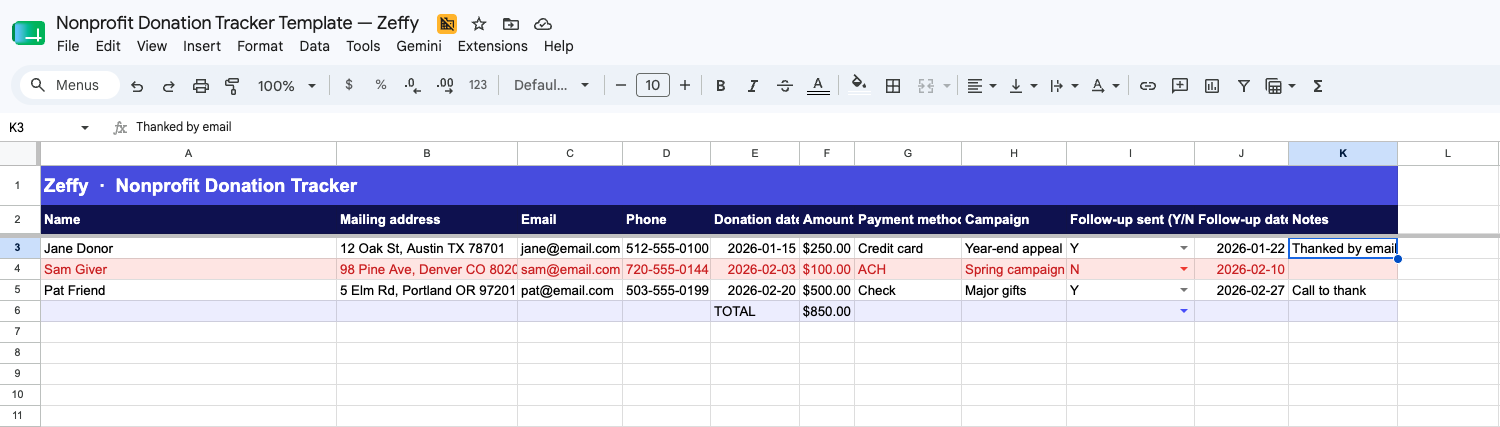
Download your free donation tracker template

Nonprofit Donation Tracker Template — Zeffy

What is in the file:

  • Donor details: name, email, phone, mailing address
  • Gift details: date, amount, payment method, campaign
  • Follow-up tracking: yes or no, follow-up date, notes
  • Auto-sum for total raised by campaign and by donor
  • Conditional formatting that flags overdue follow-ups in red

No login or email signup required — just open and use it, completely free.

For a small nonprofit: if you have one giving channel and one person entering data, this template will carry you through your first year. The ceiling shows up the moment a second channel does, and we cover that below.

What is included in this template

Eleven columns, grouped so you can scan a donor record in one glance.

  • Donor details. Name, mailing address, email, and phone. Email is the column that earns its keep: 48% of donors say email is their preferred channel for updates and appeals (Neon One, The Nonprofit Email Report).
  • Gift details. Donation date, amount, payment method, and campaign name. The amount column auto-sums at the bottom and by campaign.
  • Follow-up tracking. A yes or no flag, a follow-up date, and a free-text notes column. Overdue follow-ups highlight red automatically.

For a small nonprofit: the eleven columns are the floor, not the ceiling. Resist the urge to add more, because every new column becomes a field someone has to fill in by hand on every gift.

How to use the donation tracker template

Eight steps. One sentence each. You can have a working tracker in under an hour.

  • 1. Enter the donor's name and mailing address in the first two columns.
  • 2. Add the donor's email, since most donors prefer to hear from you there (Neon One).
  • 3. Add a phone number if you call or text donors, or leave it blank.
  • 4. Log the donation date so you can sort gifts in order.
  • 5. Enter the amount, and the Funds Donated total at the bottom updates on its own.
  • 6. Tag the campaign that drove the gift so you can compare what worked.
  • 7. Record the payment method (online, check, cash, in-kind) for your books.
  • 8. Mark yes or no in the Follow-up column and set a date, and the row turns red when the date passes.

💡 Pro tip: use a filter on the Campaign column to see one campaign at a time, and a filter on Amount to surface your major gifts. The template's auto-sum and follow-up columns also exist natively in Zeffy's free donor management software, where new donations write themselves into the record.

For a small nonprofit: the spreadsheet works as long as one person owns it. Two people typing into the same Google Sheet is where the typos and duplicate rows start.

Why track donations with a spreadsheet at all

A tracker earns its keep four ways.

  • Tax compliance and receipts. The IRS requires a contemporaneous written acknowledgment for any single contribution of $250 or more (IRS Publication 1771). A clean record makes those receipts a copy-paste job instead of a year-end scramble. Our nonprofit tax filing guide walks through the rest of the year-end checklist.
  • Budgeting. When you can see what came in last month and last quarter, you can plan what to spend next month with more than a guess.
  • Donor relationships. Knowing who gave, when, and to what campaign is the floor for stewardship. Without it, every thank-you is generic. See our donor retention guide for the next steps.
  • Campaign analysis. Tagging gifts by campaign tells you which appeal pulled its weight and which one to retire.

For a small nonprofit: these four reasons are why you track at all. They are not reasons to stay on a spreadsheet forever. The next section is the honest part.

When to upgrade from a spreadsheet to donor management software

A donation tracker template is a fine starting point for week one, and a slow leak the moment donations start arriving from more than one place. Every transaction becomes a hand-keyed entry, and the spreadsheet stops being a record. It becomes a reconciliation chore.

Real volunteers told us what that looks like, in their own words:

"We have, like, a million Google Sheets, and it's just, like, trying to get it all together in one place, and not have to search through all these sheets.""It's honestly, it's kinda all over the place, which is absolutely terrible. Things like this is all in spreadsheets and Google Docs."

If any one of these is true for you, the spreadsheet is past its useful life:

  • Donations are arriving from more than one source (an online form, a bank deposit, a corporate match, a peer-to-peer page).
  • You are copy-pasting contacts into Gmail or a newsletter tool to send updates.
  • You started a second sheet because the first one got messy.
  • You are tracking 100 or more donors, running more than one campaign at a time, or losing more than two hours a week to manual entry.

The fix is not a prettier spreadsheet. The fix is getting your donation form and your donor record into the same system, so the data writes itself. That is what Zeffy's free donor management software does. Free donation forms that auto-write to your donor record remove the form-to-spreadsheet handoff that is the actual point of failure.

The migration objection is fair: you already have a spreadsheet, and you do not want to start over. You do not have to. You can import your existing spreadsheet (up to 10,000 contacts per file) directly, past gifts included. More than 100,000+ nonprofits have already moved their giving data into Zeffy, and together they have raised $2B+ with zero platform fees.

One more honest note: Zeffy is built for simplicity, not scale. We are not a moves-management or wealth-screening tool, and we do not have custom contact fields (you use Notes and Tags instead). If you are a one-to-three-person team or an all-volunteer org, that is the point. It is the system that fits the actual job.

No platform fee, no transaction fee, no credit card fee. Ever.

For a small nonprofit: the upgrade is worth it the day the second giving channel shows up, and not really before. If you only have one channel, stay on the template.

How should I organize donations in a spreadsheet?

Set up one row per gift, with columns for donor name, date, amount, payment method, and campaign. Add a filter to the header row so you can sort by any column. Use a sum formula at the bottom of the Amount column to track running totals.

How do I record donations correctly?

Log every gift the day it comes in, with the donor's name, the amount, the date, and the payment method. For gifts of $250 or more, you also need to issue a contemporaneous written acknowledgment to the donor (IRS Publication 1771).

What is donation tracking, in plain terms?

Donation tracking is the practice of keeping one record per gift in one place, so you can issue receipts, plan your budget, and follow up with donors. A spreadsheet is the simplest version. A donor CRM is the same job, automated.

Can I use this template for tax receipts?

Yes, as a record of what you owe a receipt for. The template captures the donor name, gift amount, date, and payment method you need. You still have to generate and send the receipt itself. Our donation receipt generator creates compliant receipts in seconds, and you can automate tax receipts so you can drop that column entirely once you move off the spreadsheet.

Does this work for recurring donations?

Yes. Log each scheduled gift as its own row on the day it processes, with the same donor name and a campaign tag like "Monthly giving." Tag the row in the Notes column as "recurring" so you can filter recurring versus one-time gifts when you report. A spreadsheet handles this for a handful of recurring donors. Past a couple of dozen, you want software that posts the new row automatically.

Written by
Camille Duboz
Share this article

https://home.simplyk.io/blog/donation-tracker-template

Keep reading :

Tips & best practices
How to Choose a Top-Rated Donation Form (2026)

Simple, flexible, and recognizable online donation forms will help your nonprofit collect more donations. These online donation form best practices can help.

Read more
Nonprofit guides
Free Donation Receipt Generator for Nonprofits

Create IRS-compliant donation receipts in seconds. Free generator for single or bulk receipts, downloadable templates, and how to automate the whole process with Zeffy.

Read more
Nonprofit guides
Expert Guide to Recurring Donations for Nonprofits

Boost donor retention and revenue with recurring donations. Use these proven strategies to launch a successful recurring giving program for your nonprofit in 2024.

Read more

Raise funds with Zeffy. 100% free, forever.

Sign up for free
Thank you! Your submission has been received!
Oops! Something went wrong while submitting the form.

More fundraising tips, straight to your inbox!

Join 250K+ fundraising leaders receiving exclusive tips

Get weekly fundraising tips from nonprofits experts

Thank you! Your submission has been received!
Oops! Something went wrong while submitting the form.

Zeffy is the only 100% free fundraising platform for nonprofits.

Get tailored fundraising ideas—free AI tool!

Find your ideal grant among thousands—free AI tool!

Start your nonprofit in 3 days—for free.

Start fundraising
Zeffy is 100% free and always will be. (We even cover transactions fees.)
Sign up and start fundraising for free today
With Zeffy, 100% of the money you raise goes to your cause. <br>No credit card fees. No platform fees. No fees period.
Did you know
Sign up for free
With Zeffy, 100% of the money you raise goes to your cause. <br>No credit card fees. No platform fees. No fees period.
Did you know
Sign up for free
Question
Cost :
$
$$
Effort :
1
23
Fun :
★★

Insights from over $100M in monthly transactions

Quick wins for you:

  • Look for people who attend related events, follow relevant Facebook groups, or subscribe to aligned newsletters.These aren’t just potential donors—they’re your future advocates.
  • Look for people who attend related events, follow relevant Facebook groups, or subscribe to aligned newsletters.These aren’t just potential donors—they’re your future advocates.

See our Guide for Mission Statements

How Loose Ends turned fee savings into mission impact
$1,715
saved
1
new hire
2500+
finished textile projects
This is some text inside of a div block.
  • This is some text inside of a div block.
  • This is some text inside of a div block.
  • This is some text inside of a div block.
This is some text inside of a div block.
  • This is some text inside of a div block.
  • This is some text inside of a div block.
  • This is some text inside of a div block.

Heading

Heading

Heading

Heading

Heading

Always Say Thanks
Every donor gets an automatic, branded thank-you email the moment they give. It’s fast, personal, and completely hands-off.