We use cookies to improve your experience on our platform. By clicking “Accept all cookies”, you agree to the storing of cookies on your device to enhance site navigation, analyze site usage and assist in our marketing efforts.
Cookies required for basic website functionality.
Cookies used to deliver content most relevant to you and your needs.
Cookies used to deliver content most relevant to you and your needs.
Cookies that help understand the performance of the website, how users interact with it and to identify bugs.
How is Zeffy free?
How is Zeffy free?
Zeffy relies entirely on optional contributions from donors. At the payment confirmation step - we ask donors to leave an optional contribution to Zeffy.
Automating Zeffy Bookkeeping: Building a Zapier Workflow That Runs Itself
February 16, 2026
You've reconciled your Zeffy payouts manually. Maybe you even built a pivot table system that works. But what happens when your board asks for QuickBooks integration that runs itself? In this guide, I'll walk through how we automated our Zeffy-to-QuickBooks workflow using Zapier — transforming a 30-minute monthly process into a fully automated system that creates sales receipts and donation entries in real time. No manual exports, no pivot tables, just clean accounting that happens while you sleep.
Why Automation?
In my previous webinar, I shared the manual reconciliation process we use to break down Zeffy payouts into chart-of-accounts-ready bookkeeping. That system works — it's reliable, repeatable, and takes about 20–30 minutes per month.
But here's the thing: once you've built a system that works manually, you've already done the hard part. You understand your data structure. You know your edge cases. You've mapped your chart of accounts.
At that point, automation isn't about solving a problem — it's about reclaiming time.
"Once we had the manual process nailed down, the automation became obvious. We weren't trying to fix something broken. We were just removing ourselves from a process that didn't need us anymore." — David Ducharme
Two Transaction Types, Two Workflows
The first thing to understand about automating Zeffy transactions is that donations and sales are fundamentally different from an accounting perspective.
Donations are straightforward:
Campaign donation amount
Optional additional donation amount
Both map to revenue accounts and fund classifications
Once Zeffy's fund designation feature launches in March 2026, this will become even cleaner — donors will select their fund directly on the form, and that selection will flow through to your automation.
Sales forms are more complex:
Line-item accounting (individual products sold)
Each product maps to a QuickBooks item
Each transaction may include multiple items
Proper class assignments for restricted funds
Because of these structural differences, we run separate automation workflows for donations and sales. This keeps the logic clean and prevents one transaction type from breaking the other.
The Architecture: Lookup Tables vs. Duplication
When building automations, you face a fundamental design choice: centralized lookup tables or duplicated workflows.
We use both — strategically.
For Sales: Lookup Tables
Our sales automation uses lookup tables to:
Match Zeffy products to QuickBooks product/service items
Lookup tables centralize the logic. When we add a new product to Zeffy, we add one row to the lookup table, and the automation handles it automatically. No need to duplicate or modify the workflow itself.
The tradeoff: lookup tables require maintenance. If your product catalog changes frequently, you're updating a spreadsheet. But for us, the centralization is worth it — one place to manage product mappings means fewer places for things to break.
For Donations: Workflow Duplication
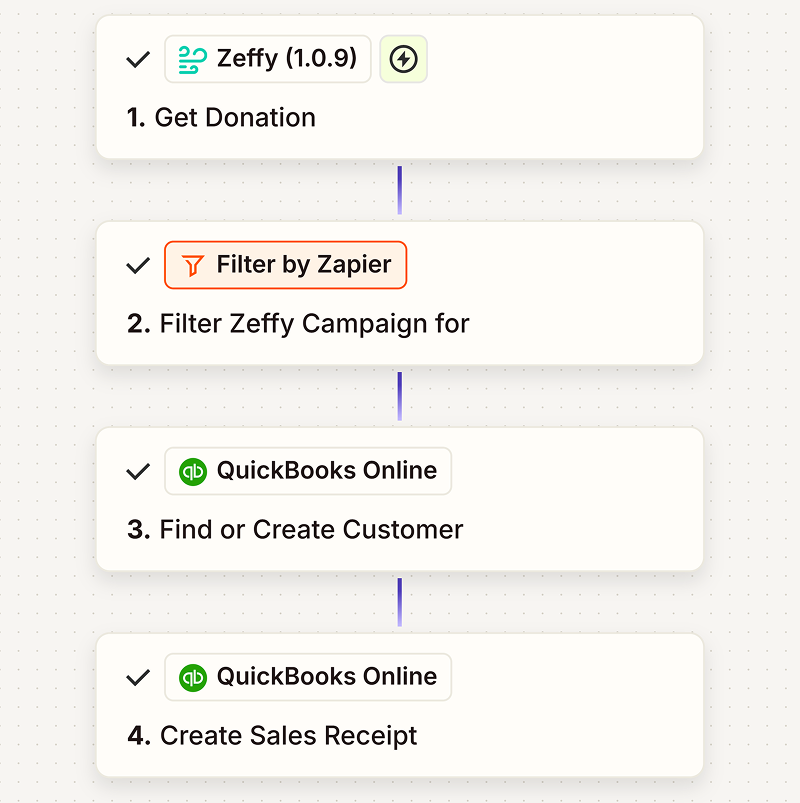
For donations, we take the opposite approach. Instead of lookup tables, we duplicate a clean base automation and adjust:
The campaign filter
The QuickBooks class assignment
The associated product code
Why duplication over lookups? Isolation. If one donation workflow breaks, it doesn't affect the others. Each campaign runs independently, which makes troubleshooting easier and reduces the risk of cascading failures.
How Sales Workflows Route Transactions
Our sales workflows begin with entrance "gates" — filters based on campaign keywords that route each transaction to the correct class restriction.
Here's how it breaks down:
Campaign-based routing:
Harrisburg → Harrisburg chapter class
Homestead → Homestead chapter class
DMV → DMV chapter class
Honorary → Honorary fund class
Everything else splits into one of two categories:
Default merchandise, or
Auction
We separate auction items from regular merchandise because the QuickBooks fallback differs. If a product lookup fails (maybe someone added a new item in Zeffy but forgot to update the lookup table), we still want the transaction to post to the correct revenue category.
For regular merchandise, the fallback is general merchandise revenue. For auctions, it's auction revenue. That way, even when something breaks, it breaks predictably — and our chart of accounts stays clean.
Handling Edge Cases in Automation
Manual reconciliation teaches you where the edge cases live. Automation forces you to decide how to handle them systematically.
Here are the scenarios we account for:
Multiple items in one transaction: Sales forms allow multiple items per checkout. Our automation loops through line items and creates individual QuickBooks entries for each, all tied to the same sales receipt.
Additional donations at checkout: When someone buys a t-shirt and adds a $10 donation, we split that into two QuickBooks line items — one for merchandise, one for the donation — with proper class assignments for each.
Auction winning bids: The item amount (starting price) and total paid (winning bid) differ. Our lookup table uses the total paid field to ensure the correct revenue amount posts.
Failed lookups: If a Zeffy product doesn't match the lookup table, the automation logs the transaction and posts it to a default revenue account. We get an alert, fix the lookup table, and move on. Nothing breaks, and nothing goes unrecorded.
Refunds: Refunds create negative amounts in Zeffy's payout reports. Our automation detects negative amounts and creates corresponding credit entries in QuickBooks, preserving audit trails without manual intervention.
Lessons from Building This
Start with manual. If you can't reconcile it by hand, you can't automate it. Build the process first, understand your edge cases, then automate.
Design for failure. Automations break. Build yours so that when something fails, it fails in a way you can diagnose quickly — and ideally, in a way that doesn't corrupt your books.
Centralize or isolate — pick one per workflow. Lookup tables work great for product catalogs. Workflow duplication works great for campaign-specific logic. Mixing both in the same automation creates confusion.
Test with real data. Sandbox environments are useful, but your automation won't be production-ready until you've run it against actual transactions with actual edge cases.
Document your logic. Six months from now, you won't remember why you routed auction items differently. Write it down. Future you will thank present you.
What This Means for Your Nonprofit
If you're currently reconciling Zeffy payouts manually, you're not doing anything wrong. Manual processes work. They're transparent, auditable, and reliable.
But if you're spending 20–30 minutes every month on reconciliation — and you've already mapped your chart of accounts, identified your edge cases, and built a repeatable process — automation isn't a leap. It's the next logical step.
You're not replacing your accounting knowledge. You're removing yourself from the routine execution of that knowledge.
And that difference matters. Because nonprofit treasurers don't just reconcile transactions. They analyze trends, prepare board reports, forecast cash flow, and plan for growth. Automation doesn't replace that work. It creates space for it.
David Ducharme serves as treasurer for the Milton Hershey School Alumni Association and owns an investment management and financial planning firm. Zeffy is 100% free for nonprofits — no platform fees, no transaction fees, no monthly subscriptions.Create your free account →
Get weekly fundraising tips from nonprofits experts
Thank you! Your submission has been received!
Oops! Something went wrong while submitting the form.
Keep reading :
Webinars
Webinar Recap: Understanding Your Zeffy Payouts — A Simple Process for Monthly Bookkeeping
Nonprofit treasurer David Ducharme explains how Zeffy payouts work and how to allocate them for bookkeeping. Watch the full webinar or read the 5 takeaways.
How to Reconcile Your Zeffy Payouts: A Step-by-Step Guide to Monthly Nonprofit Bookkeeping
Step-by-step guide to reconciling Zeffy payouts with Excel or Google Sheets. Filter, clean, pivot table, and map to your chart of accounts in 20 minutes.
Look for people who attend related events, follow relevant Facebook groups, or subscribe to aligned newsletters.These aren’t just potential donors—they’re your future advocates.
Look for people who attend related events, follow relevant Facebook groups, or subscribe to aligned newsletters.These aren’t just potential donors—they’re your future advocates.







.webp)

