We use cookies to improve your experience on our platform. By clicking “Accept all cookies”, you agree to the storing of cookies on your device to enhance site navigation, analyze site usage and assist in our marketing efforts.
Cookies required for basic website functionality.
Cookies used to deliver content most relevant to you and your needs.
Cookies used to deliver content most relevant to you and your needs.
Cookies that help understand the performance of the website, how users interact with it and to identify bugs.
How is Zeffy free?
How is Zeffy free?
Zeffy relies entirely on optional contributions from donors. At the payment confirmation step - we ask donors to leave an optional contribution to Zeffy.
How to Fill Out a W-9 for a 501(c)(3) Nonprofit: Step-by-Step Guide
April 20, 2026
⚡TL;DR — The Short Answer
Verdict: Use your EIN (never an SSN), check "C Corporation" if you're incorporated or "Other" if you're unincorporated, and enter exempt payee code 1 — these three fields trip up most nonprofits.
What works: Completing the form before a payer asks, double-checking your legal name against your IRS determination letter, and keeping signed W-9s on file for every contractor you pay over $600.
What doesn't: Leaving the exempt payee code blank, using a personal SSN instead of your EIN, or checking "Other" when your nonprofit is incorporated as a corporation.
Best for: 501(c)(3) staff and volunteers handling contractor payments, grant reporting, or service agreements for the first time.
Worth considering if: You're also requesting W-9s from contractors — the form works both ways, and this guide covers both directions.
There are times when your nonprofit works with other businesses or individuals to fulfill its mission – like when an animal shelter partners with a veterinary clinic for medical services.
Organizations may even seek your nonprofit's expertise, such as when a school district requests your guidance on sustainable practices. These partnerships come with specific reporting requirements, and one of them is the IRS W-9 form – a straightforward document that your nonprofit either needs to complete or request from your business partners.
In this blog, we will discuss in detail what the W-9 form is all about, including step-by-step instructions to complete it accurately.
What is Form W-9 and why do nonprofits need it?
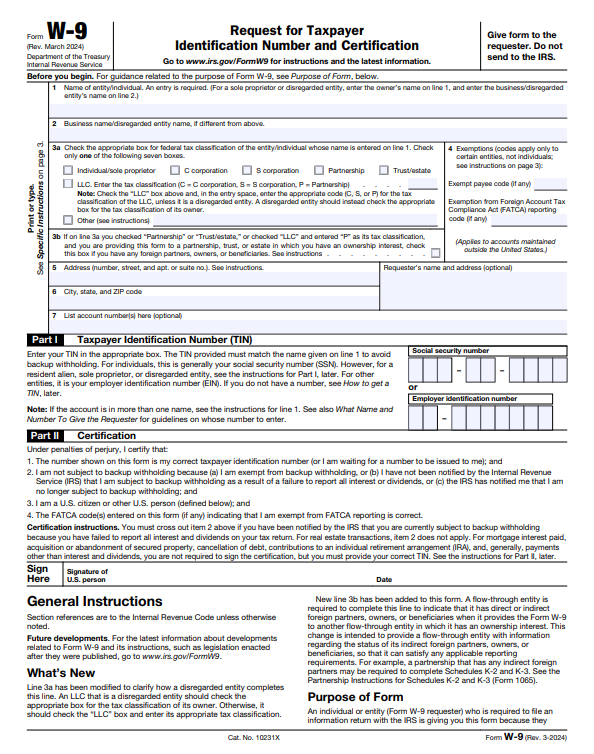
A W-9 form, officially named "Request for Taxpayer Identification Number and Certification," helps nonprofits collect Tax Identification Numbers (TIN) from contractors and businesses they work with. Nonprofits use this information to complete Form 1099, which reports miscellaneous income to the IRS.Source
The W-9 form is kept internally by your organization rather than submitted to the IRS. It serves as documentation that you've collected accurate taxpayer information needed for Form 1099 reporting and provides legal verification of the details provided.
For example, if you hire a graphic designer for your nonprofit's marketing campaigns and pay them over $600 in a year, you'll need a completed W-9 from them to issue their 1099-NEC during tax filing.
When are 501(c)(3) organizations required to fill out a W-9?
1. You work with a contractor
When you work with a contractor and pay them more than $600, you need to request a W-9 form from them rather than completing it yourself. The form provides details like their TIN and mailing address – information you'll need to include on Form 1099, along with the amount you paid them.
If you've been working with this contractor for a long time, you can continue using the W-9 form they previously submitted. It's important to regularly review if their information is still accurate – if their address or TIN changes, you'll need to obtain a new W-9 form from them.
2. You work as a contractor
If your nonprofit provides services to other organizations, they may request a W-9 form from you.
For example, if your environmental nonprofit offers paid training services on sustainable practices to local businesses, those businesses will need your W-9. Complete and return the form promptly so they have enough time to complete Form 1099.
7-step process for filling out a W-9 for your nonprofit
Before you start, download the current W-9 directly from the IRS: irs.gov/pub/irs-pdf/fw9.pdf. Always use the latest version — payers may reject outdated forms.
1. Write your official name
There are two ways to enter your nonprofit name in the W-9 form:
Name of entity/individual: Enter your official name exactly as it appears on your founding documents (such as articles of incorporation).
Business name/disregarded entity name: Enter your organization's "doing business as" (DBA) name only if it differs from the official name in your articles of incorporation. Skip this section if your organization doesn't have a separate DBA name.
For example, if your organization is incorporated as the Youth Environmental Education Foundation of California but is commonly known as Youth Eco Foundation, you would write "Youth Environmental Education Foundation of California" in Box 1 and "Youth Eco Foundation" in Box 2.
2. Specify your organization's tax classification
The W-9 form next requires you to select your federal tax classification. It offers the following options:
Individual/Sole Proprietor: Single-owner business reporting income on personal tax return
C Corporation: Separate legal entity taxed at the corporate level
S Corporation: Corporate entity with special tax status allowing income to pass to shareholders
Partnership: Business owned by multiple individuals sharing tax obligations
Trustee/Estate: Legal entity managing assets with specific tax reporting
Limited Liability Company (LLC): LLCs can choose to be taxed as sole proprietorships (single-member), partnerships (multi-member), or corporations based on their filed elections with the IRS
Other: Unique classifications, including tax-exempt organizations
Here's where many nonprofits get it wrong. The correct selection depends on how your organization is structured:
If your nonprofit is incorporated as a nonprofit corporation under state law and holds 501(c)(3) status, select "C Corporation." Per IRS W-9 instructions, a nonprofit corporation is treated as a corporation for classification purposes on this form — even though you're tax-exempt.
If your nonprofit is unincorporated (for example, an unincorporated association or trust), check "Other" and write your specific exemption type in the field provided — for example, "501(c)(3) nonprofit organization."
This is the single most common source of W-9 errors for nonprofits. When in doubt, check your state formation documents. If you filed articles of incorporation, you're an incorporated nonprofit corporation and should select "C Corporation."
The exempt payee code indicates whether payments are subject to backup withholding. This includes:
Interest and dividend payments
Broker transactions
Barter exchange transactions
Patronage dividends
Don't leave this blank. Nonprofit organizations exempt under IRS Section 501(a) — which includes all 501(c)(3) organizations — should enter exempt payee code 1 in the "Exempt payee code" box. Code 1 tells the payer your organization isn't subject to backup withholding.
For the "Exemption from FATCA reporting code" box, most domestic 501(c)(3) nonprofits can leave this blank. If your organization has foreign financial account reporting obligations, code A may apply — but this is uncommon for most US-based nonprofits. Check with your accountant if you're unsure.
4. Enter both your address and the requester's address
There are two boxes on the W-9 form for your address details. In Box 5, write your organization's street name, street number, and apartment or suite number. In Box 6, enter your city, state, and ZIP code.
The form also includes space for the requester's name and address. While optional, filling this section helps track which organizations have your nonprofit's information, especially if you submit W-9s to multiple contractors.
5. List the account number
Your contracting organization might use a numbered system to track payments it makes to its different partners. If they have assigned your nonprofit a specific account number for their internal tracking, include this number on the form. Leave this section empty if you haven't been given an account number.
6. Mention the taxpayer identification number (Part I)
Unlike individual contractors who use their Social Security number, nonprofits must use their Employer Identification Number (EIN).
Enter your EIN in the "Employer identification number" boxes — never in the "Social security number" boxes. The format is two digits, a hyphen, then seven digits (XX-XXXXXXX). Leave the SSN boxes completely blank.
If you haven't received your EIN yet, write "applied for" in the TIN section – and within the next 60 days, send them your updated EIN.
In the final section, you must certify that the information you provided is true. You have to confirm that:
You are not subject to backup withholding
You are a U.S. citizen or other U.S. person (including U.S. resident aliens, partnerships, corporations, or associations created or organized in the United States, domestic estates, and domestic trusts as defined by IRS regulations)
Your FATCA codes, if any, are correct
An authorized signer — typically your executive director, treasurer, or board officer — should sign and date the form. Review all information thoroughly before signing and submitting your W-9 form.
Completed W-9 example for a 501(c)(3) nonprofit
Reading through step-by-step instructions is helpful — but seeing a filled-out form makes everything click. Below is an annotated image of a completed W-9 followed by a line-by-line walkthrough of exactly what each field should contain for a tax-exempt 501(c)(3) nonprofit, using a fictional organization as the example.
[ANNOTATED W-9 FORM IMAGE REQUIRED HERE: Insert screenshot of completed IRS Form W-9 with callout boxes annotating each key line — Line 1 (legal name), Line 2 (DBA blank), Line 3 (C Corporation checked), Line 4 (exempt payee code 1), Lines 5–6 (address), Part I (EIN), and Part II (signature). Style consistent with Crowded and Altruic visual guidance.]
Sample organization: Youth Environmental Education Foundation
EIN: 47-1234567
Line 1 — Name
What to write: The organization's full legal name exactly as it appears in your IRS determination letter and articles of incorporation.
✏️ Youth Environmental Education Foundation
Do not use abbreviations here unless your legal name includes them. This must match your IRS records precisely.
Line 2 — Business name / disregarded entity name
What to write: Leave this blank if your organization operates under the same name listed on Line 1. Only fill this in if you use a DBA (doing business as) name that differs from your legal name.
✏️ [Leave blank]
Line 3 — Federal tax classification
What to check: If your nonprofit is incorporated, check ☑ C Corporation. If your nonprofit is unincorporated, check ☑ Other and write "501(c)(3) nonprofit organization" in the space provided.
This is one of the most common sources of confusion on the W-9. Many people assume that because a nonprofit is tax-exempt, it should always check "Other." That's not correct. If your organization filed articles of incorporation with your state, it's a corporation — and the IRS W-9 instructions direct incorporated nonprofits to select "C Corporation."
The "Other" checkbox is reserved for unincorporated tax-exempt entities, such as unincorporated associations or charitable trusts that haven't incorporated under state law. Check your formation documents if you're unsure which applies to your organization.
✏️ C Corporation (if incorporated) — or — Other: 501(c)(3) nonprofit organization (if unincorporated)
Line 4 — Exemptions
Exempt payee code: Write 1 in the "Exempt payee code" box.
Code 1 applies to organizations exempt under Section 501(a), which includes all 501(c)(3) organizations. This tells the payer that your organization is not subject to backup withholding.
Exemption from FATCA reporting code: Leave this blank unless your nonprofit has specific foreign financial account reporting obligations, which is uncommon for most domestic nonprofits.
✏️ Exempt payee code: 1 | FATCA code: [blank]
Lines 5 & 6 — Address
What to write: Your organization's official mailing address — typically your registered address or the address on file with the IRS.
✏️ 123 Green Valley Road, Suite 200✏️ Austin, TX 78701
Part I — Taxpayer Identification Number (TIN)
What to write: Your organization's Employer Identification Number (EIN) in the "Employer identification number" box — never a Social Security Number.
Format: two digits, a hyphen, then seven digits.
✏️ 47-1234567
Leave the "Social security number" boxes completely blank.
Part II — Certification
What to do: An authorized signer — typically your executive director, treasurer, or board officer — signs and dates the form.
✏️ [Signature of authorized representative] | Date: 03/15/2025
Quick-reference summary table
W-9 Field
What a 501(c)(3) Should Enter
Line 1 (Name)
Full legal name per IRS records
Line 2 (DBA)
Leave blank (unless DBA applies)
Line 3 (Tax classification)
☑ C Corporation (if incorporated) or ☑ Other: "501(c)(3) nonprofit organization" (if unincorporated)
Exempt payee code
1
FATCA code
Leave blank
TIN
EIN in XX-XXXXXXX format
SSN boxes
Leave blank
Signature
Authorized officer or representative
The most critical details to get right: select the correct tax classification for your structure on Line 3, enter exempt payee code 1, and always use your EIN — never an individual's Social Security Number. Getting these three fields correct ensures your payers can process the form without follow-up questions and that your organization's tax-exempt status is properly communicated.
Common W-9 mistakes nonprofits make
Even straightforward forms create problems when the instructions aren't written with nonprofits in mind. These are the errors that show up most often — and what to do instead.
Checking the wrong tax classification box
This is the most frequent mistake. Incorporated 501(c)(3) nonprofits should check "C Corporation," not "Other." Many people assume that checking "C Corporation" means they're claiming to be a for-profit company. It doesn't. It simply reflects how your organization is structured legally. If you filed articles of incorporation with your state, you're a corporation — check that box. If you're unincorporated, check "Other" and describe your exemption type.
Leaving the exempt payee code blank
Skipping Line 4 doesn't cause the form to be rejected outright, but it can trigger unnecessary follow-up from payers. It may also lead some payers to apply backup withholding at 24% out of caution. Your organization is exempt from backup withholding under Section 501(a). Enter code 1 and avoid the confusion entirely.
Using a Social Security Number instead of an EIN
This happens most often when a founder or executive director completes the form on behalf of their organization and defaults to their personal information. A W-9 submitted for your nonprofit must use the organization's EIN — not anyone's personal SSN. If your nonprofit doesn't have an EIN yet, write "applied for" in the TIN section and provide the EIN once it's issued.
Using an outdated form
The IRS updates the W-9 periodically. Some payers will reject older versions. Always download the current form directly from irs.gov/pub/irs-pdf/fw9.pdf rather than using a saved copy from a previous year.
Name mismatches between Line 1 and IRS records
If your legal name on the W-9 doesn't exactly match what the IRS has on file for your EIN, it can create TIN validation errors for your payer. Use your name exactly as it appears on your IRS determination letter — including punctuation, "Inc.," or "Foundation" if those words are part of your registered name.
Not updating your W-9 when information changes
A W-9 isn't a one-time filing. If your organization's legal name, address, or EIN changes, you need to provide updated forms to any payers who have your old information on file. Build a habit of reviewing your W-9s on file whenever you go through a significant organizational change.
Do nonprofits need a W-9 for donations and grants?
This question comes up often, and the answer depends on the type of payment your nonprofit receives.
Donations don't require a W-9. When an individual or company makes a charitable contribution to your 501(c)(3), that's a gift — not a payment for services. Donors don't need your W-9, and you don't need to provide one. Your donation acknowledgment letter handles the documentation on your end.
Grants are more nuanced. Most grants from private foundations, community foundations, or government agencies are made to support your charitable mission — and these typically don't require a W-9. However, some grant-making foundations do request a W-9 as part of their due diligence process, particularly when the grant is structured as a payment for specific deliverables or services rather than a general operating grant. In those cases, provide your W-9 promptly so the foundation can complete its own reporting requirements.
Payments for services always require a W-9. If your nonprofit receives payment for providing services — training, consulting, program delivery, or any other work — the payer may need your W-9 to issue a 1099. This applies whether the payer is a corporation, a government agency, or another nonprofit. The threshold is $600 paid in a calendar year.
The simplest rule: if someone is paying your nonprofit for doing something rather than donating to your mission, expect a W-9 request. Keep a completed, current W-9 on file and ready to send. It saves time and prevents payment delays.
How to submit Form W-9
Submitting the W-9 form depends on whether you're requesting the form or being asked to fill it out. Here's what to do in both cases:
When You're Responding to a W-9 Request
If a contractor requests the W-9 from your nonprofit, you must complete and return the form as soon as possible, ideally within a week of receiving the request. It won't take long unless you need to apply for an EIN, which takes time.
After receiving your form, the requester will use your information to complete your Form 1099 and send it to you by the January 31 deadline.
When You're Requesting a W-9
If your nonprofit requests the form from another organization, specify how you want to receive the signed form, whether through fax, email, or online document services.
Once you receive the signed W-9, you can complete Form 1099-MISC and issue it to the contracting organization and the IRS.
Final thoughts on Form W-9
The W-9 form is crucial in nonprofit tax compliance, serving as a vital link between organizations, contractors, and the IRS. The form collects essential details, including name, Taxpayer Identification Number, mailing address, and backup withholding status.
When working with contractors, request the W-9 form before starting the relationship and verify all information is complete and accurate. Keep these forms secure and updated to accommodate any changes in the contractor's details during your association with them.
Zeffy helps 100,000+ nonprofits manage their fundraising and financial compliance needs at no cost — so your team can focus on mission-critical work instead of paperwork.
Failing to submit a W-9 or providing an incorrect TIN can result in payers withholding 24% of your payment as taxes. To prevent this tax withholding, make sure to promptly provide your nonprofit's correct EIN to any organization that pays you for services.
No, Form 990 and a W-9 are different and serve distinct purposes. The W-9 collects a taxpayer's identification information for reporting payments, while Form 990 is an annual tax return that nonprofits file to maintain their tax-exempt status.
The W-9 helps nonprofits report payments accurately, and the Form 990 provides transparency about their financial activities.
Nonprofit organizations must report their financial activities and maintain tax-exempt status by filing IRS Form 990. The filing requirements vary based on annual gross receipts:
* Form 990-N (e-Postcard) for organizations with receipts of $50,000 or less
* Form 990-EZ for organizations with receipts under $200,000 and assets under $500,000
* Form 990 for larger organizations
* Form 990-PF for private foundations
* Form 990-T for nonprofits with unrelated business income over $1,000
Your tax-exempt organization may also need to file additional forms at the state level based on local laws. If you fail to file these forms for three consecutive years, your organization will automatically lose its tax-exempt status.
Get weekly fundraising tips from nonprofits experts
Thank you! Your submission has been received!
Oops! Something went wrong while submitting the form.
Keep reading :
Nonprofit guides
The Nonprofit Compliance Calendar: A 12-Month Guide for Small Teams
Navigate nonprofit compliance confidently with our comprehensive checklist. Learn about essential legal requirements, filings, and regulatory obligations for NPOs.
Nonprofits must issue a 1099 form when engaging with independent contractors. Learn why nonprofits get a 1099 form with precise guidelines to issue one.
Nonprofit Tax Filing (2026): The Small-Org 990 Guide
Discover essential tips for nonprofit tax filing in 2024. Learn which IRS forms to use, deadlines, and best practices to ensure compliance and maintain your tax-exempt status.
Look for people who attend related events, follow relevant Facebook groups, or subscribe to aligned newsletters.These aren’t just potential donors—they’re your future advocates.
Look for people who attend related events, follow relevant Facebook groups, or subscribe to aligned newsletters.These aren’t just potential donors—they’re your future advocates.





.webp)

