We use cookies to improve your experience on our platform. By clicking “Accept all cookies”, you agree to the storing of cookies on your device to enhance site navigation, analyze site usage and assist in our marketing efforts.
Cookies required for basic website functionality.
Cookies used to deliver content most relevant to you and your needs.
Cookies used to deliver content most relevant to you and your needs.
Cookies that help understand the performance of the website, how users interact with it and to identify bugs.
How is Zeffy free?
How is Zeffy free?
Zeffy relies entirely on optional contributions from donors. At the payment confirmation step - we ask donors to leave an optional contribution to Zeffy.
Track Membership Dues Free: Stop the Spreadsheet Patchwork
June 16, 2026
⚡TL;DR — The Short Answer
Verdict: Most small nonprofits lose track of dues because the data lives in five places at once — not because the spreadsheet is wrong, but because nothing connects it to the payment or the reminder.
What works: Consolidating the membership form, dues payment, renewal reminder, and member record into one tool. Monthly review cadence on top of that takes fifteen minutes instead of an afternoon.
What doesn't: Adding discipline on top of a fragmented system. Reviewing three spreadsheets more often does not fix the fact that they do not talk to each other.
Best for: Small nonprofits and associations running a dues program with fewer than a few thousand members and no dedicated database admin.
Worth considering if: You are currently copy-pasting members into Gmail, tracking payments in a separate spreadsheet, and losing renewals because nobody owns the list.
Membership dues are not flashy, but they are the fuel that keeps a small nonprofit's programs going. The problem is rarely the dues themselves. The problem is that the member list lives in a Google Form, who paid lives in an Excel sheet, the monthly reminder is a Gmail thread someone copy-pastes by hand, and the de facto roster is a Facebook group nobody actually controls.
You do not need a software stack, a developer, or a 10-tab spreadsheet. You need one place where the membership form, the dues payment, the renewal reminder, and the member record are the same object.
Below is the consolidation-first playbook: name the patchwork, pick a tracking method, set the system up in an afternoon, watch the right numbers, and handle the members who miss a payment. The formulas, the models, and the Greater Lowell Chamber example are still here. The order is just different.
Why membership dues slip through the cracks (and it is not a spreadsheet problem)
Picture a real small chapter. The sign-up form is a Google Form. The list of who paid this year is an Excel sheet on one volunteer's laptop. The monthly agenda email goes out from Gmail, with contacts copy-pasted in by hand. The roster everyone actually checks is the Facebook group. And dues are collected through a third-party payment processor, which quietly takes about a dollar off every $10 due.
None of those tools are broken. The breakage is that they do not talk to each other. A new member fills out the form but never lands in the spreadsheet. The dues come in through the processor but never tag the member as paid. The renewal reminder goes to whoever happened to be on last month's copy-paste list. The chapter literally cannot reach its full membership, because no single list of the full membership exists.
One nonprofit operator put it this way: "we have, like, a million Google Sheets, and it is just trying to get it all together in one place." Another said: "we are kind of a patchwork solution. Not everyone we can get to from email." That is the real bottleneck. A monthly review cadence on top of that patchwork does not fix it. Consolidating it does.
For a small nonprofit: the win here is not better discipline. It is fewer places where member data is allowed to live.
What are membership dues?
Membership dues are the recurring fees a member pays an organization to be part of it. Nonprofits, associations, chambers of commerce, professional societies, and clubs all use dues to fund operations and to give members something tangible in return.
A reliable revenue stream: dues create predictable income beyond one-off donations and grants.
More value for members: the pool funds programs, events, and benefits that members would not get on their own.
Financial stability: recurring dues make budgeting and planning far easier than chasing irregular gifts.
For a small nonprofit: if you are already collecting any kind of recurring contribution, you are running a dues program. The question is whether you are tracking it on purpose or by accident.
5 methods for tracking membership dues
Tracking method is mostly a question of how much the tool does for you. Here are the five honest options, from "free but manual" to "free and consolidated."
1. Spreadsheets
Use this only until you consolidate. A Google Sheet or Excel file is free and infinitely flexible, and that is the trap. Every renewal date, every payment confirmation, every status flip from active to lapsed is manual. There is no single roster, because the spreadsheet does not know about the payment processor. Fine as a stopgap. Not a system.
2. Accounting software (such as QuickBooks)
Accounting tools track the money well. They do not track the member relationship. You can see that $40 came in from someone, but the tool was not built to tell you which tier they are on, when their renewal is due, or whether they answered last month's email. Treat accounting software as the books, not the roster.
3. Enterprise CRM (such as Salesforce)
Powerful, customizable, and almost always overkill for a small-org dues program. Setup is a project, not an afternoon, and the per-user pricing (you pay for each staff login) adds up fast for a chapter with two volunteers and a part-time admin. Right answer for a national association with a paid admin. Wrong answer for almost everyone reading this.
4. Dedicated membership software
Purpose-built tools handle dues, renewals, and member records in one place. The catch is the monthly subscription, often priced by contact count, which can rise faster than your membership does. Good fit if a membership platform is the only thing you need software for.
5. All-in-one fundraising and membership platforms (such as Zeffy)
This is the consolidation answer, not just another row on the list. Zeffy's free membership software puts the membership form, the dues payment, the renewal reminder, and the member record in the same object. No monthly fee. No per-contact pricing. Built for small nonprofits running dues alongside donations and events.
For a small nonprofit: if you have fewer than a few thousand members and no dedicated database admin, options 1 through 4 are mostly variations of "more work or more money." Option 5 is the one designed for you.
How to consolidate and set up a membership dues tracking system
You can do this in one afternoon. The order matters: consolidate first, then layer cadence and KPIs on top.
1.Inventory every place member data lives today. The sign-up form. The dues spreadsheet. The Gmail contacts list. The Facebook group. The receipts folder from your payment processor. Write them down. You cannot consolidate what you have not named.
2.Stand up one free membership form that doubles as the member record. Use Zeffy's free membership software or an equivalent. Every new sign-up should create a member profile automatically, not a row someone has to retype.
4.Turn on automatic renewal reminders and recurring payments. Recurring dues mean a $10 due stays $10 every month without anyone having to ask. A 30-day expiry reminder plus a renewal confirmation goes out automatically. Issue auto-generated digital membership cards so members can see active or lapsed status at a glance.
5.Set a monthly review cadence. Now, and not before. Once a month, open the dashboard, look at active members, auto-renewals, anything expiring in the next 30 days, and anyone recently lapsed. Fifteen minutes.
6.Build a follow-up sequence for missed payments. See the late-payments section below. Decide once, automate the parts you can, and stop reinventing it every month.
For a small nonprofit: the cadence is the last step, not the first. If you start with "we should review the spreadsheet monthly," you are budgeting more time for a system that was already taking too much time.
Once the data is in one place, a handful of numbers tell you whether the program is healthy. You do not need all of them. You do need to know where each one comes from.
Renewal rate: the share of members up for renewal who actually renewed. Membership renewal rates vary widely by organization type, so set your benchmark against your own prior year rather than chasing an industry average.
Dues collection rate: billed dues that were actually collected in the period. If this drifts below your renewal rate, you have a payment-friction problem, not a member-loyalty problem.
Average days to payment: from invoice to paid. Trending up is an early warning.
Member lifetime value: average dues a member pays across their full time with you. Tells you what acquiring one new member is worth.
Churn rate by tier: which tier is leaking? A high churn rate on your entry tier is normal. A high churn rate on your top tier needs a phone call.
Payment method mix: card, bank transfer, cash, check. If everything is on one card and that card expires, you have a renewal cliff.
Most of these surface directly from a consolidated member record. A filtered view of members with an expiration in the last 90 days, segmented by whether they renewed, gives you renewal rate without a spreadsheet pivot.
For a small nonprofit: pick two numbers and watch them. Renewal rate and dues collection rate are enough. Add more only when you have time to act on them.
How to handle late or missed dues payments
Members are people, not billing accounts. The goal of a late-payment workflow is to make it easy for someone who meant to renew to actually renew, and to find out kindly when someone has moved on.
A simple sequence that works for most small organizations:
Day 0 (due date): automatic reminder email. Friendly, one-click to pay. No staff time.
Day 7: a short personal email from a staff member or volunteer. Ask if anything changed and offer to help.
Day 14: for higher-tier members, a phone call. For everyone else, a second email.
Day 30: final notice with a grace period or a pause-and-rejoin option, so the door stays open.
The copy-paste-into-Gmail version of this is what burns volunteers out. The consolidated version is one tag (lapsed_this_month), one filter, and one click to send segmented dues reminders straight from the member dashboard. The personal Day 7 note is still personal. The Day 0 automation just means no one forgets the easy ones.
For a small nonprofit: automate the parts that do not need a human, so you can spend real time on the members who do.
Annual vs monthly dues: which is easier to track?
Both models work. They fail differently.
Model
Pros
Cons
Annual dues
One renewal per member per year. Predictable revenue. Higher upfront commitment often boosts retention. Fewer transactions to track.
One missed renewal is a full year of lost dues. You only learn a member churned 12 months later. Less flexibility for members on tight budgets.
Monthly dues
Lower barrier to join. Smoother cash flow. Early churn signals (a failed card in February is louder than silence in November). Easier to test pricing.
More transactions and more processing touches. Members can leave any month. Higher administrative load if tracked manually.
From a tracking standpoint, monthly wins for retention visibility, because you see problems within weeks instead of a year. From a revenue-stability standpoint, annual wins, because the cash is in the door. Many small organizations offer both and let the member choose.
For a small nonprofit: if you are starting fresh, default to monthly with an annual discount. You will catch churn earlier and your cash flow will be steadier.
How to calculate membership dues
Pricing dues is a costs-plus-value exercise. Add up what the program costs to run, divide by the members you can realistically serve, and adjust for the value each tier delivers.
Program: events, education, publications, member services.
Marketing: member acquisition and retention spend.
Advocacy: where applicable, lobbying or campaign costs.
Annual base dues formula: (total annual program cost minus other funded revenue) divided by target member count equals annual base dues per member.
Monthly base dues formula: the annual base divided by 12, rounded up to a clean number.
Adjust for tiers by adding or subtracting a percentage from the base that matches the relative value of each tier. If you are standing up a first program, starting a nonprofit membership program from scratch walks through tier naming and benefit design.
For a small nonprofit: price for the membership you have, not the one you wish you had. Re-run the formula every year as costs change.
Annual base membership dues formula
Monthly base membership dues formula
How Zeffy handles membership dues tracking
Here is what the consolidated workflow actually looks like on Zeffy. More than 100,000+ nonprofits have raised $2B+ on the platform — and membership dues are one of the core tools they use to do it.
Membership form with tiers. Build a form with as many tiers as you need, custom questions for member information, and recurring or one-time payment. The form is also the member record.
Auto-populated member record. A new sign-up creates a profile with tier, payment history, renewal date, and any custom fields. No retyping.
Renewal options that match how you sell dues. Monthly auto-renewal, yearly 365-day with optional auto-renewal, yearly fixed-date with a grace period, or no expiration. 30-day expiry reminders and renewal confirmation emails go out automatically.
Recurring payments that keep dues whole. When dues are collected through Zeffy, there is no processing fee taken off the top. A $10 due stays $10 — unlike a standard third-party processor that quietly erodes each payment. No platform fee, no transaction fee, no credit card fee. Ever.
Members tab and Member Insights dashboard. See active members, auto-renewals, memberships expiring in the next 30 days, and members who recently lapsed — with each stat linking through directly to that member list.
Free built-in CRM. Tags, smart filters, custom segments, full transaction history per member, and notes. Import existing contacts and past transactions from your old spreadsheets.
Offline payments in the same record. Record and tag cash, check, or in-kind dues against a member profile so the roster is complete.
Segmented email from the dashboard. Send dues reminders, agenda emails, and re-engagement to a filtered segment with open and click tracking, instead of copy-pasting into Gmail.
Automated tax receipts. Issued on every dues payment, so you are not generating receipts by hand at year end.
Digital membership cards. Auto-generated with start and expiry dates, so a member can show active status at an event without you looking it up.
Honest scope: this is the right answer for a small or mid-size membership program collecting dues, recording members, and sending member comms. It is not a swap for an enterprise CRM or a gated-content membership website.
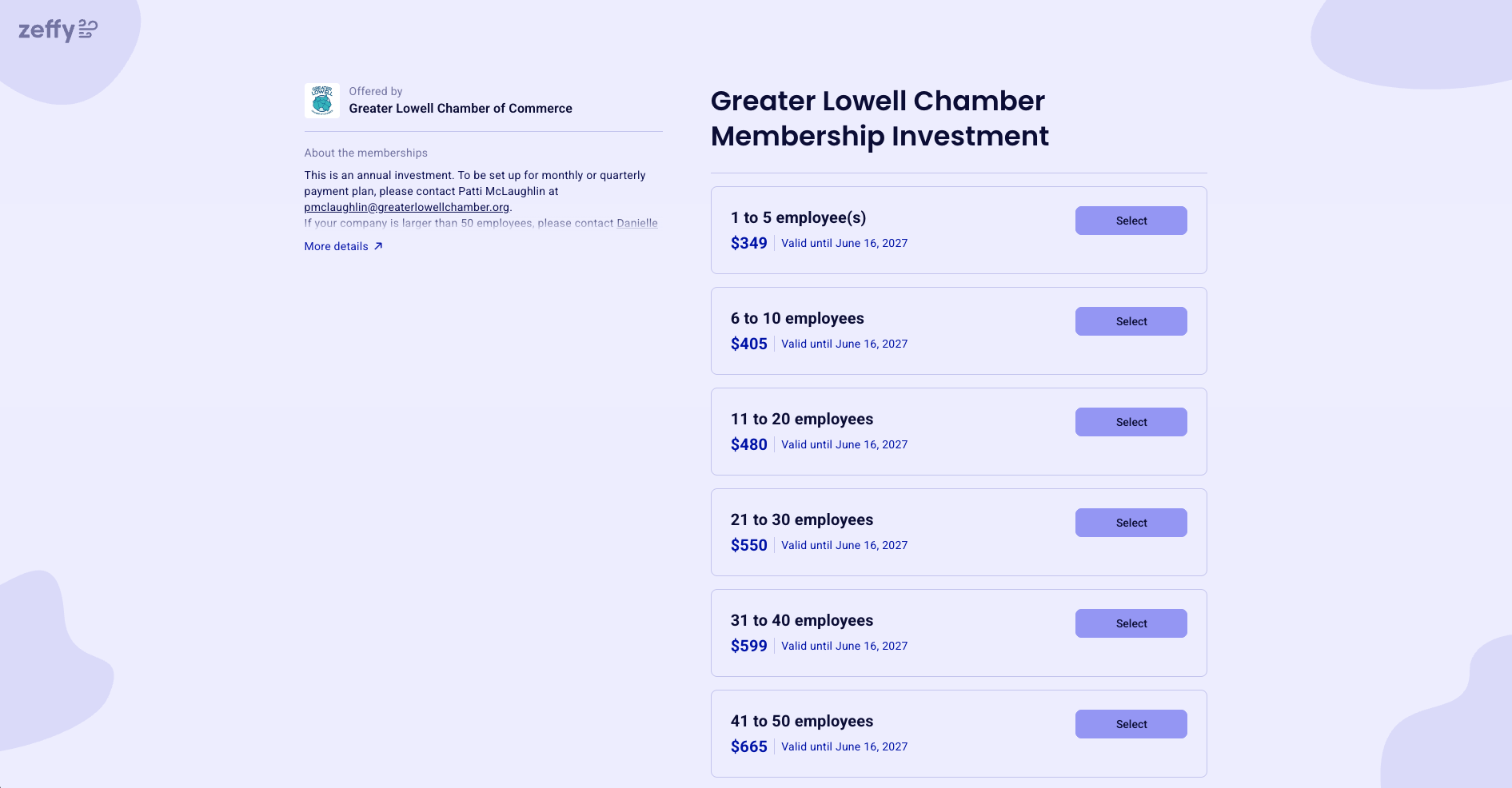
The Greater Lowell Chamber of Commerce uses Zeffy to run its membership program. The Chamber runs its dues collection through Zeffy in one place, with no platform or processing fees taken out of what members pay. The Chamber positions dues as an investment that delivers concrete value to member businesses, and its membership form offers annual, monthly, and quarterly plans so members can join at the cadence that fits their cash flow.
The practical upshot: one form does the sign-up, the payment, and the record creation. Renewal reminders go out automatically. The team is not stitching together a spreadsheet and a separate payment tool every month, which is exactly the consolidation the rest of this article is about.
One free system where the membership form, the dues payment, the renewal reminder, and the member record are the same object. The exact tool matters less than collapsing the patchwork. For most small nonprofits, an all-in-one platform is simpler and cheaper than stitching a form, a spreadsheet, a payment processor, and Gmail together.
Monthly, once you have consolidated. Open the dashboard, look at active members, auto-renewals, memberships expiring in the next 30 days, and recently lapsed members. Fifteen minutes is usually enough. Reviewing a fragmented patchwork weekly will not help; reviewing one consolidated roster monthly will.
Run the Day 0, Day 7, Day 14, Day 30 sequence in the late-payments section above. Automate Day 0. Keep Day 7 personal. Leave the door open at Day 30 with a pause-and-rejoin option.
For accounting purposes, membership dues are typically recognized as revenue tied to the member benefits the organization promises to deliver. Those benefits act as performance obligations that should be documented when recording dues. For a deeper walkthrough, see our complete guide to nonprofit accounting.
Membership dues paid to a 501(c)(3) organization can be tax-deductible donations, provided the transaction is properly documented and accompanied by a valid tax receipt. The deductible portion is typically the amount paid above the fair market value of any member benefits received. Consult your accountant for your specific situation.
Neither is universally better. Annual is steadier for cash flow and retention; monthly is friendlier for members and gives you earlier churn signals. Offer both if you can, and let the member pick.
Best Nonprofit Membership Software (Free + Paid) — Compare Top 14 Options in 2025
Discover the top nonprofit membership software options, including free platforms like Zeffy. Compare prices, features, and find the best fit for your organization in 2025.
Look for people who attend related events, follow relevant Facebook groups, or subscribe to aligned newsletters.These aren’t just potential donors—they’re your future advocates.
Look for people who attend related events, follow relevant Facebook groups, or subscribe to aligned newsletters.These aren’t just potential donors—they’re your future advocates.







.webp)

