We use cookies to improve your experience on our platform. By clicking “Accept all cookies”, you agree to the storing of cookies on your device to enhance site navigation, analyze site usage and assist in our marketing efforts.
Cookies required for basic website functionality.
Cookies used to deliver content most relevant to you and your needs.
Cookies used to deliver content most relevant to you and your needs.
Cookies that help understand the performance of the website, how users interact with it and to identify bugs.
How is Zeffy free?
How is Zeffy free?
Zeffy relies entirely on optional contributions from donors. At the payment confirmation step - we ask donors to leave an optional contribution to Zeffy.
TikTok for Nonprofits: Fundraising Guide + How to Add a Donate Link
April 21, 2026
⚡TL;DR — The Short Answer
Verdict: TikTok is one of the best platforms for nonprofit fundraising — but only if you know which donation path fits your situation. Use Tiltify + Benevity for native donation stickers, and Zeffy for everything else with zero fees.
What works: Bio-link donation pages (Zeffy), TikTok LIVE fundraising with real-time donor acknowledgment, hashtag challenges, and cross-platform amplification of a single donate URL.
What doesn't: Relying solely on TikTok's native donation sticker — eligibility requirements exclude many nonprofits, and LIVE Gifts take a significant cut of every dollar sent.
Best for: Nonprofits of any size looking to reach Gen Z donors and convert TikTok engagement into real revenue, with zero platform fees.
Worth considering if: Your nonprofit isn't yet eligible for TikTok donation stickers — Zeffy's bio-link donation form works immediately, for any org, anywhere.
TikTok is one of the fastest-growing fundraising channels for nonprofits, and Zeffy helps you capture every donation without losing a cent to fees. Whether you're collecting donations through your TikTok bio link or running a full LIVE fundraising event, the right setup makes the difference between engagement and actual revenue. This guide covers every TikTok fundraising path — native donation stickers, LIVE fundraising, bio-link donations, and how Zeffy fits into each one.
Why should nonprofits use TikTok?
A relatively young social media platform, TikTok has over 1.04 billion active users monthly, with a predominantly younger audience.
Gen Z, born between 1997 and 2012, makes up the majority of TikTok's user base, preferring it over other platforms like Instagram. This demographic isn't just comprised of teens; it includes young adults who are politically engaged and eager to drive social change.
With a strong TikTok presence, nonprofits can engage with future supporters and ensure their cause becomes a priority for a new generation.
TikTok benefits your organization in different ways:
TikTok features such as duets, stitches, and live streams let you interact directly with your audience, building a community
Using popular hashtags or creating mission-specific ones can increase your visibility and reach
TikTok's short, easy-to-digest content makes complex issues more accessible to a broader audience
Nonprofits can add donation stickers to videos on TikTok, making it easy for users to donate
In-app editing tools let you quickly record and post videos; no computer is needed
Successful campaigns, like hashtag challenges, can go viral instantly, boosting fundraising
TikTok fundraising fees: what every nonprofit needs to know
Not all TikTok fundraising paths cost the same. Before you build your strategy, it's worth understanding exactly what gets taken out of every dollar your supporters send — because the difference is significant.
Fundraising method
Platform fee
Who receives it
Notes
TikTok LIVE Gifts
A significant portion of each gift
TikTok
Exact split varies; TikTok retains a large share of coin purchases before creators/nonprofits receive anything. See TikTok's official monetization terms
Donation stickers (via Tiltify + Benevity)
$0 from TikTok
N/A
Standard payment processing fees may apply through Tiltify
Bio-link donation page (Zeffy)
$0
N/A
No platform fee, no transaction fee, no credit card fee —
TikTok paid ads
Ad spend only
TikTok
No donation fee; costs are your ad budget
The pattern is clear. LIVE Gifts are powerful for engagement, but a significant share of each gift never reaches your mission. Donation stickers via Tiltify are fee-free from TikTok's side but require eligibility approval. Your bio-link donation page — especially on Zeffy — keeps 100% of every dollar you raise.
That fee gap matters more than it sounds. If your nonprofit raises $5,000 through LIVE Gifts and TikTok retains a large portion, hundreds of dollars that supporters intended for your cause go elsewhere. Over a full year of campaigns, that adds up fast. The smartest TikTok fundraising strategies use each method for what it does best: LIVE Gifts for real-time engagement and visibility, donation stickers where eligible, and a Zeffy bio-link for everything where keeping every dollar counts.
Understanding these fee structures also helps you communicate honestly with your donors. When you tell supporters that donations through your Zeffy link reach your mission with zero fees taken out, that's a real differentiator — and donors notice.
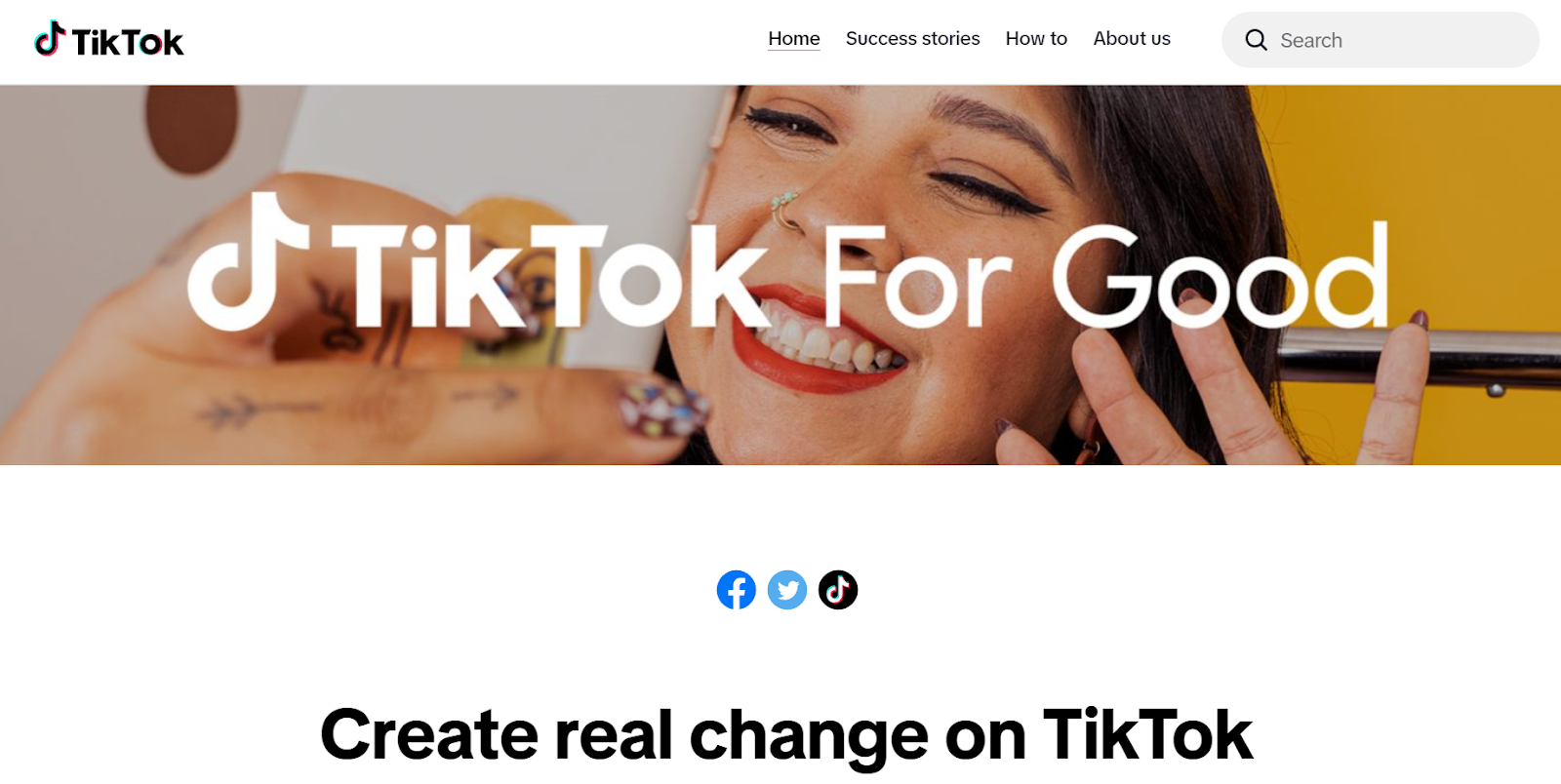
TikTok for Good is the platform's program for nonprofit organizations and charities to engage with users. It helps grow your audience, raise awareness, and activate supporters with three unique features:
Account management: TikTok helps out with best practices and handles your user relationships. It offers guidance every step of the way until you reach your goals
Advanced analytics: TikTok offers your nonprofit insights about your account and videos, shedding light on how your audience interacts with your content and how your account grows over time
Promoted hashtags: TikTok promotes the hashtag related to your specific cause to users, who can then post videos using your hashtag
Examples of nonprofits using TikTok for Good
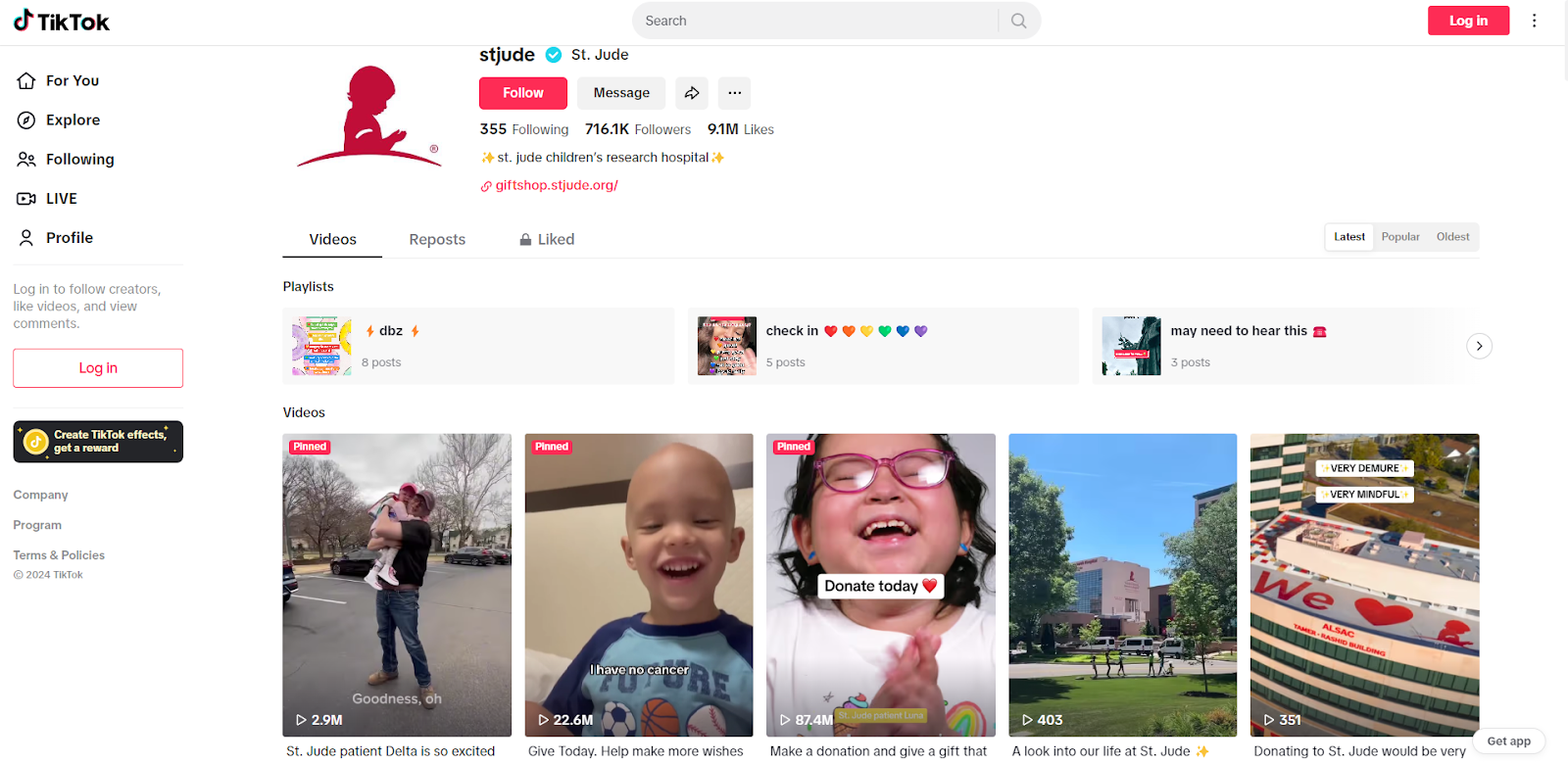
1. St. Jude's Children's Research Hospital (716.1K Followers)
With endless content on St. Jude's TikTok, the nonprofit mostly uses its channel for storytelling. The research hospital shines a light on cancer survivors, provides behind-the-scenes glimpses of what happens at the hospital, and brings in its supporters and partners to talk about their cause.
Their content is tailored to the platform, featuring strong hooks to attract audiences and relatable material. The team often uses captions on videos to make its content more accessible.
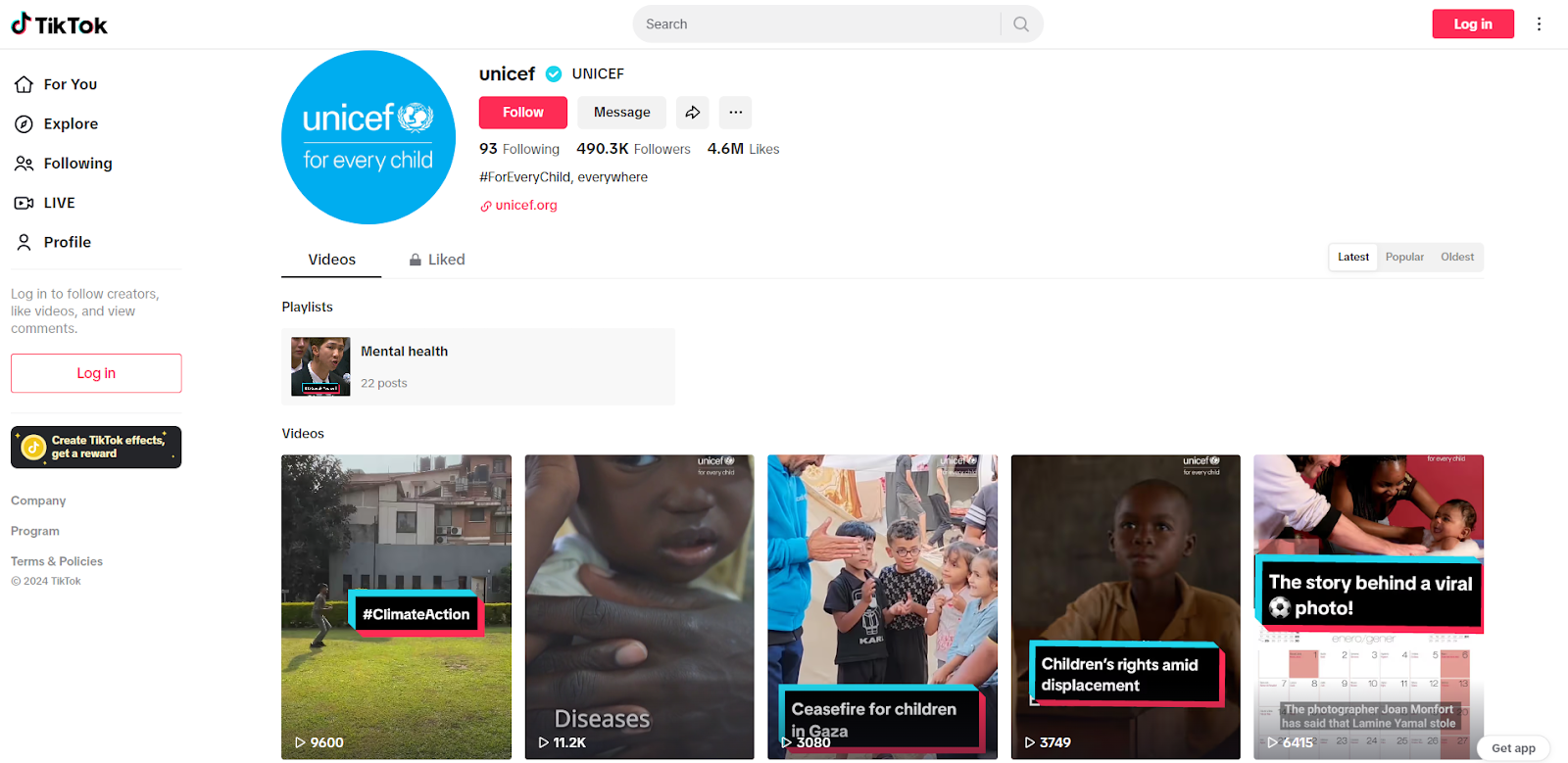
UNICEF's impactful TikTok presence features collaborations with major influencers alongside authentic stories from team members and beneficiaries. The organization has also worked with celebrities like Millie Bobby Brown to raise awareness about its cause.
The organization effectively uses TikTok's donation tools and hashtag campaigns while focusing on positive, human-centered content. UNICEF's TikTok content highlights human resilience, focusing on uplifting stories and showcasing humanity in diverse situations.
ASPCA is dedicated to ending animal cruelty. Their content strategy, as such, is pretty straightforward: focusing on lots and lots of cute little furry friends.
On TikTok, they showcase the journeys of pets from shelters to loving homes, highlighting successful adoptions. Through targeted hashtag campaigns, ASPCA also promotes adoption and fundraising. Their content aims to forge an emotional connection to their animal rescue efforts, emphasizing the value of adopting pets rather than buying them.
How to set up your nonprofit TikTok account?
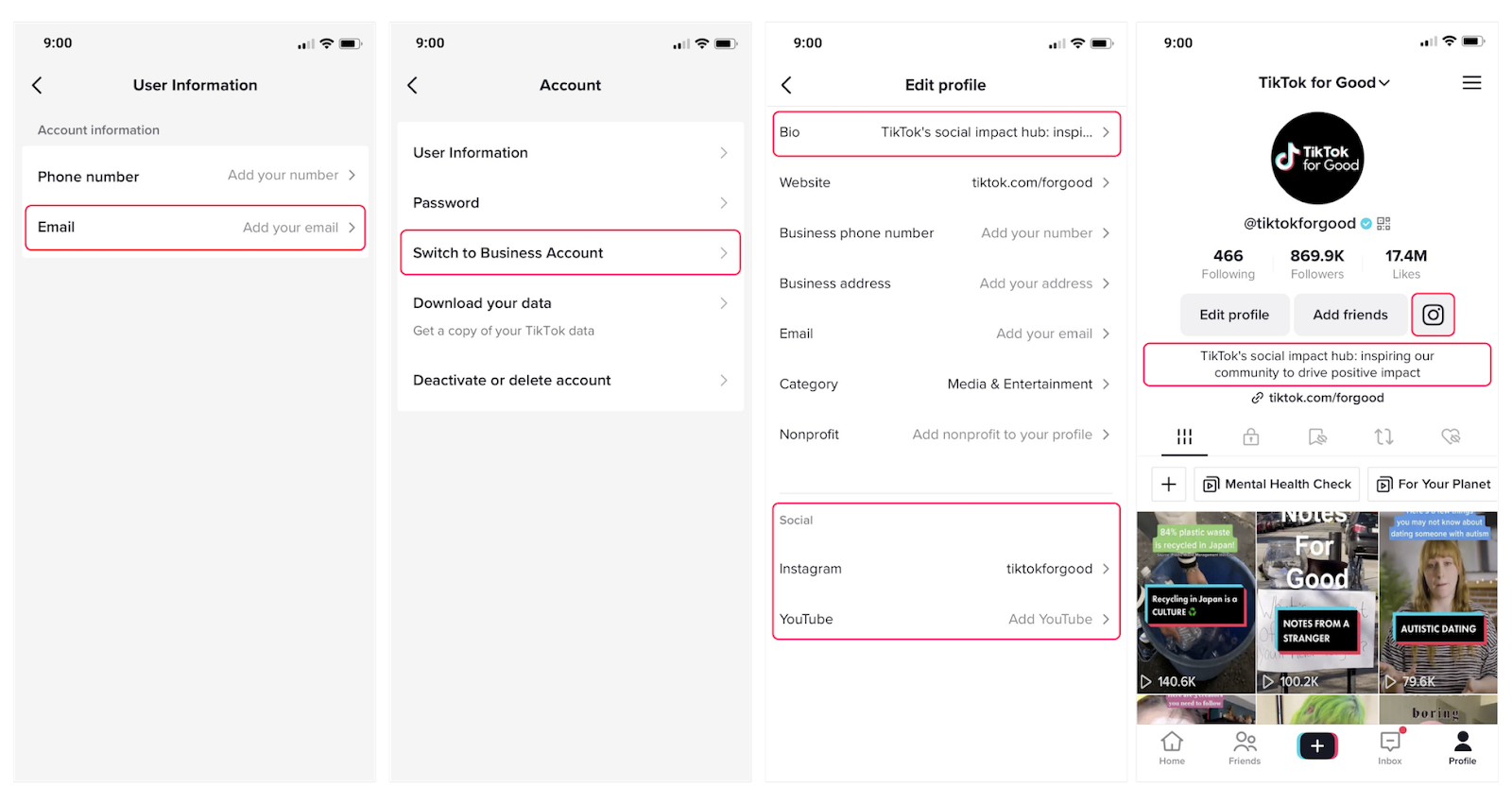
Set up your nonprofit TikTok account
1. Download TikTok for free from the Google Play Store (for Android users) or Apple Store (for iOS users)
2. Open the app and sign up using an email address, phone number, or a social media account (like Facebook)
3. Choose a username reflecting your nonprofit's mission
4. Set up your profile by adding a high-quality image of your nonprofit organization. Write a short and engaging bio that highlights your mission
5. Make it business official to unlock exclusive features. Click on settings, select "Manage Account," and then switch to "Business Account."
How do nonprofits raise money on TikTok?
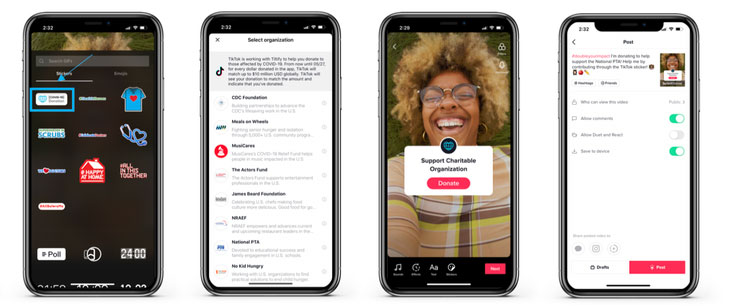
1. Donation stickers
Donation stickers are clickable icons embedded in videos that help you raise money. When clicked, they take users straight to the donation form, where they can make a donation to your nonprofit.
Powered by Tiltify, the process is simple and secure, and donors do not need to leave the TikTok app.
Currently, donation stickers are only available to select nonprofits that meet TikTok's eligibility criteria. While TikTok plans to expand this feature, organizations should check their eligibility on the platform. Even without immediate access, building a strong TikTok presence can position your nonprofit for future fundraising opportunities on the platform.
If your nonprofit does not yet have access to donation stickers, focus on increasing your followers and engagement. Building a strong presence will put you on the TikTok radar and improve your chances of gaining access to this feature in the future.
How to set up TikTok donation stickers via Tiltify + Benevity
To enable native donation stickers on TikTok, you need accounts on both Tiltify and Benevity. Here's the setup process:
1. Create a Tiltify account and register your nonprofit. Tiltify is TikTok's official fundraising partner for donation stickers.
2. Register your organization on Benevity Causes. Benevity is the charity vetting and payment processing layer TikTok requires before enabling stickers.
3. Once your Benevity profile is approved and linked to your Tiltify account, connect Tiltify to your TikTok account through TikTok's in-app settings under Creator Tools.
4. Create a fundraising campaign inside Tiltify. This campaign generates the donation destination that appears when someone taps your sticker.
5. Add the donation sticker to your TikTok videos by tapping the sticker icon during video creation and selecting the fundraiser you set up.
The process takes a few days to a few weeks depending on Benevity's approval timeline. If your organization is international or newly registered, eligibility may be limited — which is exactly where your Zeffy bio-link fills the gap in the meantime.
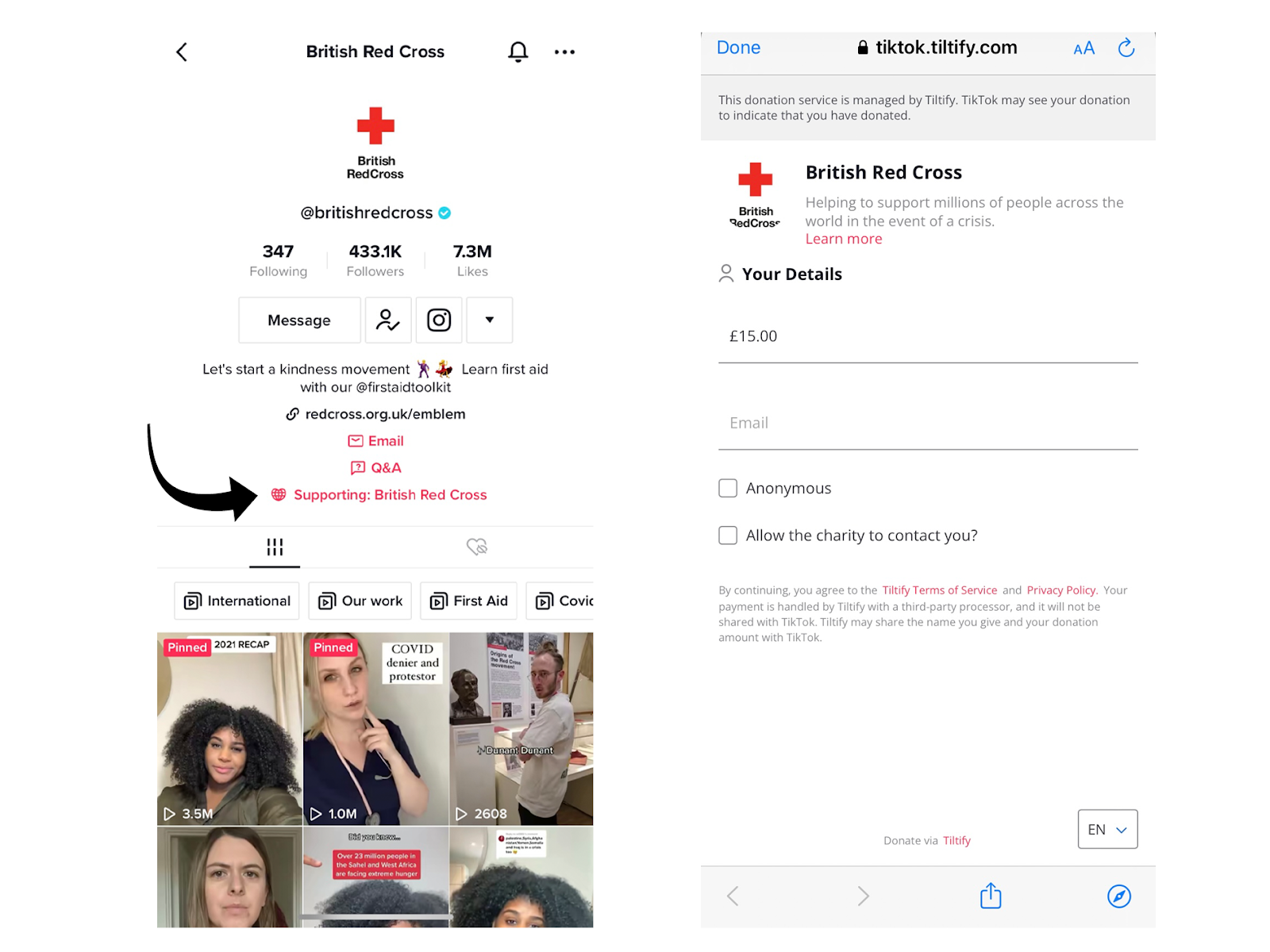
2. Adding a nonprofit profile
TikTok lets you collect donations for your nonprofit directly from your profile. Under the bio and follow button, TikTok users can add a link to an organization they want to support. All TikTok users, including official nonprofit accounts, can use this feature.
Some charities, like the Red Cross, have added donation buttons to their profiles as it makes it easier for them to encourage donations for their cause. For nonprofits that want zero-fee donations through their bio link, a Zeffy donation form is the strongest option — no platform fee, no transaction fee, and works for any org regardless of TikTok sticker eligibility.
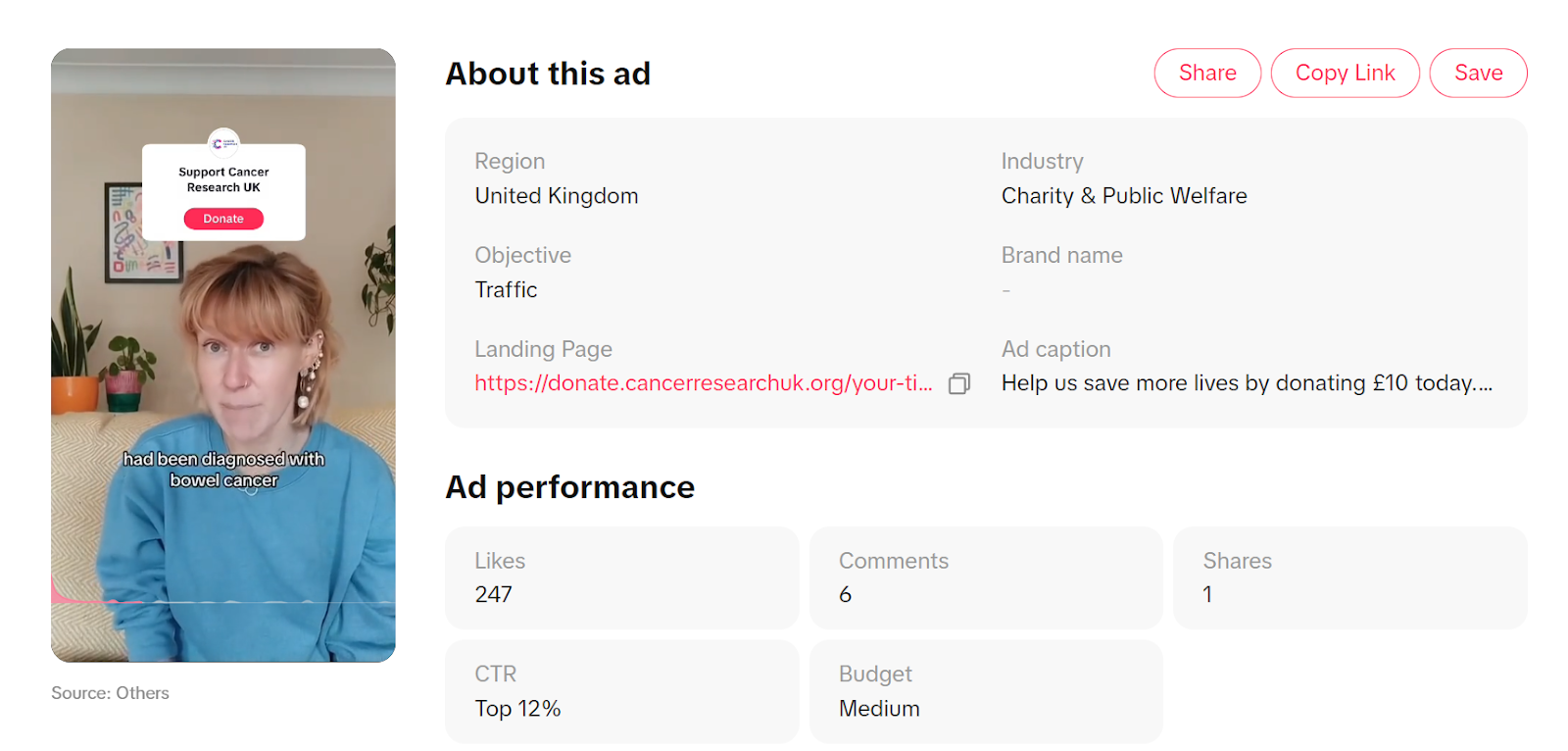
3. Run paid ad campaigns
Besides organic content, TikTok offers paid advertising campaigns. Some notable charities, such as Cancer Research UK, the British Red Cross, and the WWF, are already running ads there.
TikTok ads work on an auction model, where users specify a bid and daily spend limit. The ads are available in many formats. They appear between organic and user-generated content with a "sponsored tag" and a "call-to-action" button that takes viewers to a landing page.
You can create ads to target specific audience demographics and achieve various advertising goals. For instance, using conversion objectives enables you to capture donations as part of a cash appeal, while lead generation goals help drive conversions and gather potential supporter information.
How Zeffy works with TikTok
Thousands of nonprofits ask the same question: "How does Zeffy actually work with TikTok?" The answer is simple, and it's the reason this combination converts so well.
You create one Zeffy donation form. You paste that URL into your TikTok bio. Every supporter who visits your profile and wants to donate taps that link, completes their donation on your Zeffy form, and 100% of what they give goes directly to your mission. No platform fee. No transaction fee. No credit card fee. That's it.
Zeffy doesn't offer a native TikTok integration or a donation sticker replacement — and it doesn't need to. TikTok doesn't allow clickable links inside video captions anyway. The bio link is the only consistent, reliable place to send TikTok traffic to a donation page. And since you can only have one link there, it needs to be a link that keeps every dollar you raise. Zeffy's donation forms are free to create, free to run, and accept recurring donations, one-time gifts, and event ticket purchases — all from a single URL.
This approach works particularly well for nonprofits that aren't yet eligible for TikTok's native donation stickers. International organizations, newly registered nonprofits, and smaller orgs still building their Benevity and Tiltify profiles can all use a Zeffy bio link immediately, from day one. You don't need approval. You don't need a minimum follower count. You just need a free Zeffy account.
The Zeffy link also travels well beyond TikTok. Pin it in a comment on any cross-posted video. Add it to your Linktree alongside your other social links. Drop it in video captions when you repurpose TikTok content to Instagram Reels or YouTube Shorts. One URL becomes your universal donate button across every platform where your content lives. Over 100,000 nonprofits have raised more than $2 billion through Zeffy — with $0 in fees taken out.
Tiltify + Benevity vs. Zeffy: which do you actually need?
Short answer: probably both, for different reasons. These tools aren't competitors — they work at different layers of your TikTok fundraising stack. Here's how to think about each one.
Tiltify and Benevity are required middleware for TikTok's native donation sticker. TikTok built its in-app donation feature on top of this infrastructure. If you want a sticker on your videos that lets donors give without leaving the app, Tiltify + Benevity is the only path. There's no workaround. Zeffy doesn't replace this functionality because TikTok's sticker system is a closed integration.
Zeffy is your general-purpose zero-fee donation platform for every other fundraising channel — including your TikTok bio link, your cross-posted content on Instagram and YouTube, your email campaigns, and your website. It also handles recurring donations, event ticketing, peer-to-peer fundraising, and more. If you're not eligible for TikTok stickers yet, Zeffy covers you immediately.
Feature
Tiltify + Benevity
Zeffy
Required for TikTok donation sticker
Yes
No
Works as TikTok bio-link donation page
No
Yes
Platform fees
Varies by payment processor
$0
Transaction fees
Standard processing may apply
$0
Eligibility required
Yes (Benevity approval needed)
No
Works for international nonprofits
Limited
Yes
Recurring donations
Limited
Yes
Event ticketing
No
Yes
Works across Instagram, YouTube, email
No
Yes
Setup time
Days to weeks
Under 10 minutes
The honest recommendation: if you're eligible and approved, use Tiltify + Benevity for your TikTok donation sticker. Use Zeffy for your bio link and every other donation channel. If you're not yet eligible for stickers, start with Zeffy now and pursue Tiltify + Benevity eligibility in parallel. You don't have to choose — they solve different problems.
One thing worth noting: some nonprofits assume that because they have a donation sticker on their videos, they don't need a bio-link donation page. That's a mistake. Not every viewer taps a sticker in the moment. Many watch, feel inspired, and then visit your profile later to find a way to give. If your bio link takes them somewhere fee-free and fast, you convert that delayed interest into a donation.
TikTok LIVE fundraising strategies for nonprofits
TikTok LIVE is one of the most powerful fundraising tools on the platform — and one of the most underused by nonprofits. Going live creates urgency, builds real relationships with your audience, and gives donors a reason to act right now rather than scrolling past. But a successful LIVE fundraiser doesn't happen by accident. It takes a clear structure and a follow-up plan.
Before your LIVE: promotion and preparation
Give your LIVE at least a week of runway. Post teaser videos explaining what you'll be doing and why it matters. Share the date and time in your bio and pin it in a comment on your most recent posts. Cross-promote on Instagram Stories, YouTube community posts, and your email list. The more supporters who know it's coming, the more who'll show up.
Set a specific, visible fundraising goal before you go live. A clear number creates urgency and gives donors a shared target to rally around. Choose a goal that feels achievable but meaningful — something your audience can visualize in terms of real impact ("$2,000 feeds 400 families this month").
Decide in advance how you'll handle donor acknowledgment during the stream. Name-checking live donors by username is one of the most effective ways to encourage others to give. It makes giving feel social and rewarding, not anonymous.
During your LIVE: structure that converts
Open with a 60-second hook. Tell viewers exactly what the fundraiser is for, what their donation will do, and how long the stream runs. Don't assume people tuning in mid-stream know the context — repeat the goal and mission every 10 to 15 minutes for late arrivals.
Move into your main content: behind-the-scenes footage, beneficiary stories, staff interviews, or a live demonstration of your work. Keep it authentic. TikTok audiences respond to genuine moments, not polished presentations.
Acknowledge donors by name the moment they give. Thank them publicly, tell them what their gift means, and invite others to join them. This real-time social proof is the single biggest driver of mid-stream donations. End with a strong closing CTA — remind viewers where they can donate after the stream ends, and direct them to your bio link.
After your LIVE: convert momentum into recurring giving
The LIVE ends, but the opportunity doesn't. Clip the most impactful moments from your stream and post them to your regular feed within 24 hours. The emotional highlights, the donor acknowledgments, the impact moments — these work as standalone content and bring new viewers into the story.
Send a follow-up email to everyone who donated during the LIVE. Thank them, show them the total you raised together, and invite them to become recurring donors via your Zeffy donation form. A one-time LIVE donor who converts to a monthly $10 gift is worth far more to your mission than a single event donation. Zeffy's recurring donation forms make this conversion straightforward — one link, one click, and a supporter becomes a sustaining partner.
For cadence: nonprofits with smaller followings (under 10K) tend to see the strongest results with one LIVE per month, giving each event enough lead time to build anticipation. Larger accounts with engaged communities can sustain weekly LIVEs, especially during campaign periods or around Giving Tuesday.
Off-platform amplification: turning TikTok views into donations
TikTok video captions don't support clickable links. That's a real limitation — but it's also why having the right bio link matters so much. Your Zeffy donation URL in your bio is the single destination every piece of TikTok content points toward. Make it count by amplifying that link everywhere else your content appears.
When you repurpose a TikTok video to Instagram Reels, add your Zeffy link directly in the caption. Instagram does allow clickable links in captions for business accounts. When you cross-post to YouTube Shorts, drop the link in the video description. When you embed TikTok content in your newsletter, add a "Donate here" button that links to your Zeffy form. One URL, multiple channels, zero friction for donors.
This cross-platform approach has a compounding effect. A supporter might first see your content on TikTok, not donate in the moment, then see the same video on Instagram with a clickable link and give there. Or they see a TikTok clip shared on Twitter, click through to your profile, and then tap your bio link. Each platform becomes a different entry point to the same donation destination.
Linktree and similar bio-link tools can help if you want to surface multiple links from a single TikTok bio URL. Put your Zeffy donation form as the first and most prominent option — above your website, above your newsletter signup, above everything else. Donations are the goal; everything else is secondary.
For influencer campaigns, this same logic applies. When you work with a creator like MrBeast or a niche micro-influencer, give them your Zeffy link to share in their own bio and captions on other platforms. The Ocean Cleanup's #TeamSeas campaign with MrBeast and Mark Rober used cross-platform amplification at scale to raise awareness and direct supporters to donate — the same principle works at any budget level.
7 proven tips for using TikTok to maximize your nonprofit's impact
1. Jump on the TikTok trends
An easy way to get more eyes on your nonprofit is to find what's trending and join in.
Keep an eye out for popular themes, dances, songs, filters, and hashtags, and adapt your content to align with these trends. You can discover current trends by tapping the search icon at the top right corner of your home feed.
Browse TikTok like one of your supporters might to see what content ideas pop up.
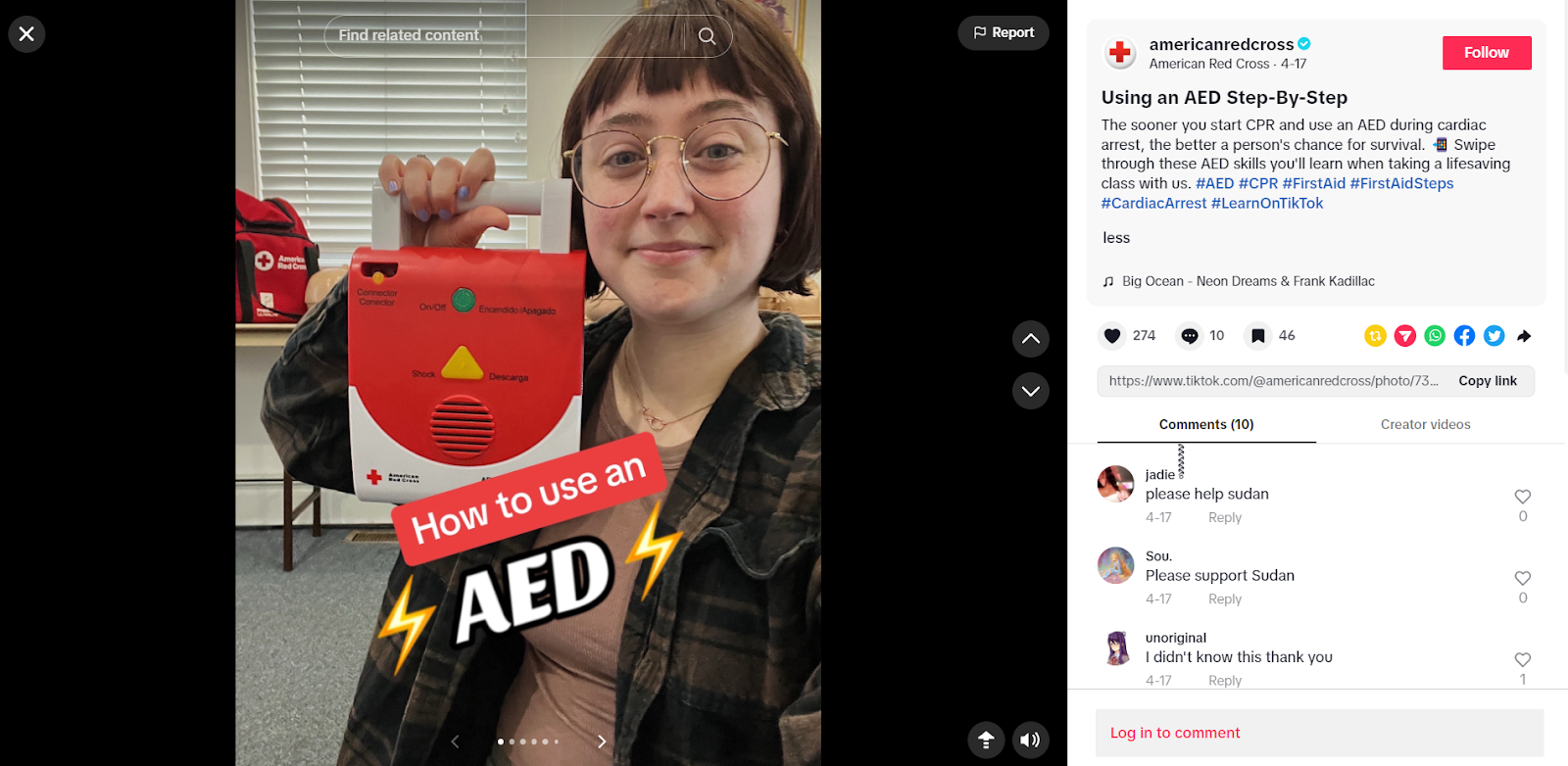
The #LearnOnTikTok hashtag is one of the most popular and widely used, with over 855.4B views and counting. The Red Cross leverages this hashtag on most of its informational videos to secure more visibility for its content.
2. Take part in hashtag challenges
TikTok challenges let your nonprofit engage supporters to act for your mission. Create challenges with clear, simple goals and relevant hashtags to maximize impact.
A good example is the #keepthebeat challenge by the American Heart Association, in which participants made videos set to the "Keep the Beat" tune and helped raise funds. By adding text-to-give info, the nonprofit made it easy for supporters to donate.
This approach not only helped to raise support but also translated to enhanced engagement and reach on TikTok.
3. The more posts, the better
This may sound tough, but with over a billion videos watched on TikTok every day, you need to post often to stand out. Most experts say brands should aim to post one to four times per day to maximize awareness and build a following.
While it can seem challenging for busy nonprofits, reusing content offers a great solution. If your social media or website content is under three minutes long, it can be adapted for TikTok.
To keep posting regularly, you can pre-record videos and schedule them in advance using tools like Later.
TED Talk uses compelling clips from its longer talks to share practical tips — repurposing existing content into short, high-performing TikTok videos.
Some of the different types of content that you can repurpose include:
YouTube videos: Choose the most value-packed clip and reformat it into a vertical video format with off-app tools such as CapCut
Interviews and podcasts: Create a video to highlight the most quotable and interesting moments
Articles and commentary: Recap the main points of your blog or offer commentary on research with the Green Screen feature
4. Educational content is key
Nonprofits can use TikTok's visual appeal to create compelling, educational content that connects with their audience. These can include eye-opening stats, mission-related facts, or tutorials about their cause.
The NRDC, for example, works to protect wildlife, fight climate change, and advocate for public health and equality. To communicate this message, they share short explainer videos on environmental terms, current events, and more.
By presenting information in bite-sized formats on TikTok, you can explain complex topics in easily digestible content, fostering a more informed supporter base.
5. Use TikTok live
Just like the Facebook Live feature, TikTok Live allows you to go live and interact with your followers in real-time, helping you to create a more personal and transparent relationship with your audience. This authenticity leads to greater trust, deeper engagement, and more support for your cause.
Some of the ideas to give a try when you decide to go live include:
Host interactive Q&A sessions, addressing audience queries directly and fostering a sense of community
Showcase the human side of your nonprofit through behind-the-scenes tours and staff interviews
Provide live updates on project progress, demonstrating the tangible impact of donations
Share beneficiary stories in real-time, creating emotional connections with viewers
Conduct live fundraising events, leveraging the immediacy of the platform to drive donations
Every social media platform has influencers, and TikTok is no different. Reach out to influencers who are interested in your mission or have a personal connection with your cause.
Note that you don't have to work with influencers with over a million followers. Even those with a couple of thousand followers are great for raising awareness for your cause. If they have a passion for your mission, there's a good chance their followers will, too — introducing you to a whole new pool of genuine supporters.
For instance, check out the nonprofit organization The Ocean Cleanup. In collaboration with popular YouTubers MrBeast and Mark Rober, the organization launched the #TeamSeas campaign on TikTok. It encouraged users to create videos about ocean pollution and donate to the cause, with the goal of removing 30 million pounds of trash from oceans and rivers.
7. Engage with your audience
Social media platforms are one of the many ways to engage with your audience. On TikTok, engage with your followers by responding to comments on posts, sharing the content posted by partners, and tagging volunteers or donors in your videos.
The American Red Cross, a notable nonprofit humanitarian organization, replies to users with a video. If you look at the comments section under any of the organization's TikTok videos, there's more than likely a video response from their social media team to followers' questions.
Final thoughts on creating a positive impact through TikTok
If your nonprofit organization is not yet on TikTok, now is the perfect time to build your presence. With its huge reach and active community, TikTok is a great way to showcase your mission to potential donors, volunteers, and people who may need your help.
To make the most of TikTok, share impact stories and educational content and focus on current trends and challenges. Remember to collaborate with influencers and use the TikTok for Good initiative. Take your best content from other social media and give it a TikTok twist using trending sounds and hashtags to stand out.
Use Zeffy to turn your engagement into donations. Create a free donation form, paste the URL in your TikTok bio, and keep every dollar your supporters send — no platform fees, no transaction fees, no credit card fees. Zeffy is 100% free for nonprofits, so your mission keeps what it earns.
For LIVE fundraising, pair TikTok's real-time energy with a post-event Zeffy follow-up to convert one-time donors into recurring givers. For everything beyond TikTok's native sticker system, one Zeffy URL does the job across every channel where your content lives.
It depends on the donation method. For TikTok LIVE Gifts, TikTok retains a significant portion of each gift before any amount reaches the nonprofit — see TikTok's official monetization terms for current rates. For donation stickers powered by Tiltify and Benevity, TikTok takes nothing — though standard payment processing fees may apply through Tiltify. For bio-link donations through Zeffy, there are zero fees of any kind. No platform fee, no transaction fee, no credit card fee.
To enable TikTok donation stickers, you need to complete two steps. First, sign up for Tiltify and register your organization as an approved charity. Second, register and maintain an up-to-date charity profile on Benevity Causes. Once Benevity approves your profile and it's linked through Tiltify, you can connect the integration to your TikTok account and add donation stickers to your videos. The approval timeline varies from a few days to a few weeks. If you're not yet eligible — or if you're an international or newly registered nonprofit — a Zeffy bio-link donation form works immediately with no eligibility requirements.
Donation stickers appear directly on your TikTok videos and let viewers donate without leaving the app. They require Tiltify + Benevity setup and TikTok eligibility approval. A bio-link donation page (like a Zeffy form) lives in your profile bio and is accessible to anyone who visits your page. There are no eligibility requirements, no approval process, and with Zeffy, no fees. Both methods serve different moments in the donor journey — stickers capture in-the-moment impulse, bio links capture considered donors who seek you out.
Not for native donation stickers. TikTok's sticker system is built on Tiltify + Benevity infrastructure, and there's no alternative path to enabling in-app stickers. Zeffy replaces everything else — bio-link donations, cross-platform donation pages, recurring giving, event ticketing, and any fundraising that happens outside TikTok's native sticker feature. The two tools serve different layers of your fundraising stack and work best together.
The most effective content types include beneficiary stories (showing real human or animal impact), behind-the-scenes footage, educational explainers on your cause, participation in trending hashtag challenges, and LIVE fundraising events. Repurposing existing YouTube, podcast, or blog content into short vertical videos is also a high-ROI tactic for nonprofits with limited production time.
Most social media experts recommend one to four posts per day for maximum algorithmic reach, but even one to three posts per week will build momentum over time. Consistency matters more than volume. Scheduling tools like Later let you pre-record and queue videos so posting stays manageable for small teams.
Facebook for Nonprofits: Complete Guide to Tools, Setup, and Best Practices (2026)
Explore the benefits of using Facebook for nonprofits, top fundraising tools, and best practices. Learn how to master social media to get more supporters.
Social Media For Nonprofits: Benefits & Best Practices
Social media can boost your nonprofit’s impact, and here’s how. Check this guide for social media best practices and tools to grow your online presence and reach more donors.
Look for people who attend related events, follow relevant Facebook groups, or subscribe to aligned newsletters.These aren’t just potential donors—they’re your future advocates.
Look for people who attend related events, follow relevant Facebook groups, or subscribe to aligned newsletters.These aren’t just potential donors—they’re your future advocates.





.webp)

