We use cookies to improve your experience on our platform. By clicking “Accept all cookies”, you agree to the storing of cookies on your device to enhance site navigation, analyze site usage and assist in our marketing efforts.
Cookies required for basic website functionality.
Cookies used to deliver content most relevant to you and your needs.
Cookies used to deliver content most relevant to you and your needs.
Cookies that help understand the performance of the website, how users interact with it and to identify bugs.
How is Zeffy free?
How is Zeffy free?
Zeffy relies entirely on optional contributions from donors. At the payment confirmation step - we ask donors to leave an optional contribution to Zeffy.
Automate your Zeffy-to-QuickBooks workflow with Zapier
July 1, 2026
You have reconciled your Zeffy payouts manually. Perhaps you even built a pivot-table system that works. But what happens when your trustees ask for a QuickBooks integration that runs itself? In this guide, I walk through how we automated our Zeffy-to-QuickBooks workflow using Zapier, transforming a 30-minute monthly process into a fully automated system that creates sales receipts and donation entries in real time. No manual exports, no pivot tables: just clean bookkeeping that happens while you sleep.
In a previous webinar, I shared the manual reconciliation process we use to break down Zeffy payouts into chart-of-accounts-ready bookkeeping. That system works. It is reliable, repeatable, and takes about 20 to 30 minutes per month.
But here is the thing: once you have built a system that works manually, you have already done the hard part. You understand your data structure. You know your edge cases. You have mapped your chart of accounts.
At that point, automation is not about solving a problem. It is about reclaiming time.
"Once we had the manual process nailed down, the automation became obvious. We weren't trying to fix something broken. We were just removing ourselves from a process that didn't need us anymore.", David Ducharme
Two transaction types, two workflows
The first thing to understand about automating Zeffy transactions is that donations and sales are fundamentally different from an accounting perspective.
Donations are straightforward:
Campaign donation amount
Optional additional donation amount
Both map to revenue accounts and fund classifications
A note on Gift Aid: if your charity is HMRC-recognised and the donor has given a valid Gift Aid declaration, every £1 donated becomes £1.25 to your charity when you reclaim from HMRC (Gift Aid: donating to charity, gov.uk). Decide upfront whether your Zapier workflow posts the Gift Aid receivable at the point of donation, or whether you reconcile HMRC's batched payment against QuickBooks separately when it lands. Both approaches are defensible: the first gives you a truer month-end position, the second is simpler to build.
Sales forms are more complex:
Line-item bookkeeping (individual products sold)
Each product maps to a QuickBooks item
Each transaction may include multiple items
Proper class assignments for restricted funds
UK charities are not automatically VAT-exempt. Trading income such as merchandise, some event tickets, and auction lots above fair value may be within scope of VAT depending on your charity's registration status and the specific reliefs that apply. This is not a Zapier or Zeffy question: ask your accountant which VAT code each item should carry, then encode that once in the lookup table. For technical guidance see the Charity Tax Group.
Because of these structural differences, we run separate automation workflows for donations and sales. This keeps the logic clean and prevents one transaction type from breaking the other.
Architecture: lookup tables vs duplication
When building automations, you face a fundamental design choice: centralised lookup tables or duplicated workflows.
We use both, strategically.
For sales: use lookup tables
Our sales automation uses lookup tables to:
Match Zeffy products to QuickBooks product/service items
Add a VAT code column to the lookup table so each Zeffy product carries the VAT treatment your accountant has already decided on. Encode it once, not every time a fundraising event comes round.
Lookup tables centralise the logic. When we add a new product to Zeffy, we add one row to the lookup table, and the automation handles it automatically. No need to duplicate or modify the workflow itself.
The trade-off: lookup tables require maintenance. If your product catalogue changes frequently, you are updating a spreadsheet. But for us, the centralisation is worth it. One place to manage product mappings means fewer places for things to break.
For donations: duplicate the workflow
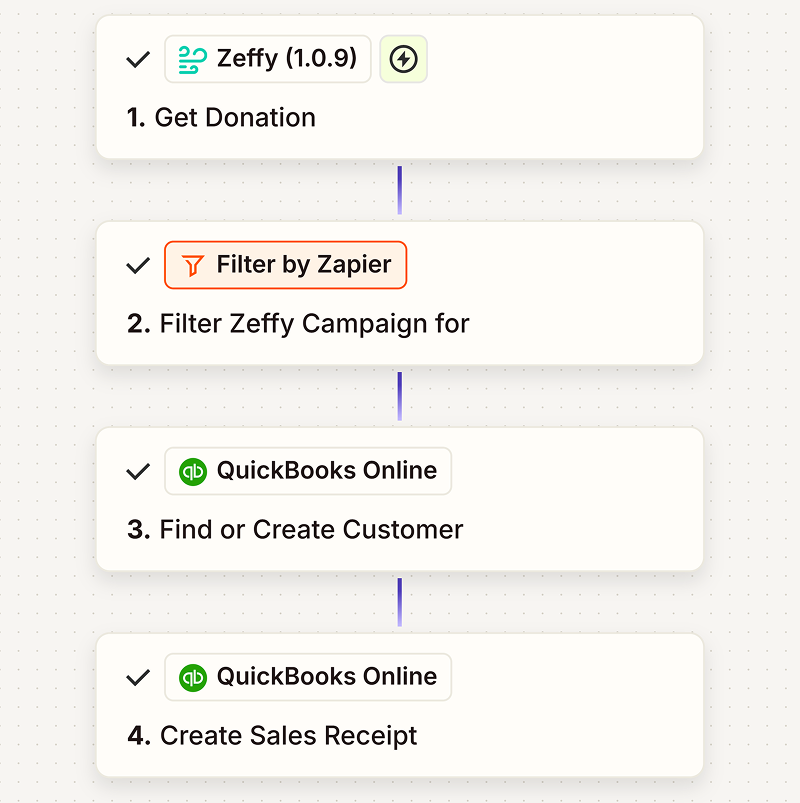
For donations, we take the opposite approach. Instead of lookup tables, we duplicate a clean base automation and adjust:
The campaign filter
The QuickBooks class assignment
The associated product code
Why duplication over lookups? Isolation. If one donation workflow breaks, it does not affect the others. Each campaign runs independently, which makes troubleshooting easier and reduces the risk of cascading failures.
Route sales transactions through gates
Our sales workflows begin with entrance 'gates': filters based on campaign keywords that route each transaction to the correct class restriction.
Here is how it breaks down:
Campaign-based routing:
Branch: London → London branch class
Branch: Manchester → Manchester branch class
Branch: Edinburgh → Edinburgh branch class
Restricted: Building Fund → Building Fund restricted class
In UK SORP terms these classes typically map to restricted vs unrestricted funds. Mirror whatever fund structure your Trustees' Annual Report already uses.
Everything else splits into one of two categories:
Default merchandise, or
Auction
We separate auction items from regular merchandise because the QuickBooks fallback differs. If a product lookup fails (perhaps someone added a new item in Zeffy but forgot to update the lookup table), we still want the transaction to post to the correct revenue category.
For regular merchandise, the fallback is general merchandise revenue. For auctions, it is auction revenue. That way, even when something breaks, it breaks predictably, and your chart of accounts stays clean.
Handle edge cases deliberately
Manual reconciliation teaches you where the edge cases live. Automation forces you to decide how to handle them systematically.
Here are the scenarios we account for:
Multiple items in one transaction: sales forms allow multiple items per checkout. Our automation loops through line items and creates individual QuickBooks entries for each, all tied to the same sales receipt.
Additional donations at checkout: when someone buys a t-shirt and adds a £10 donation, we split that into two QuickBooks line items, one for merchandise and one for the donation, with proper class assignments for each.
Auction winning bids: the item amount (starting price) and total paid (winning bid) differ. Our lookup table uses the total paid field to ensure the correct revenue amount posts. Note for UK charities: auction lots at fair value do not carry Gift Aid. Only any amount paid above the item's fair value can be treated as a donation, and only where the donor is a UK taxpayer who has given a valid declaration. Encode the fair-value split in your finance policy rather than in Zapier logic.
Raffle and lottery ticket income: route small society lottery ticket sales to their own revenue account (for example, 'Small society lottery income'). Do not mark raffle income as Gift Aid eligible: a raffle ticket is a chance to win, not a gift, and Gift Aid does not apply (Gambling Commission: licences for small society lotteries). Keep the numbers clean so your annual return to the local licensing authority reconciles without a rebuild.
Failed lookups: if a Zeffy product does not match the lookup table, the automation logs the transaction and posts it to a default revenue account. You receive an alert, fix the lookup table, and move on. Nothing breaks, and nothing goes unrecorded.
Refunds: refunds create negative amounts in Zeffy's payout reports. Our automation detects negative amounts and creates corresponding credit entries in QuickBooks, preserving audit trails without manual intervention.
Lessons from building this
Start with manual. If you cannot reconcile it by hand, you cannot automate it. Build the process first, understand your edge cases, then automate.
Design for failure. Automations break. Build yours so that when something fails, it fails in a way you can diagnose quickly, and ideally in a way that does not corrupt your books.
Centralise or isolate: pick one per workflow. Lookup tables work well for product catalogues. Workflow duplication works well for campaign-specific logic. Mixing both in the same automation creates confusion.
Test with real data. Sandbox environments are useful, but your automation will not be production-ready until you have run it against actual transactions with actual edge cases.
Document your logic. Six months from now, you will not remember why you routed auction items differently. Write it down. Future you will thank present you.
Example Zeffy donation form used by a US alumni association; the same structure works for a UK registered charity's unrestricted appeal.
What this means for your charity
If you are currently reconciling Zeffy payouts manually, you are not doing anything wrong. Manual processes work. They are transparent, auditable, and reliable.
But if you are spending 20 to 30 minutes every month on reconciliation, and you have already mapped your chart of accounts, identified your edge cases, and built a repeatable process, automation is not a leap. It is the next logical step.
You are not replacing your bookkeeping knowledge. You are removing yourself from the routine execution of that knowledge.
And for many UK charity treasurers, that matters a great deal. The treasurer is often a trustee volunteer who holds the role alongside a full-time job, doing month-end after 9pm. Every 30 minutes reclaimed each month is 30 minutes that goes back into fundraising planning, Gift Aid submission chasing, or preparing the Trustees' Annual Report. Automation does not replace that work. It creates space for it.
David Ducharme serves as treasurer for the Milton Hershey School Alumni Association (a US alumni charity) and owns an investment management and financial planning firm. The workflow he describes is user-built in Zapier and is not a Zeffy product or service. UK charities can adapt the same approach for their own chart of accounts. Zeffy is 100% free for charities: no platform fees, no transaction fees, no monthly subscriptions.
Get weekly fundraising tips from nonprofits experts
Thank you! Your submission has been received!
Oops! Something went wrong while submitting the form.
Keep reading :
Webinars
How to reconcile your Zeffy payouts: a step-by-step guide to monthly charity bookkeeping
Step-by-step walkthrough for UK charity treasurers reconciling Zeffy payouts in Excel or Google Sheets, covering Gift Aid eligibility, SORP fund mapping, and annual return preparation. Takes 20 to 30 minutes per month.
Look for people who attend related events, follow relevant Facebook groups, or subscribe to aligned newsletters.These aren’t just potential donors—they’re your future advocates.
Look for people who attend related events, follow relevant Facebook groups, or subscribe to aligned newsletters.These aren’t just potential donors—they’re your future advocates.







.webp)

