We use cookies to improve your experience on our platform. By clicking “Accept all cookies”, you agree to the storing of cookies on your device to enhance site navigation, analyze site usage and assist in our marketing efforts.
Cookies required for basic website functionality.
Cookies used to deliver content most relevant to you and your needs.
Cookies used to deliver content most relevant to you and your needs.
Cookies that help understand the performance of the website, how users interact with it and to identify bugs.
How is Zeffy free?
How is Zeffy free?
Zeffy relies entirely on optional contributions from donors. At the payment confirmation step - we ask donors to leave an optional contribution to Zeffy.
YouTube for Charities: Turn Views into Donations in 2026
July 2, 2026
⚡TL;DR — The Short Answer
YouTube is one of the most powerful storytelling tools available to UK charities, and converting views into donations takes the right setup.
Apply for the YouTube Nonprofit Program through Google for Nonprofits and Percent validation, the UK is on the approved country list.
Use your Zeffy donation form link in your channel banner, video descriptions, pinned comments, end screens, and live stream chat.
Add Gift Aid to every donation form: a £100 YouTube-driven donation becomes £125 with no extra cost to the donor.
Zeffy charges 0% platform fee, 0% transaction fee, and 0% card fee, every pound raised stays with your charity.
Community groups, PTAs, and CICs that aren't yet registered charities can still fundraise on YouTube using Zeffy, though Gift Aid requires HMRC recognition.
Your charity is already on YouTube, or it should be. The question isn't whether YouTube can drive donations. It's whether you're capturing that intent when viewers feel moved to give. This guide covers the YouTube Nonprofit Program, a 10-tactic playbook for turning views into donations, and how Zeffy works as your universal donate link, whether you're in the Nonprofit Program or not. These tactics work for every charity, in every country, at every stage.
The YouTube Nonprofit Program gives eligible organisations a set of tools that go beyond what a standard YouTube channel offers. It is not a separate platform. It is an upgrade layer on top of your existing channel.
Who qualifies
To access the programme, your charity must:
Be a registered charity in the UK, registered with the Charity Commission for England and Wales (E&W threshold: income above £5,000; Charitable Incorporated Organisations register regardless of income), with OSCR in Scotland (all sizes register), or with CCNI in Northern Ireland
These tactics work for any charity. For each one, the donate link you use is your Zeffy donation form URL, no developer, no API, no approval process needed.
Tactics available to every charity
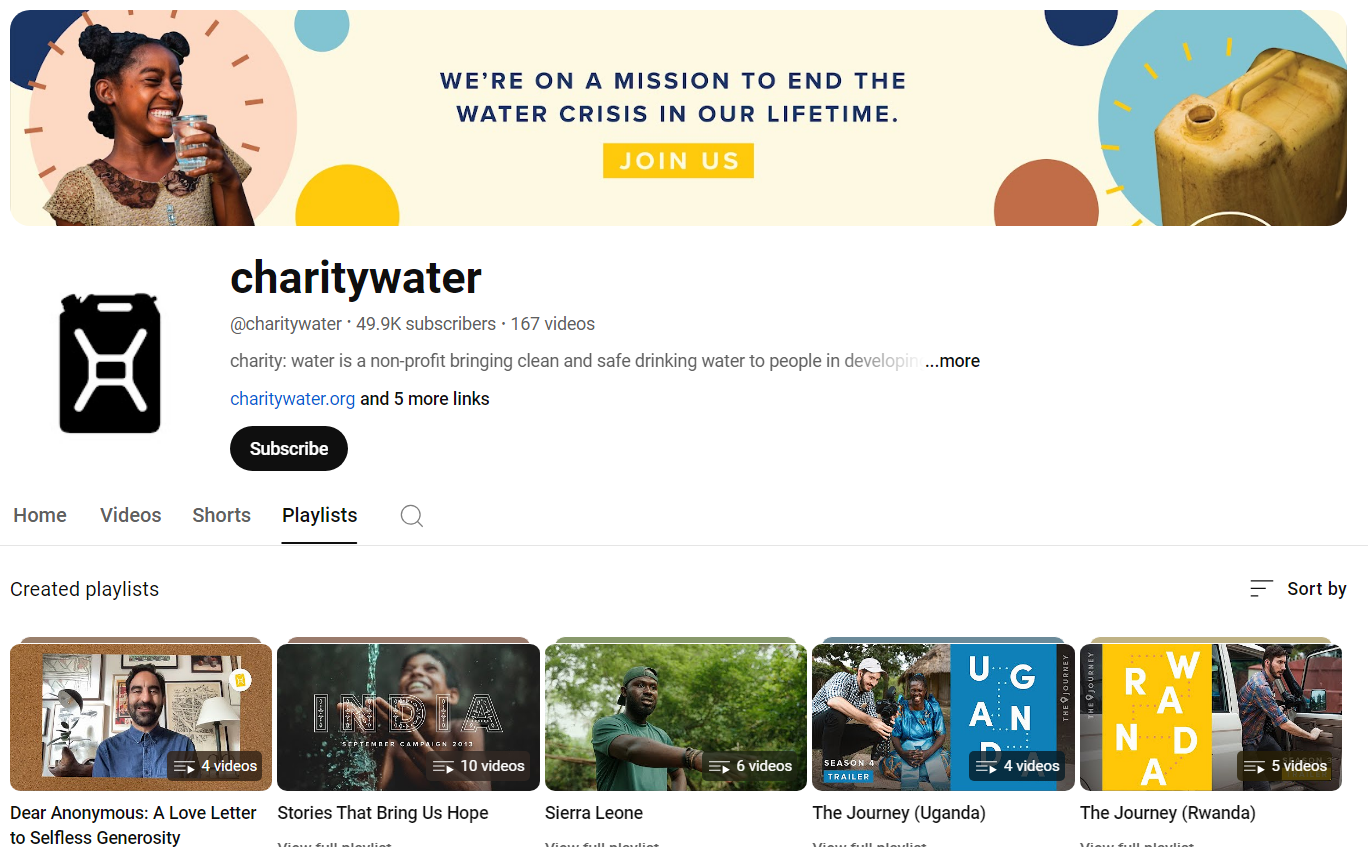
1.Channel banner CTA: add "Donate" text and your Zeffy link to the channel header. Every visitor to your channel page sees it first.
2."About" tab pinned donate link: the About tab is the most persistent, evergreen placement on your channel. Drop your Zeffy URL here so it's always visible, even on older videos.
3.Video descriptions, above the fold: place your Zeffy link within the first two to three lines of every video description. Viewers see it without clicking "Show more." Do this on every upload and go back to update older videos.
4.End screens and cards: YouTube lets you add clickable overlays in the final 5 to 20 seconds of any video. Link those overlays to your Zeffy donation form. Viewers who watch to the end are your most engaged, catch them at peak intent.
5.Pinned top comment on every video: post a comment such as "Support our work: [your Zeffy link]" and pin it to the top of comments on each video. It costs nothing and stays visible indefinitely.
6.Community tab posts: use the Community tab for weekly or monthly donate-link reminders. Pair the post with a mission update or impact figure so it reads like news, not a pitch.
7.YouTube Shorts caption link: every Short has a "Visit website" link at the bottom. Set that destination to your Zeffy donation form. Shorts reach new audiences, give them a path to give. This works particularly well for footage from fetes, quiz nights, and sponsored events, where fewer supporters now carry cash.
8.Live stream chat pinned message: during any live stream, pin a chat message with your Zeffy link for the entire broadcast. Viewers in the moment are primed to act, make the link impossible to miss.
9.QR code overlay on-screen: display a QR code pointing to your Zeffy donation form in your video intros or outros. Mobile viewers can scan directly without leaving the video.
Tactic for YouTube Nonprofit Program members only
1.Link Anywhere cards: Nonprofit Program members can place clickable cards at any point mid-video that link to an external URL. Point those cards directly at your Zeffy donation form, not your homepage. A direct path to donate beats a general website every time.
Every tactic above uses one thing: your Zeffy donation form URL. Paste it once, reuse it everywhere.
Zeffy and YouTube: your universal donate link
Zeffy does not integrate with YouTube via an API. It does not need to. Your Zeffy donation form URL is a plain web link, and YouTube accepts plain web links in every placement listed above. That is the entire integration.
Why this matters
0% in fees: Zeffy charges no platform fee, no transaction fee, and no card fee. Every pound a YouTube viewer donates reaches your charity. YouTube's own Channel Memberships take 30% of membership revenue, and Channel Memberships and Super Thanks do not process Gift Aid, so a UK charity loses both the 30% cut and the 25% Gift Aid uplift. A £10 membership yields around £7 with YouTube versus £12.50 through a Zeffy Gift-Aid-enabled form.
No approval gate: you do not need to be in the YouTube Nonprofit Program to use a Zeffy link. You do not need a technical team. You do not need a special account. You paste the link, it works.
Recurring donations included: Zeffy supports recurring donations at 0% fees. A YouTube viewer who becomes a monthly donor through your Zeffy link costs your charity nothing extra, ever.
Consolidate your fundraising stack: a UK charity currently paying JustGiving for donations, Ticket Tailor for event tickets, and a separate CRM can replace all three with a Zeffy donation form, ticketing, and supporter management, all at 0%.
Built for UK charities: Zeffy works with Gift Aid, GBP, and UK regulators.
Gift Aid built in
Zeffy captures Gift Aid declarations on the donation form so your charity can reclaim 25p per £1 from HMRC, turning a £100 YouTube-driven donation into £125 at no extra cost to the donor. (HMRC Gift Aid guidance)
Note that Gift Aid does not apply to payments for goods or services, event tickets, raffle entries, and auction lots at fair value are excluded. A Zeffy donation form (not a ticketing link) is the right destination for a YouTube donate CTA if you want to unlock the Gift Aid uplift.
More than 100,000 charities and not-for-profits have raised over £2bn through Zeffy at 0% fees. The YouTube tactic is just one more channel where those same zero fees apply.
Not yet eligible for the YouTube Nonprofit Program? You can still fundraise
The YouTube Nonprofit Program is not available to:
Unregistered community groups, CICs, and unincorporated associations, village halls, PTAs, Neighbourhood Watch groups, and similar organisations that have not registered with the Charity Commission are not eligible, even if they do valuable charitable work. As one UK community fundraiser put it: "because we're not a charity, most of the better fee options are for charities… that does limit us."
Newly registered charities awaiting Google for Nonprofits or Percent validation
Charities that have not completed Percent validation, even if UK-registered
None of that blocks you from fundraising on YouTube. Here is the two-part model that works regardless of eligibility.
YouTube as top-of-funnel
Use YouTube to tell your story, show your impact, and build an audience. You do not need any special programme access to upload videos, run live streams, or post Shorts. That content does the emotional work.
Zeffy as the donation rail
Every tactic from 1 through 9 in the playbook above is available to any YouTube channel. Paste your Zeffy donation form link into your banner, descriptions, pinned comments, end screens, Shorts captions, and live stream chat. Viewers who are ready to give have a clear path.
You are not waiting on Google's approval timeline. You are not locked out of a fee-free donate option. You can start today.
A note for community groups and CICs
Unincorporated community groups, PTAs, and CICs that cannot register with the Charity Commission can still use YouTube and Zeffy to collect donations. The key difference: Gift Aid is only available to HMRC-recognised charities and Community Amateur Sports Clubs (CASCs). Unregistered groups collect donations without the 25p-per-£1 uplift. If your organisation is growing and Gift Aid matters to your supporters, registering with the Charity Commission is worth exploring.
How to set up your charity's YouTube channel
If you are starting from scratch, here is how to get your channel ready before you add any donate links.
2. Click your profile icon, select "Your Channel," then "Create Channel"
3. Choose a channel name that matches your charity's brand
4. Add your logo as the channel profile picture
5. Write a channel description that explains your mission in plain language, include your Zeffy donation link here from day one
Channel optimisation
Upload a channel banner sized to YouTube's recommended dimensions (2560 x 1440 px)
Add your Zeffy donation form URL to the channel links section (visible on your banner on desktop)
Create a channel trailer, a short video that explains who you are and what you do for first-time visitors
Organise videos into playlists by campaign, topic, or programme so new visitors can find relevant content quickly
A well-set-up channel makes every donate link you place more credible. Viewers give to organisations they trust, and a complete, professional channel builds that trust before a viewer ever clicks your Zeffy link. Study the channel banners, description CTAs, and pinned comments of charities like Macmillan Cancer Support and Cancer Research UK to see how leading UK charities structure their YouTube presence.
Making content that drives donations
Getting views is half the job. The other half is turning those views into action.
Tell stories, not statistics
Viewers respond to people, not data points. A two-minute video following one beneficiary through a single day of impact will outperform a five-minute summary of your annual report. Lead with the person. End with the ask.
Optimise for search and discovery
Write descriptive video titles using phrases your audience actually searches
Put your most important keywords in the first 100 characters of your description
Use relevant tags and select the correct category
Design thumbnails with high contrast and legible text, viewers decide whether to click in under two seconds
Put the ask in the video
Do not rely on viewers to notice your description link. Say the URL out loud, or reference it on screen. Something like "The link to donate is in the description and pinned in the comments" takes five seconds and meaningfully increases clicks.
Be consistent
One viral video does not build a donor community. A regular publishing schedule does. Even one video per month is enough to keep your audience engaged and your channel appearing in recommendations. Pair each upload with a pinned comment and description update that includes your Zeffy link.
Collaborate with creators
Find YouTubers whose audience overlaps with your cause. A shared video, a shoutout, or a co-hosted live stream exposes your work to new viewers who are already interested in your issue area. Your Zeffy donate link travels with every collaboration.
The YouTube Nonprofit Program is a set of tools available to eligible registered charities that goes beyond a standard YouTube channel. The key feature is Link Anywhere cards, clickable overlays that can appear at any point mid-video and link to an external URL such as your Zeffy donation form. Eligible charities also receive a share of YouTube Premium revenue from viewers who watch their content. Access the programme through Google for Nonprofits and complete Percent validation to confirm your charity's status.
Yes. The UK is on the YouTube Nonprofit Program's approved country list. To be eligible, your charity must be registered with the Charity Commission for England and Wales, OSCR (Scotland), or CCNI (Northern Ireland), hold an active Google for Nonprofits account, and complete Percent validation. Once approved, you gain access to Link Anywhere cards and other programme benefits.
There are several ways. Any charity can add its Zeffy donation form URL to the channel banner links, the About tab, video descriptions, end screens, pinned comments, Community tab posts, Shorts captions, and live stream chat. Charities in the YouTube Nonprofit Program can also add Link Anywhere cards mid-video. Zeffy requires no developer or API integration, you paste the link and it works.
Use Zeffy. Zeffy charges 0% platform fee, 0% transaction fee, and 0% card fee, every pound a viewer donates reaches your charity. Pair it with Gift Aid: if your charity is HMRC-recognised and the donor is a UK taxpayer who completes a Gift Aid declaration on your Zeffy form, a £100 donation becomes £125 with no extra cost to the donor. YouTube's own Channel Memberships take 30% of revenue and do not capture Gift Aid declarations, making Zeffy the significantly more cost-effective route for UK charities.
Yes, if your charity is HMRC-recognised and the donor is a UK taxpayer. Zeffy captures Gift Aid declarations on the donation form, enabling your charity to reclaim 25p per £1 from HMRC. A £100 YouTube-driven donation becomes £125 at no extra cost to the donor. YouTube's own tipping and membership features do not capture Gift Aid declarations, so a Zeffy donation link is the only route that unlocks the 25p-per-£1 reclaim. Note that Gift Aid does not apply to payments for goods or services, so use a Zeffy donation form rather than a ticketing link as your YouTube CTA. (HMRC Gift Aid guidance)
No. A Google for Nonprofits account is only required to access the YouTube Nonprofit Program and its Link Anywhere cards. All other tactics in this guide, banner links, description links, pinned comments, end screens, Shorts captions, Community tab posts, and live stream chat, are available to any YouTube channel. You can start using your Zeffy donation form link on YouTube today, without any programme approval.
Consistency matters more than frequency. Even one video per month is enough to keep your audience engaged and your channel appearing in recommendations. Pair every upload with a pinned comment and a description that includes your Zeffy donation link. A regular schedule builds the audience that turns viewers into donors.
Yes. Community groups, CICs, PTAs, and unincorporated associations can upload videos, run live streams, post Shorts, and use a Zeffy donation form link in every placement. The difference is Gift Aid: the 25p-per-£1 HMRC reclaim is only available to HMRC-recognised charities and CASCs. Unregistered organisations can still collect donations through Zeffy at 0% fees, they simply do not receive the Gift Aid uplift. If your organisation is growing and Gift Aid is important to your supporters, registering with the Charity Commission is worth considering.
Get weekly fundraising tips from nonprofits experts
Thank you! Your submission has been received!
Oops! Something went wrong while submitting the form.
Keep reading :
Nonprofit guides
Social media for charities: top strategies for 2026
Social media lets a small UK charity reach supporters without a marketing budget. This guide covers the top strategies for 2026: from adding Gift Aid-friendly donation links and running compliant paid social to managing influencer partnerships under ASA rules. It also covers what to include in a charity social media policy and which tools help you plan, design, and measure your content.
Look for people who attend related events, follow relevant Facebook groups, or subscribe to aligned newsletters.These aren’t just potential donors—they’re your future advocates.
Look for people who attend related events, follow relevant Facebook groups, or subscribe to aligned newsletters.These aren’t just potential donors—they’re your future advocates.







.webp)

